
By default, LoadView distributes virtual users across multiple Load Injector Servers. Each Load Injector has its own public IP address and simulates a configurable number of virtual users defined by the Payload parameter. As a result, all virtual users running on the same Load Injector share that server’s IP address.
For some testing scenarios, you may need every virtual user to originate from a unique IP address.
Configuring Unique IP Addresses for Virtual Users
To assign a unique IP address to each virtual user:
- Open your load test configuration.
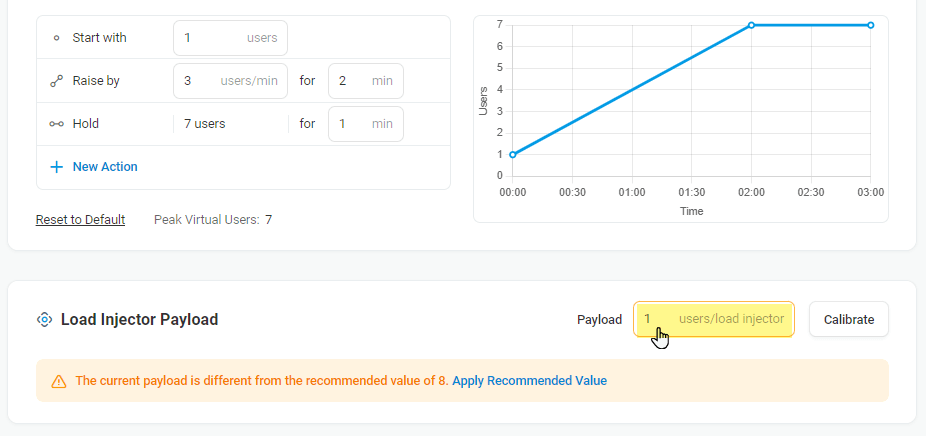
- Navigate to the Load Injector Payload settings.
- Set the Payload value to 1.
With a payload of 1, each Load Injector simulates a single virtual user, ensuring every virtual user is assigned a unique public IP address.
Considerations
Please note that reducing the Load Injector payload to 1 virtual user will significantly increase the number of Load Injectors required to run the test and the overall test cost.
Combine Unique IPs with Geo-Distributed Load Testing
Using multiple source IP addresses produces more realistic traffic than sending all requests from a single IP address. However, unique IP addresses alone do not fully represent production traffic. Real users access applications from different geographic regions, networks, and Internet service providers. To learn why distributing requests across multiple source IPs improves test accuracy, see Why Realistic Load Testing Requires Multiple IP Addresses.
For a more complete simulation of production traffic, distribute virtual users across multiple LoadView monitoring locations in addition to assigning unique IP addresses. Geo-distributed testing helps validate CDN behavior, regional latency, DNS routing, load balancing, and application performance under geographically distributed user traffic. To learn more, see Geo-Distributed Load Testing: Advantages, Importance, and Use Cases.