
Some of the targets you want to monitor with Dotcom-Monitor — such as a mailbox or an API endpoint — may no longer accept a username and password. Instead, they may require OAuth 2.0 or OAuth-based modern authentication.
OAuth 2.0 is an authorization framework that allows an application such as Dotcom-Monitor to access a protected resource without requiring the user’s password. When user authentication and identity information are required, OAuth 2.0 is commonly used together with OpenID Connect (OIDC).
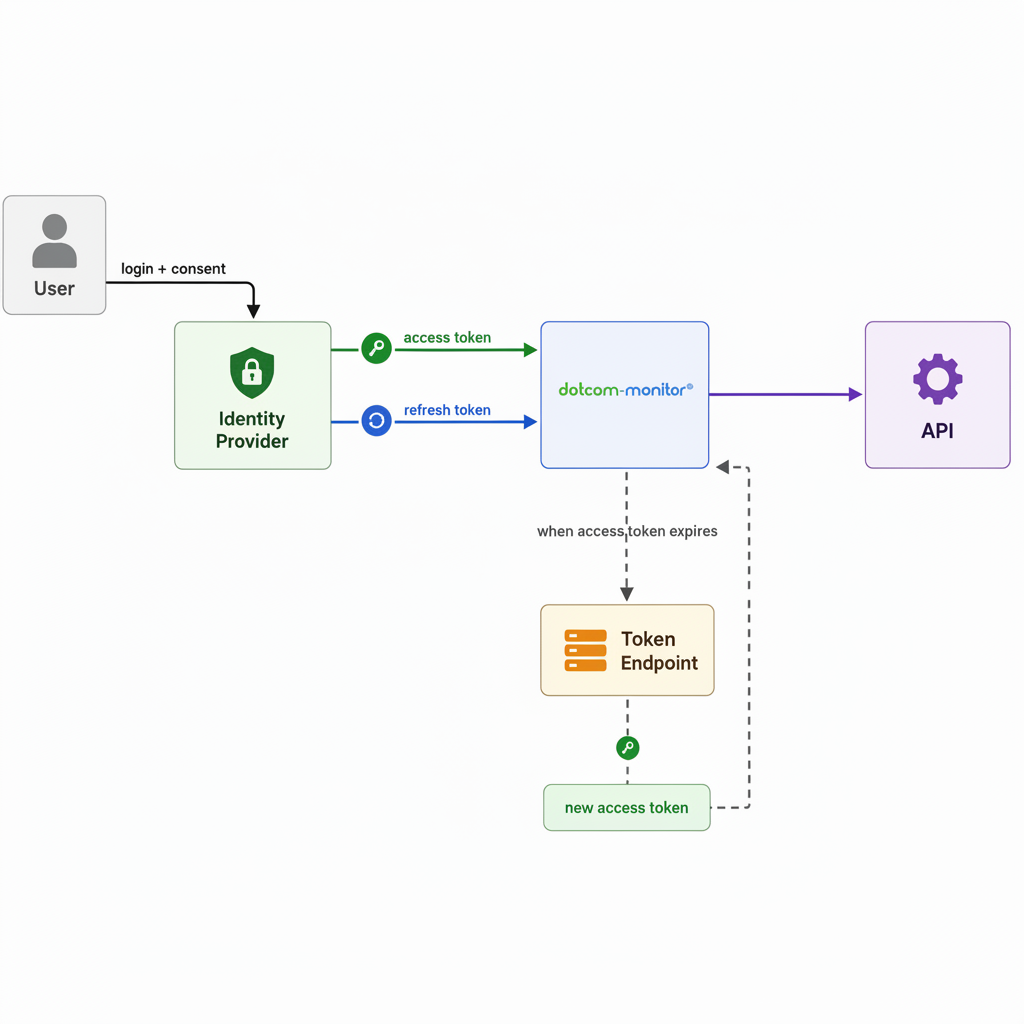
In a monitoring scenario, Dotcom-Monitor obtains an access token from the identity provider and uses that token to access the protected resource. If the identity provider issues a refresh token, Dotcom-Monitor can use it to obtain a new access token when the current one expires.
What is OAuth 2.0?
OAuth 2.0 allows an application to obtain delegated access to a protected resource on behalf of a user or application. For example, an API may require an OAuth access token instead of an API key or Basic Authentication:
Authorization: Bearer <access_token>
The identity provider is responsible for issuing and validating tokens. The protected resource — such as an API or mailbox service — uses the access token to determine whether the request is authorized.
Typical use cases in monitoring:
- API monitoring (HTTP/HTTPS tasks): an API you want to monitor may require a valid OAuth access token for each request instead of an API key or username and password.
- Mail protocol monitoring (SMTP, POP3, IMAP):mailbox providers such as Microsoft 365 and Google Workspace increasingly use OAuth-based modern authentication instead of traditional username/password authentication.
How OAuth 2.0 Works
The exact OAuth flow depends on the identity provider and application type. A typical user-based authorization flow consists of the following steps:
- Redirect the user to the identity provider. Dotcom-Monitor redirects the user to the provider’s login and authorization page, such as Microsoft, Google, or another supported identity provider.
- Authenticate and grant consent. The identity provider authenticates the user and, when required, prompts them to approve the requested permissions, known as scopes.
- Obtain tokens. After successful authorization, the provider returns an authorization response that the application uses to obtain an access token. Depending on the provider and authorization flow, a refresh token may also be issued.
- Use the access token. Dotcom-Monitor sends the access token with requests to the protected resource, typically in the HTTP Authorization header.
Refresh the access token. - Access tokens are normally short-lived. If the provider issues a refresh token and supports token refresh, Dotcom-Monitor can use the refresh token to obtain a new access token without requiring the user to authenticate again.
How to Use OAuth in Dotcom-Monitor
Dotcom-Monitor provides the downloadable Windows application GetOAuthToken.exe to obtain OAuth tokens and generate the script required for monitoring configuration.
The application guides you through the provider’s authorization flow and generates a ready-to-use script containing the OAuth configuration and token information required by the monitoring target.
The application supports two main configuration options:
- Microsoft and Google — the standard Dotcom-Monitor configuration is already provided, so you do not normally need to register a client or enter OAuth endpoints manually.
- Custom Identity Provider — used for other providers such as Okta or an in-house OAuth/OIDC server. In this case, the required application and provider parameters must be configured manually.
Using the GetOAuthToken Application
Download the latest version of the application:
Then run the application. If you do not see “Your browser is up to date” on the right-hand side of the application, install the Microsoft Edge WebView2 component from Microsoft’s official website before continuing.
The application provides separate configuration tabs for the supported identity providers.
Microsoft and Google Identity Providers
Select the appropriate tab when using Microsoft 365 or Google.
The standard Dotcom-Monitor configuration is preconfigured for these providers, including the client information, redirect URL, and default scopes. If these values have been changed, click Dotcom Defaults to restore the standard configuration.
To obtain the token and generate the monitoring script, follow the steps described in Using GetOAuthToken to Set Up Microsoft 365 (Exchange Online) Monitoring.
Custom Identity Provider
Use the Custom Identity Provider tab when the resource is protected by an identity provider other than the standard Microsoft or Google configuration.
Examples include:
- Okta
- Auth0
- Keycloak
- an enterprise identity platform
- an internally hosted OAuth/OIDC server
The exact configuration depends on the provider and the OAuth flow it supports.
| Field | Description |
| Auth Endpoint | The full authorization request URL, where the user is authenticated and grants consent. |
| Token Endpoint | The full HTTP request template — URL, headers, and body — used for the first token exchange: trading the authorization code you receive for an access token and a refresh token. The body includes grant_type=authorization_code, the received code, your Redirect Url, Client ID, and Client Secret. |
| Redirect URL | Where your provider sends the user back after signing in and approving access. This must exactly match a redirect URI registered with your provider. |
| Token URL | The endpoint used afterward to obtain a refreshed access token once the current one expires — exchanging a refresh token for a new access token, instead of repeating the full sign-in flow. |
| Client ID / Client Secret | Issued by your provider when you register your application with them. |
| Scopes | The permissions requested from the identity provider and/or protected resource. These are provider- and resource-specific.d OpenID Connect discovery document (a .well-known/openid-configuration URL), you can use the built-in detector to auto-populate the Auth Endpoint, Token Endpoint, and related fields instead of entering them by hand. Scopes still need to be entered manually, since these are provider-specific and not standardized. |
Well-Known Endpoint Detector
If your identity provider supports OpenID Connect Discovery, it may publish a standard discovery document at a URL similar to:
https://<identity-provider>/.well-known/openid-configuration
The Well-Known Endpoint Detector can use this document to automatically populate standard endpoints such as:
- Authorization Endpoint
- Token Endpoint
- related OIDC configuration values
Scopes still need to be configured manually because the scopes required by the protected resource are provider- and API-specific.
Once all required fields are configured, to obtain the token and generate the monitoring script, follow the steps described in Using GetOAuthToken to Set Up Microsoft 365 (Exchange Online) Monitoring.