





Organizations Worldwide
Platform Uptime SLA
Global Monitoring Locations
Website Monitoring Leader
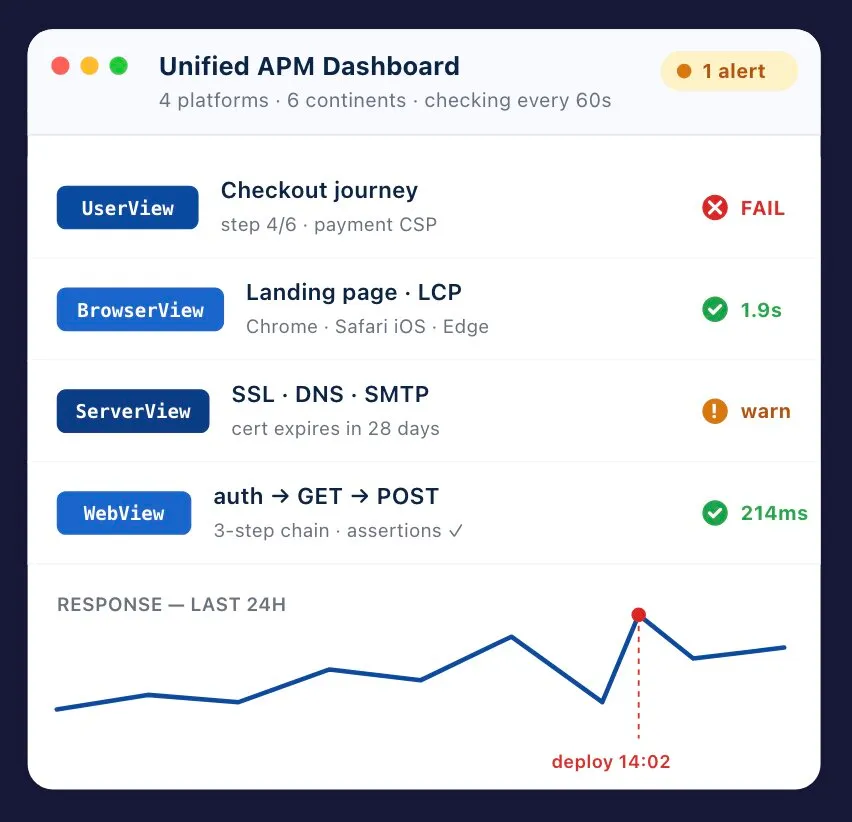
Dotcom-Monitor is agentless APM. Four purpose-built platforms cover front-end, back-end, infrastructure, and web services — UserView for multi-step user journeys, BrowserView for element-level page loads, ServerView for protocol and infrastructure checks, and WebView for API monitoring. Each is a distinct tool with its own depth, but all four feed one unified dashboard, alert system, and reporting layer. Nothing is installed in your code.
Multi-step transaction monitoring — record real user journeys in a real browser and replay them worldwide every few minutes.
Element-level page-load analysis across 40+ real browser/device combinations — full waterfall, errors, and screenshots.
Continuous checks for the protocols and internet services your app depends on — DNS, SSL, mail, FTP, VoIP, and more.
SOAP, REST, and JSON API monitoring — chain requests, pass tokens, validate payloads, import Postman & Insomnia.
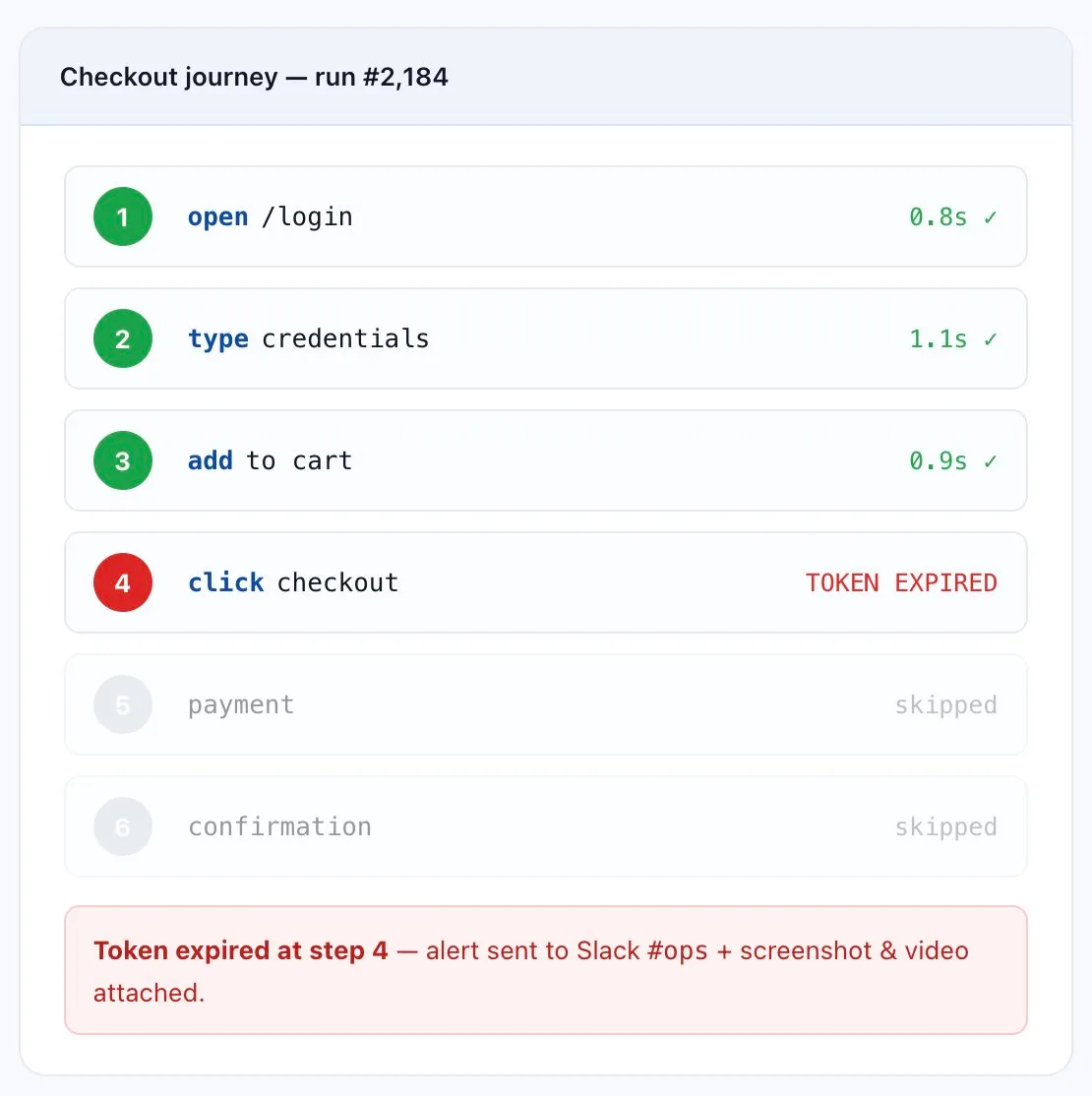
Record real user journeys in a real browser — login, search, add-to-cart, checkout, post-purchase confirmation — and replay them every few minutes from monitoring locations around the world.
Use it for: critical user journeys, SLA verification, e-commerce funnels, regulated workflows.
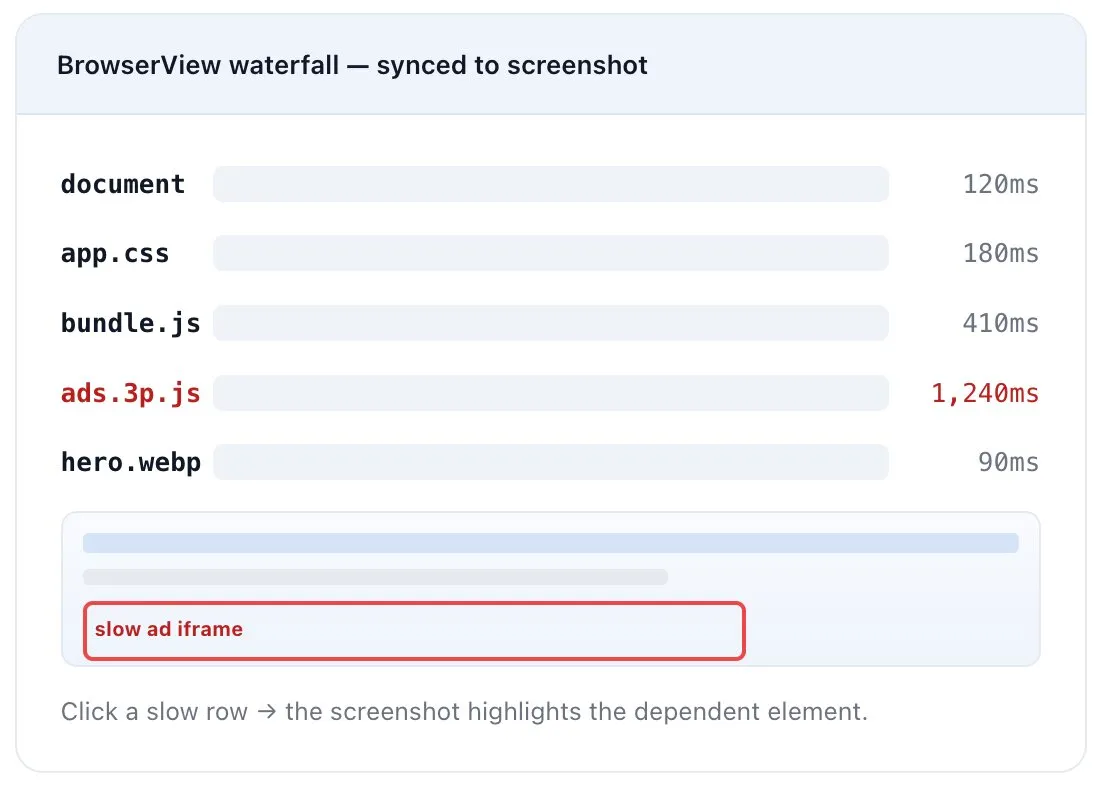
Load any URL in a real browser across 40+ desktop and mobile browser/device combinations. Get a full waterfall, every resource’s timing, render-blocking assets, JS errors, console output, and a screenshot at the exact moment of the issue.
Use it for: marketing landing pages, post-deploy regression checks, third-party tag monitoring, Core Web Vitals tracking.
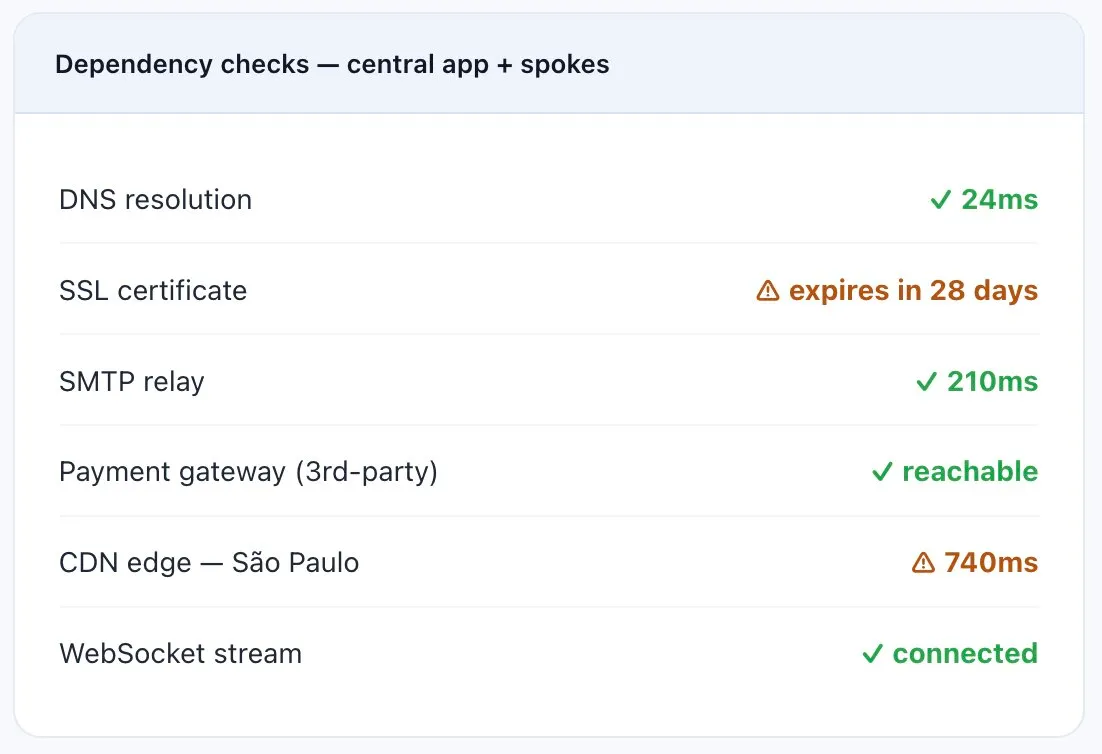
Continuous checks for the protocols and services your app depends on: DNS, SSL certificates (including expiry), SMTP/IMAP/POP3, FTP, ICMP, Telnet/TCP ports, Traceroute, VoIP/SIP, streaming media, WebSocket, and more.
Use it for: protocol health, certificate management, third-party dependency monitoring.
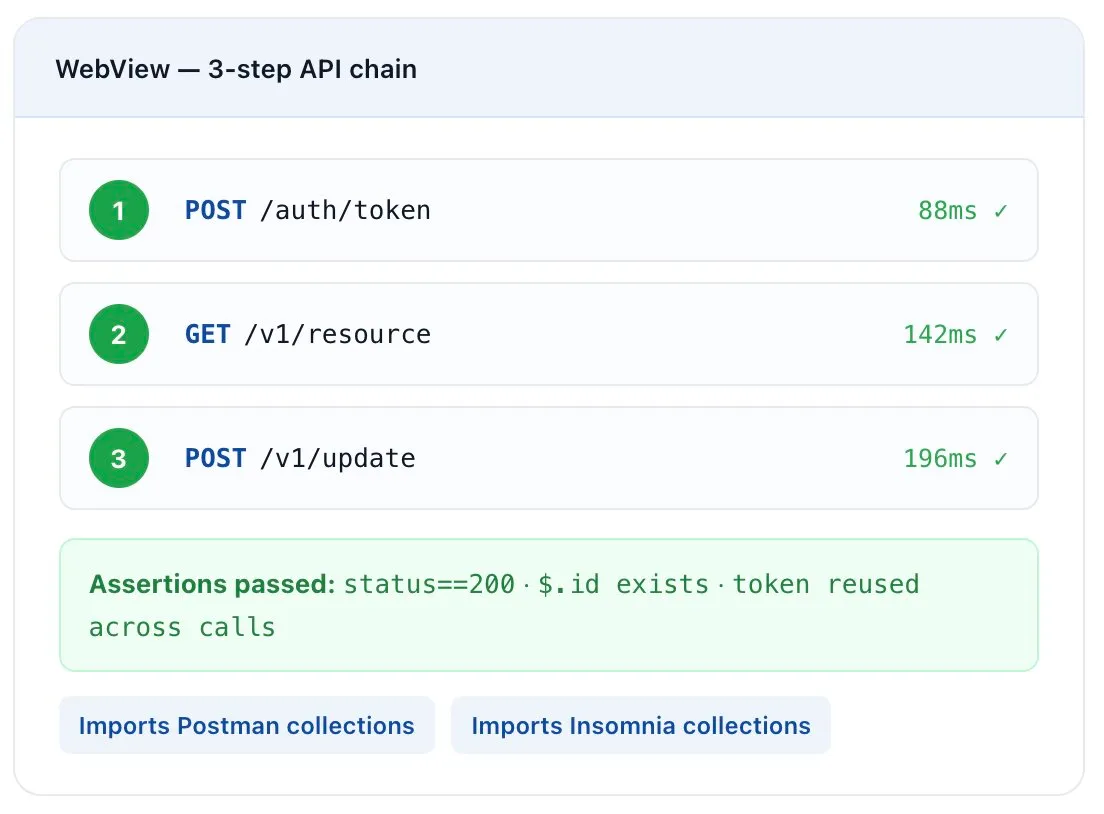
Continuous functional and performance monitoring for every API endpoint your app — or your customers — depend on. Chain multiple requests, pass auth tokens between calls, validate response payloads with assertions, and run from multiple geographies.
Use it for: public APIs, internal microservices, partner integrations, webhook reliability.
If you’re only testing in Chrome on a fast Mac, you’re missing what most of your users actually see. Coverage is the foundation of any synthetic strategy.
40+ real desktop and mobile browser/device combinations — Chrome, Firefox, Safari, Edge, plus mobile Safari on iOS and Chrome on Android — running on actual browser engines, not headless approximations. Schedule the same monitor across multiple browsers and locations to catch regressions that only show up on, say, Safari iOS in São Paulo.
Desktop | Tablet | Mobile | |
|---|---|---|---|
Chrome | Android | ||
Safari | iOS | ||
Firefox | |||
Edge |
Each combination runs from monitoring locations across six continents.
Single-page apps, server-rendered apps, micro-frontends, hybrid mobile — if it runs in a browser, Dotcom-Monitor can monitor it. Tested against HTML5, AJAX-heavy apps, and any framework that ultimately renders to the DOM.
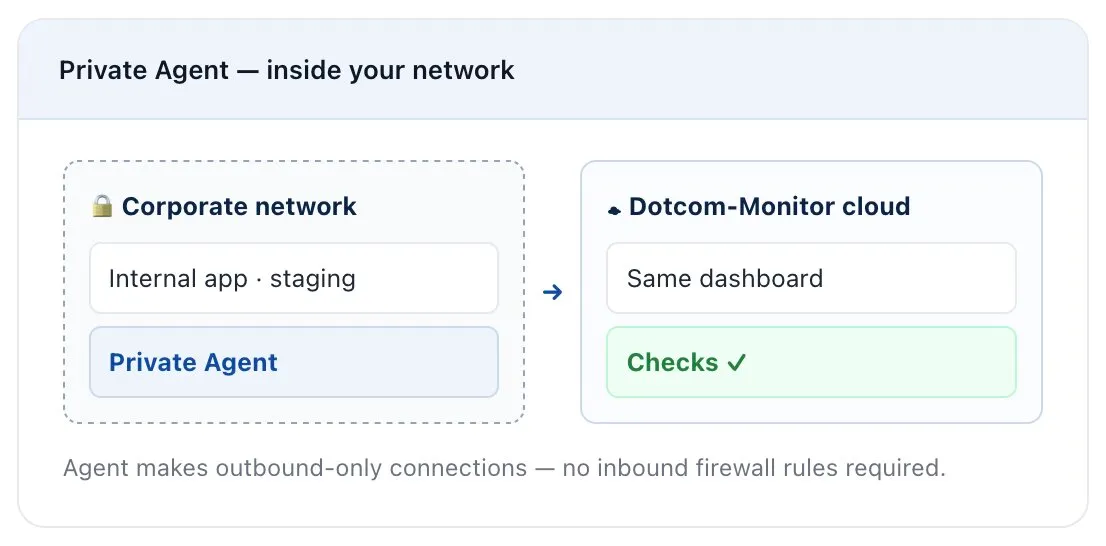
Monitor apps that don’t have a public IP — internal tools, staging environments, apps behind corporate VPN or SSO. Deploy a Private Agent inside your network, and Dotcom-Monitor’s cloud dashboard treats those checks the same as public ones.
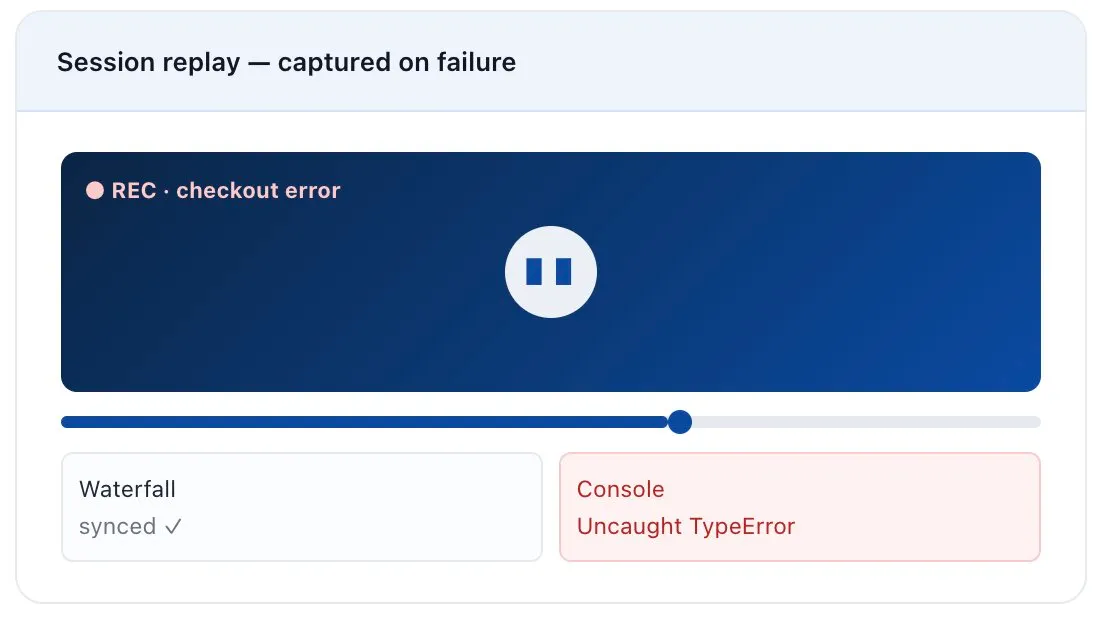
Stop asking users to send a screenshot. When a transaction fails or a page misbehaves, Dotcom-Monitor records the full session as video — only on errors by default, or on every run if you want continuous evidence.
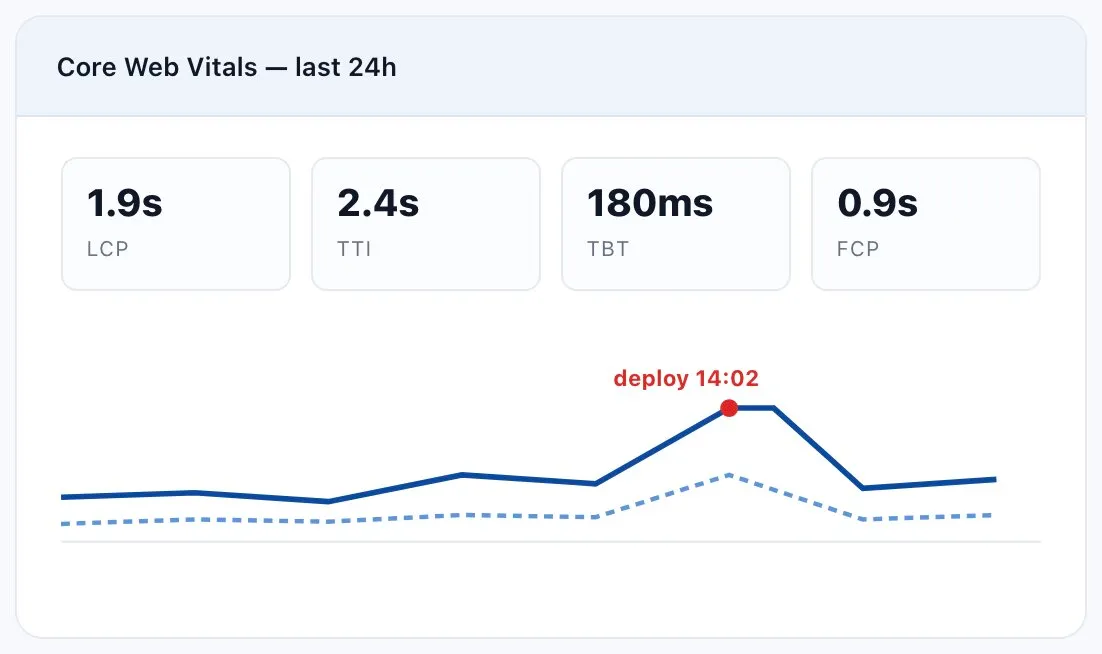
Page-load performance is where most user frustration starts. Dotcom-Monitor measures it the way browsers actually render — not how your CDN’s edge node reports it.
Measure Largest Contentful Paint, Time to Interactive, Total Blocking Time, and First Contentful Paint from actual desktop and mobile browser sessions. Set thresholds tied to your Core Web Vitals targets and alert when they degrade.
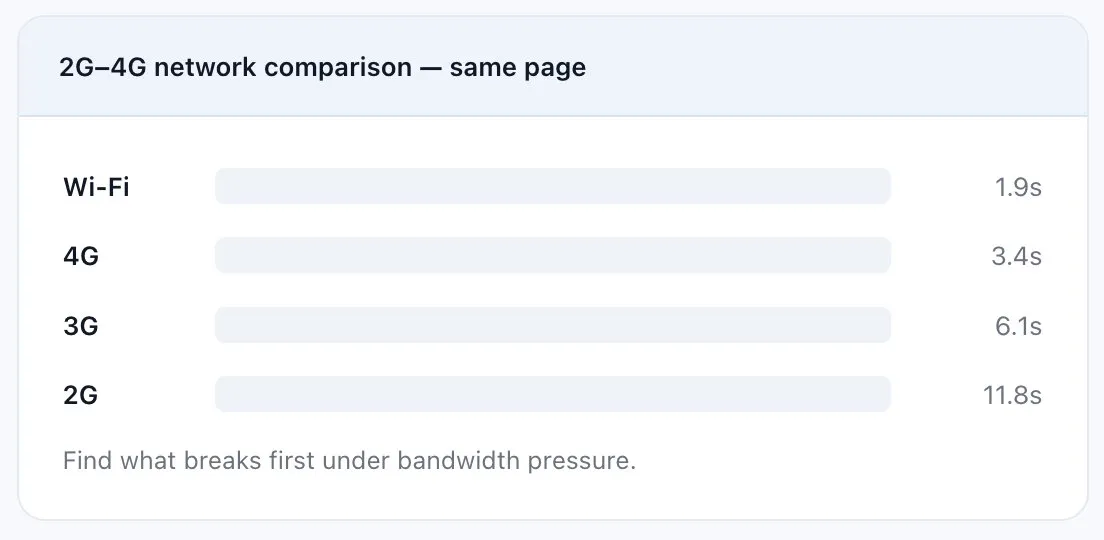
Your users aren’t all on gigabit fiber. Throttle the monitor to 2G, 3G, or 4G and see exactly how the page behaves on a phone in transit. Compare results across network profiles to find what breaks first under bandwidth pressure.
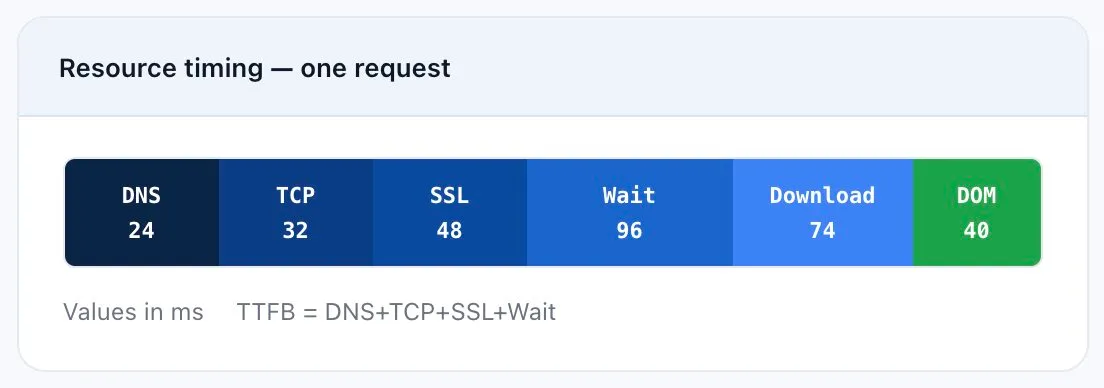
When something breaks, you get a stitched view: the waterfall, the moment-of-failure screenshot, the JS console output, and a video replay. Per-resource timing — DNS, TCP, SSL, TTFB, content download, DOM events — comes straight from the Navigation Timing and Resource Timing APIs in the real browser.
Tier-3 data-center checkpoints across six continents. Schedule monitors from specific regions to verify geo-routing, CDN performance, and regional outages independently — see slow São Paulo users in the data, not in a support ticket two days later.
One dashboard for UserView transactions, BrowserView page loads, ServerView protocol checks, and WebView API monitors. Drill down from a high-level health view into a specific failed step in seconds.
Real-time dashboards, on-demand waterfall reports, scheduled PDF/CSV exports, and SLA reports for uptime, response time, and error rate against your thresholds. White-label reports for MSPs and agencies.
Define thresholds per monitor, step, or metric. Route to PagerDuty, Slack, Teams, email, SMS, voice, or webhook. Suppress noise by requiring N consecutive failures or failures from M of N locations.
Capture multi-step transactions with the EveryStep web recorder — point, click, fill in fields, submit. The recorder produces a portable script you can edit, parameterize, and reuse across monitors.
Aggregate health across all four platforms at the top; per-platform status in the middle; a single failed check with its waterfall and screenshot at the bottom. One drill-down path from green to root cause.
How engineering teams in regulated, transaction-heavy industries actually use synthetic APM.
Quote engines, broker portals, and claims-submission workflows that must work end-to-end on every check. Carriers run UserView scripts against the full quote-to-bind flow every 5 minutes from multiple geographies, with SLA reports that satisfy compliance audits.
Customer: Aflac.
Account portals, billing pages, and streaming endpoints at carrier scale. Streaming providers use WebView and ServerView together to confirm video manifests load and segment delivery stays under SLA, even when CDN behavior shifts.
Customers: Comcast, Dish.
Storefronts where seconds of latency cost real revenue. UserView monitors the full search-to-checkout flow across 40+ browsers; BrowserView tracks Core Web Vitals on product pages; WebView watches inventory and pricing APIs. Teams alert on step-level regressions before they reach the conversion report.
Login, SSO, dashboard, and API flows for SaaS products and internal tools. Teams run Private Agents inside their corporate network to monitor pre-production environments behind VPN — and use WebView Postman imports to monitor every documented endpoint continuously.
Customers: Dell, Citrix, Xerox.
Most APM platforms are built agent-first — you instrument code to see inside it. Dotcom-Monitor is built outside-in. Here’s where that difference shows up against the platforms teams evaluate alongside it.
Capability | Dotcom-Monitor | New Relic | Datadog | Dynatrace | Site24x7 |
|---|---|---|---|---|---|
Agentless monitoring is the core product | Add-on | Add-on | Add-on | ||
Full value with no code instrumentation | Partial | Partial | Partial | ||
Monitors 3rd-party SaaS & partner APIs you don’t control | Partial | Partial | Partial | ||
Native Postman / Insomnia collection import as a monitor | Integration | Limited | |||
Error-triggered full session video replay | Partial | Partial | Partial | ||
2G / 3G / 4G network-condition simulation | Partial | Partial | |||
Flat per-monitor pricing — no per-host or data-ingest fees | Per-GB ingest | Per-host | Consumption | Plan-based | |
White-label / MSP reseller reporting | |||||
Multi-step transaction recorder | |||||
Private agent for internal apps | |||||
Free trial, no credit card to start | 30 days | Free tier | 14 days | 15 days | 30 days |
Dedicated monitoring vendor since the 1990s | 1998 | 2008 | 2010 | 2005 | 2006 |
Wire UserView monitors into your deploy pipeline. After every production release, run a full-funnel synthetic check before promoting traffic. Route failures to PagerDuty with severity tied to which step broke. Track error budgets with SLA reports instead of spreadsheets.
Import Postman or Insomnia collections directly into WebView. Record UI flows once with EveryStep and reuse them across staging, UAT, and production. Compare baselines across releases to catch regressions before manual QA does.
ServerView covers DNS, SSL/TLS certs, BGP routing changes (via traceroute), SMTP, FTP, VoIP/SIP, and WebSocket. Alert on certificate expiry far enough ahead to actually rotate. Run traceroute monitors from multiple regions to spot ISP-level routing changes.
BrowserView’s element-level waterfalls show which resource — yours or a third party’s — slowed the page. Error videos and console logs from real browsers let you reproduce client-side bugs without asking a customer for steps.
Alerts, dashboards, and data flow into the tools your team already uses.
Route different monitors to different escalation chains, suppress alerts during maintenance windows, and acknowledge from the chat client.
Tie performance regressions to commits and turn failures into tickets automatically. Trigger post-deploy checks from your pipeline.
The Dotcom-Monitor REST API provisions monitors, pulls historical data, manages configs, and triggers on-demand checks — for status pages, exec dashboards, or chatbots.
If your question isn’t here, contact us — a real engineer will answer.
Synthetic APM runs scripted transactions on a schedule from controlled monitoring locations — proactive, deterministic, and useful for catching regressions before users do. RUM captures real production sessions — reactive, useful for understanding actual user behavior. Most teams use both; Dotcom-Monitor specializes in synthetic and integrates with RUM tools.
No. Dotcom-Monitor runs from outside your application. There’s nothing to install in your code, no SDK to maintain, and no agent to deploy on your servers. For monitoring internal apps behind a firewall, you can optionally deploy a Private Agent inside your network — it’s a single binary, not application instrumentation.
Most monitors are running within minutes. Record a UserView script with EveryStep, import a Postman collection into WebView, or paste a URL into BrowserView. No agent rollout, no config-file editing, no waiting on platform-team approval.
Yes — that’s one of the strongest use cases. Because monitoring runs from outside, anything reachable by URL can be monitored: third-party CRMs, billing systems, identity providers, partner APIs, and vendor dashboards. You don’t need vendor cooperation.
Email, SMS, voice call, PagerDuty, Slack, Microsoft Teams, Opsgenie, JIRA, ServiceNow, GitHub, Jenkins, and webhook destinations. Alert conditions can require N consecutive failures, M-of-N location failures, or specific error types. Escalation chains and quiet hours are configurable per monitor or per team.
By telling you exactly where the failure happened. A failed UserView run gives you the broken step, the screenshot, the video, the console log, and the waterfall — evidence captured at the moment of failure instead of reconstructed later. That’s what lets teams resolve customer-facing issues faster than reconstructing an incident after the fact.
Yes. Because monitoring is outside-in, the runtime of your app doesn’t matter. Whether the workload runs on bare metal, VMs, Docker, Kubernetes, ECS, Cloud Run, or serverless, Dotcom-Monitor checks the public (or Private-Agent-reachable) endpoints exactly the same way.
A 30-day free trial with full feature access. No credit card required to start.
Pricing is based on monitor count, check frequency, and platform mix — not per-host or per-seat, and with no surprise charges for ingest volume. See the pricing page for current plans or contact sales for a custom quote.
Yes. White-label reports, custom branding, multi-tenant account management, and reseller programs are available for MSPs, VARs, and agencies managing monitoring for end customers.
Set up your first monitor in under five minutes. No credit card. No sales call required to start.