
In short, the UserView and BrowserView platforms load web pages in real browsers and execute all page components. In contrast, HTTP(S) monitoring uses emulated, synthetic browsers and downloads only the requested page elements without rendering them.
HTTP(S) monitoring devices rely on HTTP/S requests between a custom synthetic browser and the server. Although HTTP(S) devices can be recorded and replayed to monitor applications, they are best suited for measuring server performance associated with a web application. HTTP(S) tasks also support dynamic variables, cookies, and secure sites.
Because HTTP(S) monitoring uses a custom process rather than a standard browser to replay recorded steps, it is not recommended for websites that rely heavily on Rich Internet Applications (RIAs), such as JavaScript or AJAX. In these cases, web content may not be included in the HTTP(S) response, which can cause the HTTP(S) device to trigger false alerts during content validation.
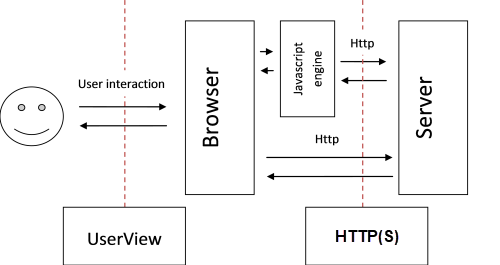
On the other hand, monitoring devices created from the BrowserView and UserView platforms utilize a regular browser to open a web page and replay the task. Therefore, both of them provide content validation in a real browser window, so you can visually check the presence of relevant content. In addition, UserView replays a multi-step path through an application, such as a shopping cart or login submission. UserView monitoring is capable of emulating actual browser events during monitoring, such as mouse clicks, text typing, and hovers. These events are executed in a browser window (see image above.). The regular browser aspect of UserView monitoring can be coupled with a virtual keyboard/mouse “picture match” technology, which enables monitoring of very complex web applications running RIAs, including Silverlight, AJAX, Flex, Flash, JavaScript, applets, add-ons, as well as other web page objects that interact dynamically with a browser. Additionally, UserView is able to record a video capture of the page interaction as issues are detected.
How to make a choice
One way to check which type of monitoring is most appropriate is to decide if you want to make sure a web page is available for an end user or to check if its content is rendered properly.
If the URL availability is under question, select HTTP(S) monitoring.
If the content verification matters, select a device from BrowserView or UserView platforms. To make a choice between BrowserView and UserView platforms, simply test the page that you want to monitor. If the page contains JavaScript, which may manipulate the content or load it additionally from your or third-party servers, then opt for a Multiple Step Journey monitoring type from the UserView platform.
Due to these differences in HTTP(S) monitoring and devices provided by BrowserView and UserView platforms, there is also a difference in the response time measured by each device type.
See below for an example of the differences:
The website https://daniel.lorch.cc/docs/ajax_simple/ajax-cool.html? has an edit field. If the number “1” is entered into the edit field, the JavaScript will make a request to https://daniel.lorch.cc/docs/ajax_simple/validate.php, which should return a “Username too short” string and display it as HTML.
Because a UserView (Multiple Step Journey) monitoring script emulates the action of a real browser it will perform the following steps: load the page, find the edit field, and input “1”; the final action is a keyword validation that the “Username too short” string is displayed in the HTML:
HTTP(S) monitoring performs this task differently. It emulates low level HTTP(S) requests. For example, if the previous UserView monitoring example is converted to a HTTP(S) monitoring process, the monitoring is conducted as two HTTP tasks with GET requests: