Deliver Monitoring Reports Under Your Brand — Not Ours

White Label lets you replace Dotcom-Monitor branding with your own company identity across PDF reports, real-time Shareable Pane dashboards, and custom-built reporting tools powered by the XML data feed. Your clients see your brand — not ours.
White-labeled monitoring dashboard showing custom company branding
Trusted by thousands of organizations worldwide
10,000+

Organizations Worldwide

99.99%

Platform Uptime SLA

30+

Global Monitoring Locations

Since 1998

Website Monitoring Leader

What Is White Label

Your Brand on Every Report — Not Ours

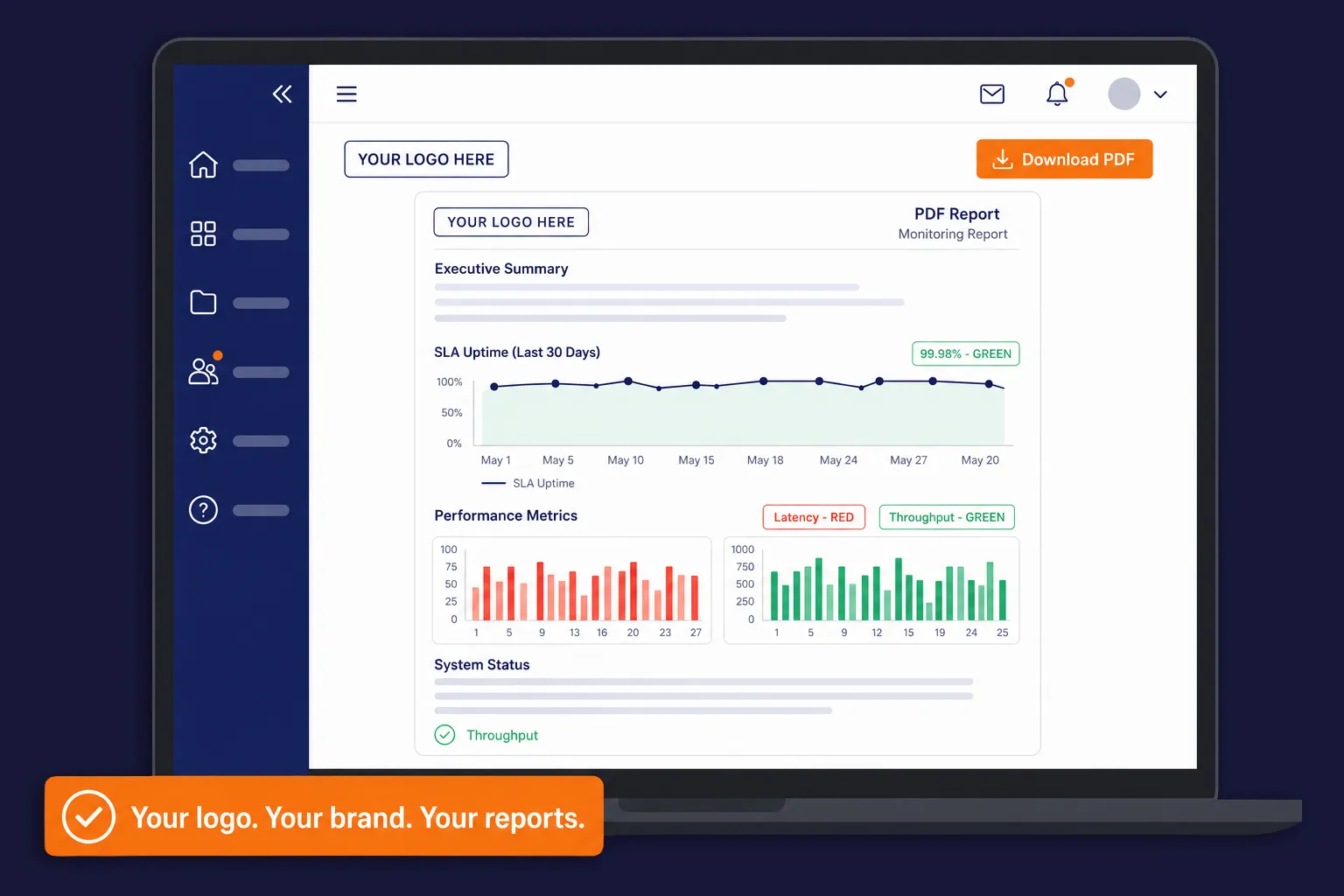
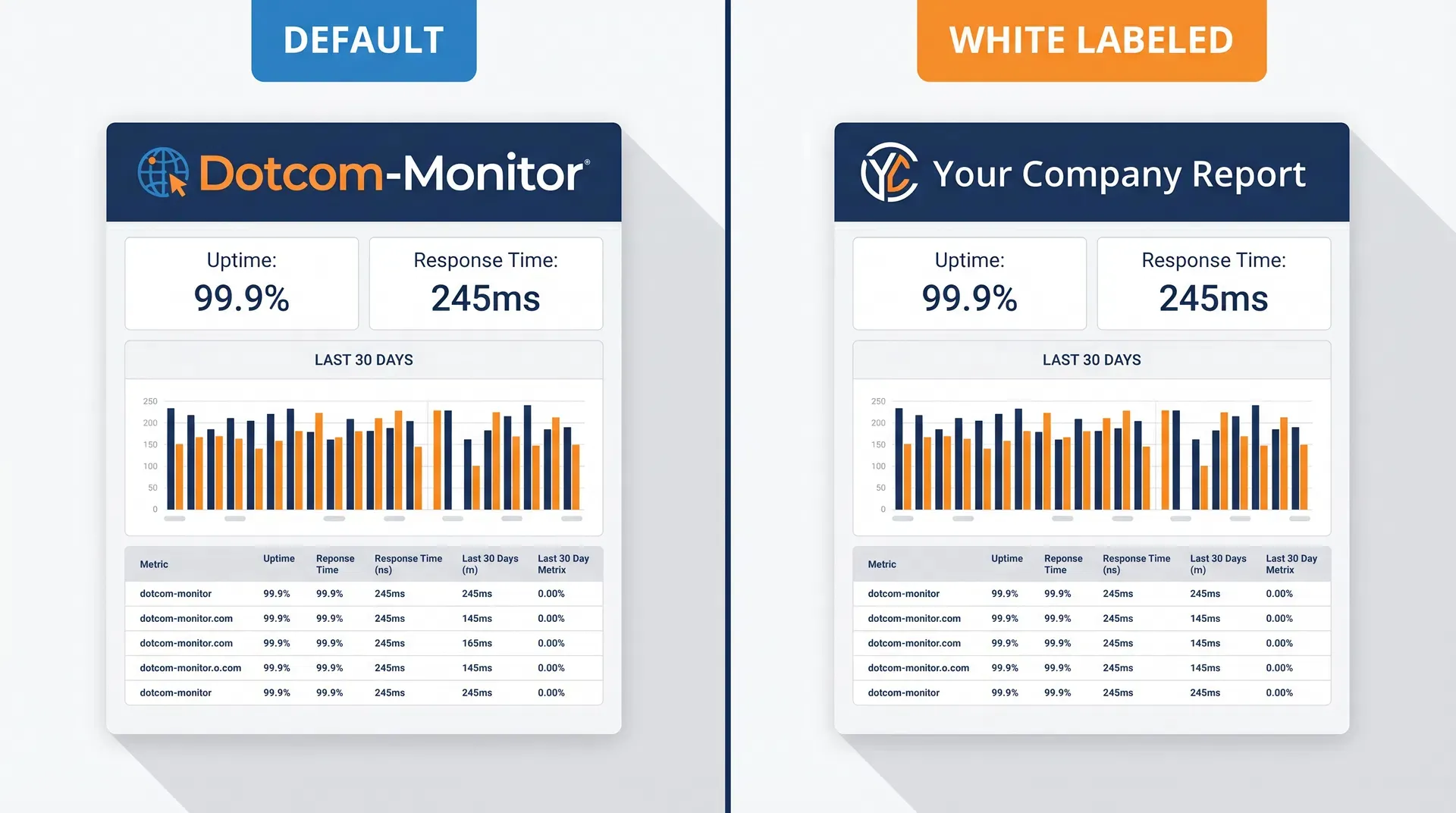
White labeling allows you to brand selected Dotcom-Monitor reports with your own company identity, making them suitable for client-facing, executive, or compliance reporting. When white labeling is configured, your company logo is displayed in the report instead of Dotcom-Monitor branding — giving your clients a seamless, professional experience that reinforces your own brand authority.
Your company logo replaces Dotcom-Monitor branding in every generated PDF

Reports appear as if produced entirely by your own team

Clients see your brand — not the underlying monitoring infrastructure

Fully compliant, professional-grade documents for executive and compliance audiences

Side-by-side comparison of default vs white-labeled monitoring report
White Label Capabilities

Three Ways to Brand Your Monitoring

From scheduled PDF reports to live real-time dashboards and developer-grade data feeds, Dotcom-Monitor gives you full control over how your brand appears in every client touchpoint.

Shareable Pane Dashboards

Real-Time

Real-time monitoring dashboards shared via a unique URL — no login required. Apply your company logo to replace Dotcom-Monitor branding, giving clients a live, branded view of their service health. Ideal for embedding in client portals or status pages.

Executive Summary Report

PDF

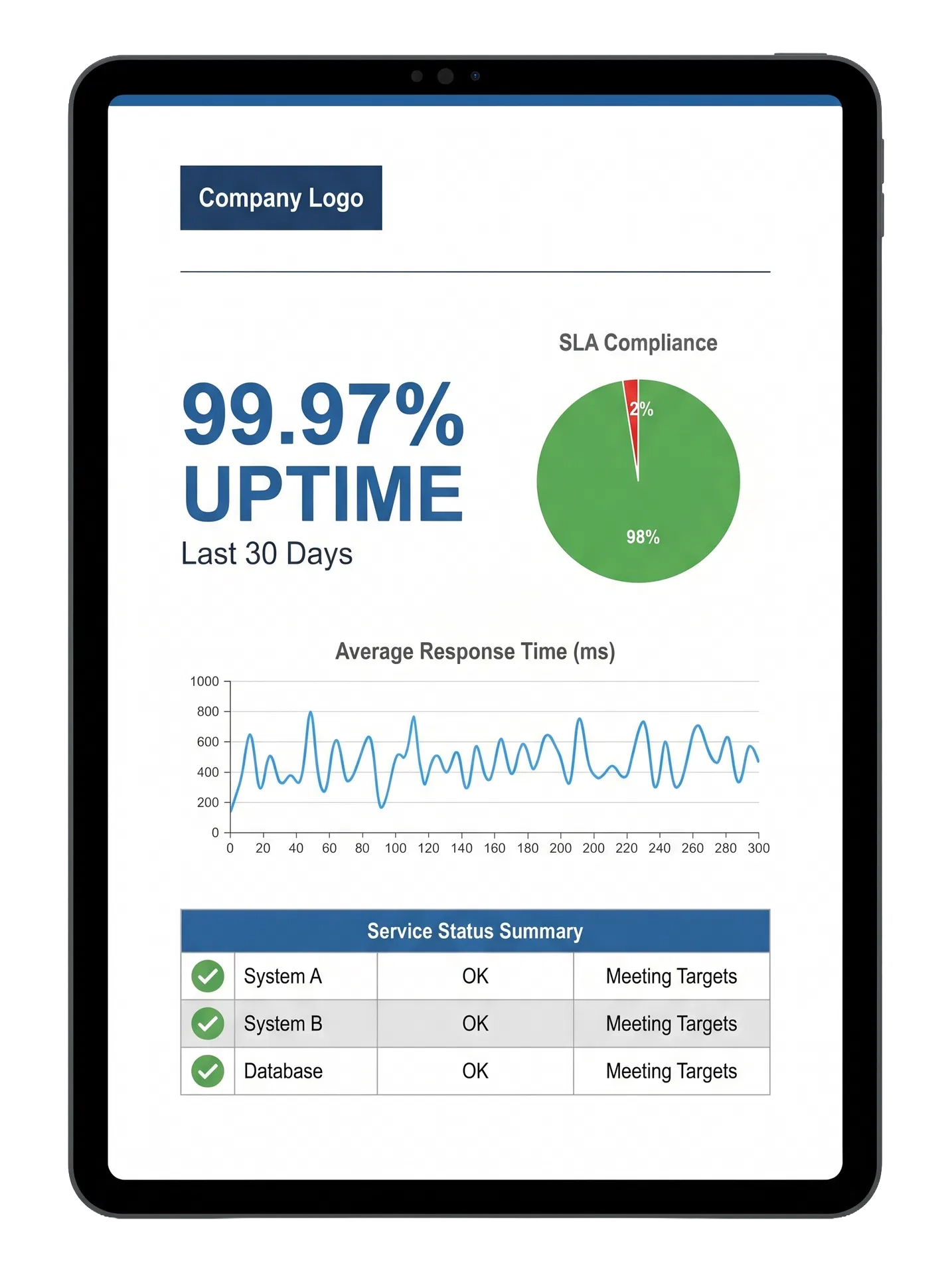
A high-level overview of your monitoring performance delivered as a polished PDF. Ideal for sharing with leadership, stakeholders, or clients who need a concise snapshot of uptime, response times, and overall service health — all under your company’s brand.

Service Level Agreement (SLA) Report

PDF

A detailed SLA compliance report documenting whether your services met agreed performance thresholds. Perfect for compliance audits, client contract reviews, and internal accountability — presented with your own branding for a seamless client experience.

XML Real-Time Data Feed

DEVELOPER API · FREE

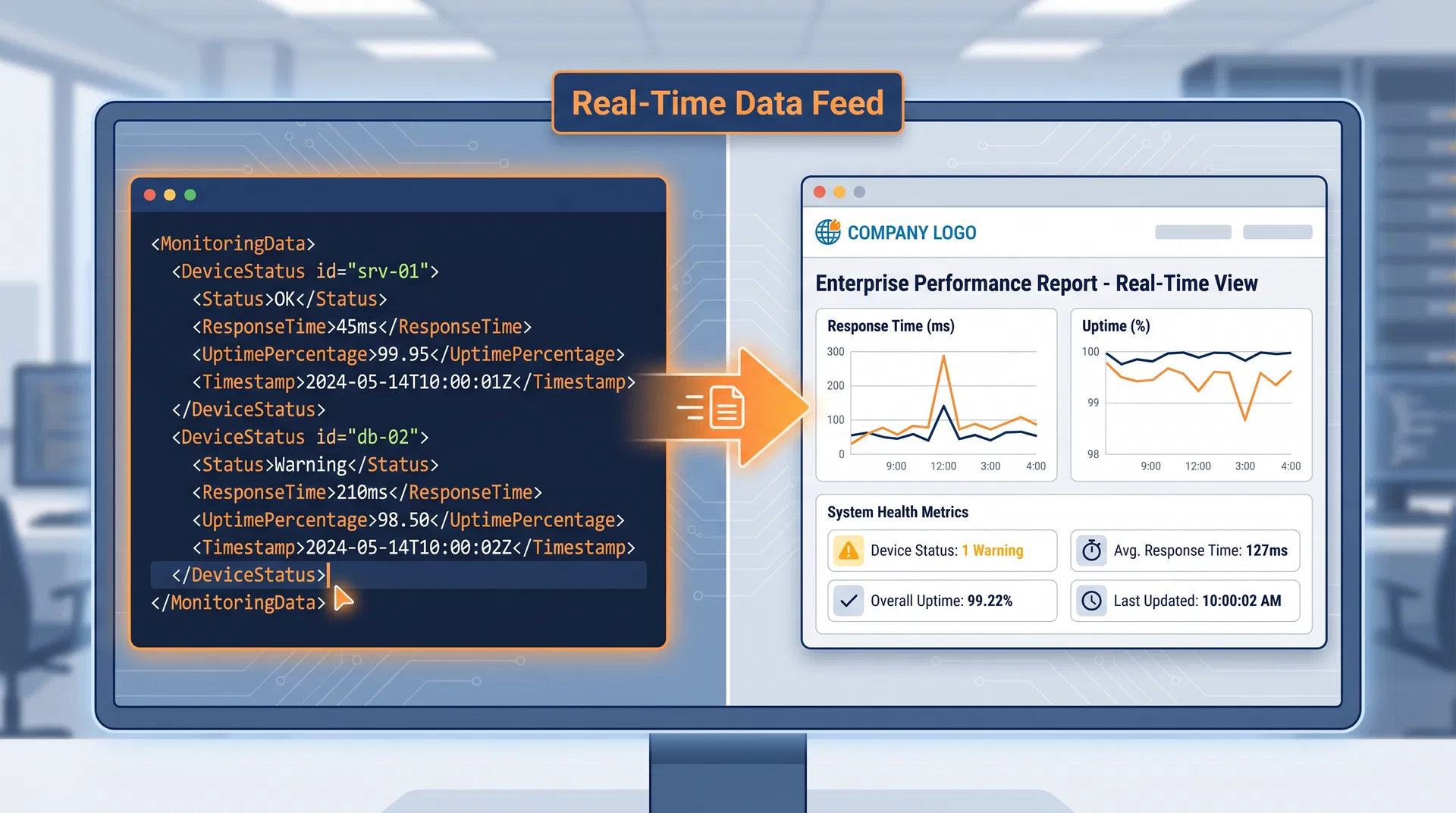
The XML Reporting Service (XRS) streams live monitoring data — device status, response times, uptime percentages — in a structured XML format. Use it to build fully custom, fully branded reporting tools embedded in your own portal or website.

Real-Time Dashboards

White-Labeled Shareable Panes
Live Data, Your Brand

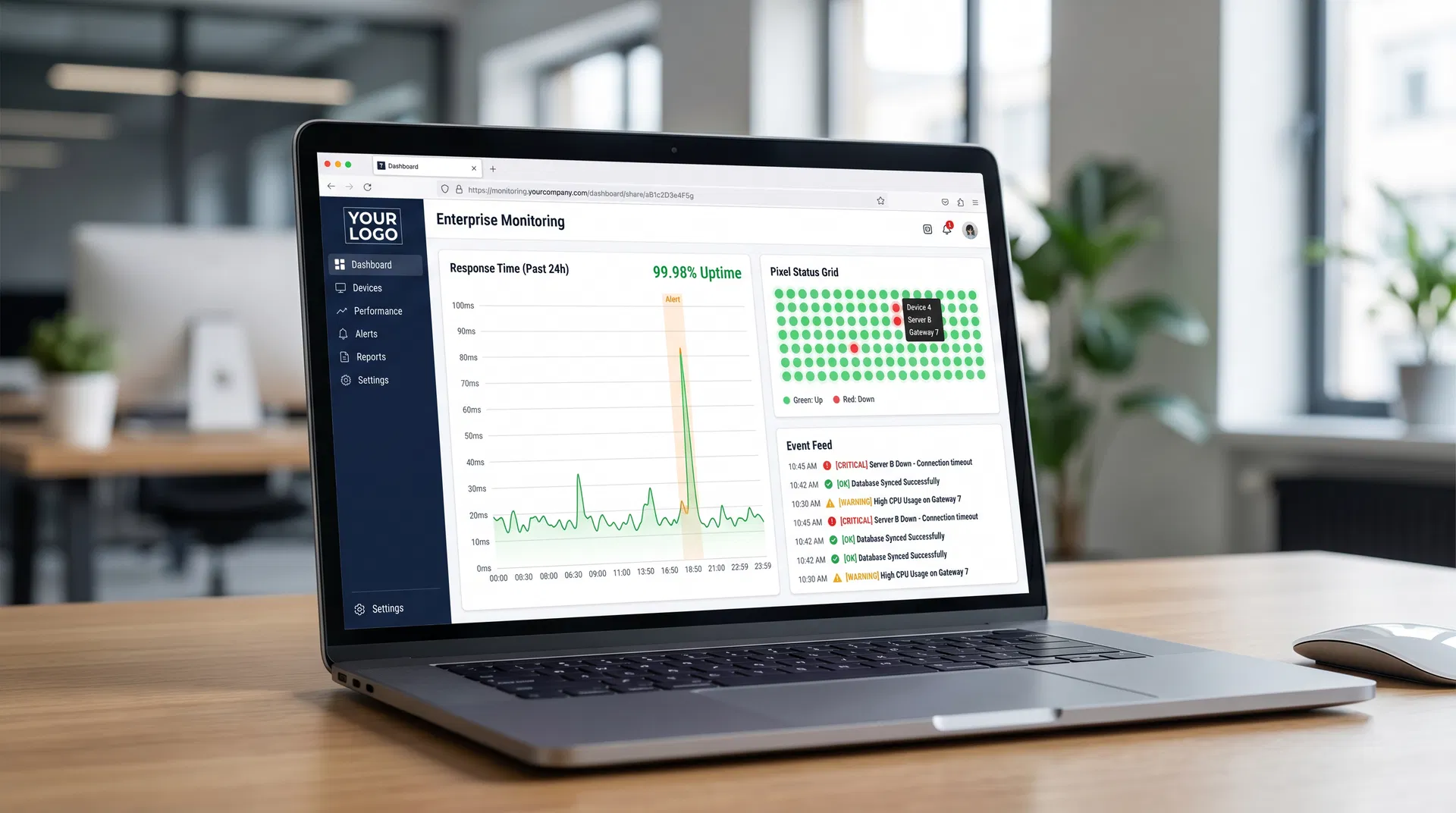
Shareable Panes are real-time monitoring dashboards that can be accessed by anyone via a unique URL — no Dotcom-Monitor account required. When white labeling is applied, your company logo replaces Dotcom-Monitor branding, giving clients a seamless, branded live-monitoring experience.

White-labeled Shareable Pane dashboard showing real-time monitoring data with custom company logo

Response Time Charts

Display real-time response time charts for your monitored devices over the past few hours — all under your brand.

Pixel Status Grid

Show a color-coded pixel grid of all device statuses at a glance. Green for up, red for down — instant visibility for clients.

Event Feed

Stream a live feed of monitoring events and status changes, keeping clients informed in real time without platform access.

Shareable via Unique URL

Each pane has a unique, bookmarkable URL. Share it with clients or embed it in your own portal — no login needed.

SAMPLE XML FEED ENDPOINT

https://api.dotcom-monitor.com/config_api_v1/reports/xml?uid=YOUR_UID

Developer API

Build Custom Reports
with the XML Real-Time Feed

The Dotcom-Monitor XML Reporting Service (XRS) delivers live monitoring data in a structured XML format that your development team can consume to build fully custom, fully white-labeled reporting tools — embedded in your own portal, website, or internal dashboard with zero Dotcom-Monitor branding.

Live Device Status & Metrics

Access real-time status, response times, uptime percentages, and timestamps for all monitored devices via a structured XML endpoint.

Build Any Report Format

Use the data to render custom HTML dashboards, PDF reports, or internal BI tool integrations — styled entirely with your own brand.

ISP & Data Center Use Cases

ISPs can provide clients with independent uptime data via their own portal. Data centers can integrate monitoring status into internal systems.

Free to Use

The XML Reporting Service is included at no additional cost. No extra API keys or add-ons required — just activate and start building.

How It Works

Four Steps to Fully Branded Reports

Open Report Settings

Navigate to Device Settings → Reports for device-level configuration, or use the Reports menu in the main Dotcom-Monitor interface for account-level settings. Both paths give you access to the White Label configuration panel.

01

Scroll to the White Label Section

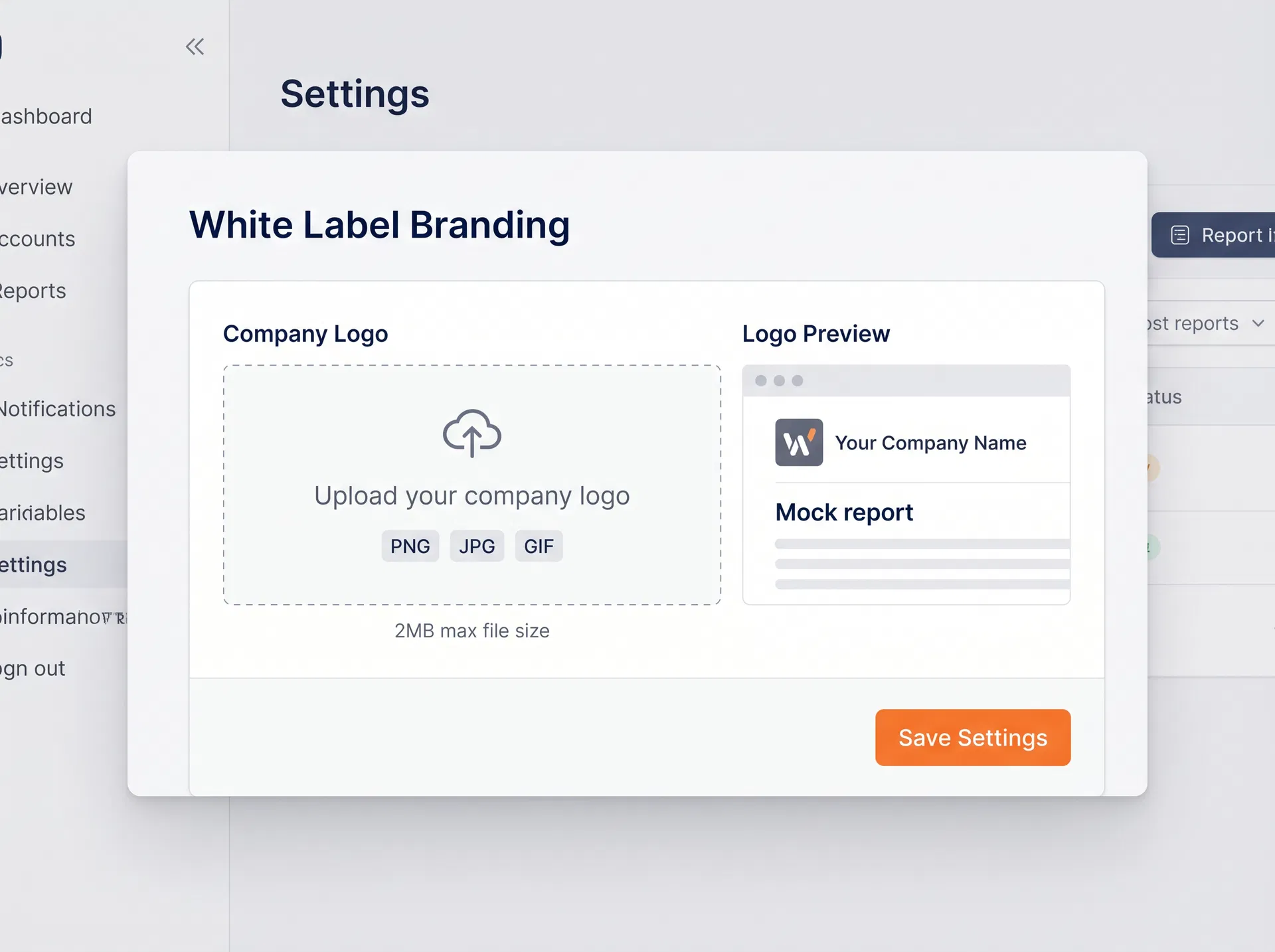
Within the report settings window, scroll down to find the dedicated White Label section. This is where you upload the image asset that will replace Dotcom-Monitor's branding in all generated PDFs.

02

Upload your company logo in PNG, JPG, or GIF format (maximum 2 MB). For best results, use an image 220 px wide by 40 px high. The upload panel provides an instant preview of how your logo will appear in the report header.

03

Generate Branded Reports

Once saved, your logo is automatically included in all generated PDF versions of the supported reports. Every Executive Summary and SLA Report produced from that point forward will display your brand — not ours.

04

Start Your 30-Day FREE Trial

Technical Specifications

Everything You Need to Know

Supported Image Formats

PNG, JPG, GIF

All common web image formats are accepted for your company logo upload.

Maximum File Size

2 MB

Keep your logo file under 2 MB for optimal report generation performance.

220 × 40 px

This size ensures your logo renders crisp and proportional in the report header.

Configuration Level

Device or Account

Apply white labeling at the individual device level or globally across your account.

White Label Surfaces

3 Touchpoints

PDF Reports (Executive Summary + SLA), Shareable Pane Dashboards, and XML Feed-powered custom tools.

Auto-Application

All Future PDFs

Once configured, your logo is automatically included in every generated report PDF.

Dashboard Reload Interval

Every 3 Minutes

Shareable Pane dashboards auto-reload to display the latest monitoring data without manual refresh.

XML Feed Cost

Free

The XML Reporting Service (XRS) is included at no additional cost on all plans.

Dashboard Access

No Login Required

Shareable Panes are accessible via unique URL — clients can view live data without a Dotcom-Monitor account.

Who It's For

Built for Teams That Deliver to Clients

White Label is most valuable when your reports are going outside your organization — to clients, executives, or compliance reviewers who should see your brand, not ours.

Managed Service Providers (MSPs)

Deliver monitoring reports to your clients that carry your agency’s brand, not a third-party tool’s. Reinforce your value proposition and professional identity with every report cycle.

Enterprise IT Teams

Present uptime and SLA compliance data to internal stakeholders and leadership using reports that align with your corporate identity standards — no third-party logos in executive presentations.

Digital Agencies & Resellers

Resell monitoring services under your own brand. White-labeled reports ensure your clients never see the underlying infrastructure provider, keeping your service offering seamless and proprietary.

Report Deep Dive

Professional PDF Reports That Carry Your Identity

Once white labeling is configured, every PDF generated by Dotcom-Monitor’s reporting engine automatically includes your uploaded logo in the report header. The data, charts, and metrics remain identical — only the branding changes.

Logo in Report Header

Your company logo appears prominently at the top of every generated PDF, replacing the Dotcom-Monitor identity.

Consistent Across All Periods

Whether generating a monthly, quarterly, or custom-range report, your branding is always applied automatically.

No Watermarks or Attribution

The generated PDFs contain no Dotcom-Monitor watermarks, footnotes, or attribution when white labeling is active.

FAQ

Frequently Asked Questions

White labeling is supported across three surfaces: (1) PDF Reports — the Executive Summary Report and the SLA Report; (2) Shareable Pane Dashboards — real-time monitoring dashboards accessible via a unique URL; and (3) Custom reporting tools built using the XML Real-Time Data Feed (XRS), where you control all branding entirely.

Shareable Panes are real-time monitoring dashboards that can be shared with anyone via a unique URL — no Dotcom-Monitor account required. When white labeling is configured, your company logo replaces Dotcom-Monitor branding on the pane. Clients can bookmark the URL and view live response time charts, pixel status grids, and event feeds under your brand.

The XML Reporting Service (XRS) is a free API that streams live monitoring data — device status, response times, uptime percentages, and timestamps — in a structured XML format. Your development team can consume this feed to build fully custom reporting tools, portals, or dashboards that are branded entirely with your own identity, with no Dotcom-Monitor branding present at all.

Yes. The XML Reporting Service (XRS) is included at no additional cost. No extra API keys or add-ons are required — simply activate it and start building your custom white-labeled reporting tools.

Yes. By default, Shareable Panes are accessible to anyone with the unique URL. You can restrict access in the dashboard settings so that only users of your Dotcom-Monitor account can open the pane. You can also revoke access at any time by using the Reset GUID action, which changes the URL and invalidates any previously shared links.

White labeling is currently supported for two PDF reports: the Executive Summary Report and the Service Level Agreement (SLA) Report. Both can be configured at the device level or at the account level.

You can configure white labeling in two places: at the device level via Device Settings → Reports, or at the account level through the Reports menu in the main Dotcom-Monitor left-side navigation. Both paths lead to the same White Label upload section.

The White Label section accepts PNG, JPG, and GIF image formats. The maximum file size is 2 MB. For best visual results, we recommend an image that is 220 pixels wide by 40 pixels high.

Yes. Once you upload your logo and save the configuration, it is automatically included in all generated PDF versions of the supported reports going forward. You do not need to re-apply it for each report generation.

Yes. By configuring white labeling at the device level (Device Settings → Reports), you can assign different logos to different monitoring devices. This allows MSPs and agencies to use client-specific logos for each client’s reports.

When white labeling is configured, your uploaded logo replaces the Dotcom-Monitor branding in the report header. The goal is to provide a fully branded experience for your clients or stakeholders.

White labeling capabilities may vary by subscription plan. We recommend checking the current pricing page or contacting our sales team to confirm availability on your specific plan.

Start Delivering Reports Under Your Brand Today

Set up white labeling in minutes. No coding required. Your clients will never know the reports came from a third-party monitoring platform.