- Product · Internet Infrastructure Monitoring
VoIP Monitoring and SIP Monitoring: A Scheduled Softphone That Registers and Calls Through Your PBX
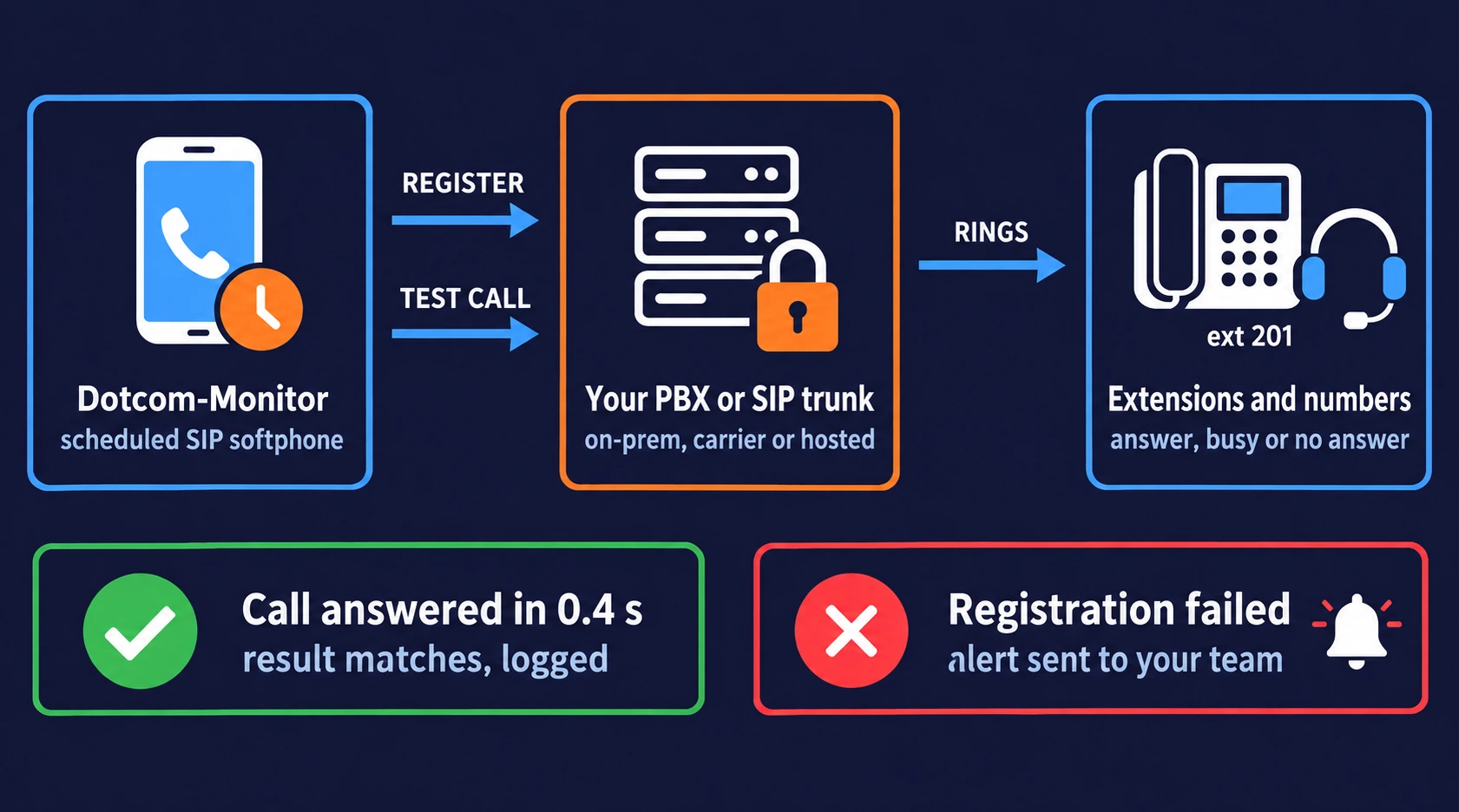
Dotcom-Monitor’s VoIP monitoring behaves like a SIP softphone. On the schedule you set, it connects to your PBX, SIP trunk or hosted VoIP provider with the credentials of an extension, registers the same way a desktop softphone does, places a call to the number you choose, and checks that the called party answered, was busy or did not answer, whichever you told it to expect.
Any other outcome (registration rejected, no response inside your time threshold, Busy where you expected Answer) is an error. It is re-checked from a second monitoring node and sent to your on-call channel with the details attached.
Two SIP checks in one task
Shortest check interval
Expected results:
Answer · Busy · No Answer
Secure transport options for the test call
What VoIP Monitoring Is, and What Ours Does
VoIP monitoring is the automated, continuous checking that a voice over IP system can accept a registration, set up a call and connect it to the right place. Dotcom-Monitor’s VoIP monitoring software does this synthetically. Instead of watching existing traffic, a monitoring agent acts as a SIP softphone: it registers on your server with an extension’s credentials, the same way a desktop softphone or desk phone does, and places a SIP call through it on a fixed interval. If a softphone can register and dial on your system, the monitor can test the same path. Each result is recorded, compared with the expected outcome, and alerted on if it differs.
The protocol doing the work is SIP, the Session Initiation Protocol (RFC 3261) that almost every VoIP platform uses to register endpoints and set up calls. SIP monitoring is the mechanism; VoIP monitoring is the outcome. The same monitoring task tests an on-premises PBX, a carrier SIP trunk or a hosted VoIP service, because all of them accept SIP at the edge.
One clarification, because the names look alike. This page covers monitoring your SIP infrastructure: the server, the trunk, the registration and call setup path. It does not cover dialing a published phone number from the outside to confirm it rings and is answered. That is phone number monitoring, which our sister service performs over the public telephone network on its own page. Many teams run both. SIP monitoring tells you the PBX is healthy; phone number monitoring tells you customers can reach it.
How a VoIP Monitoring Check Runs
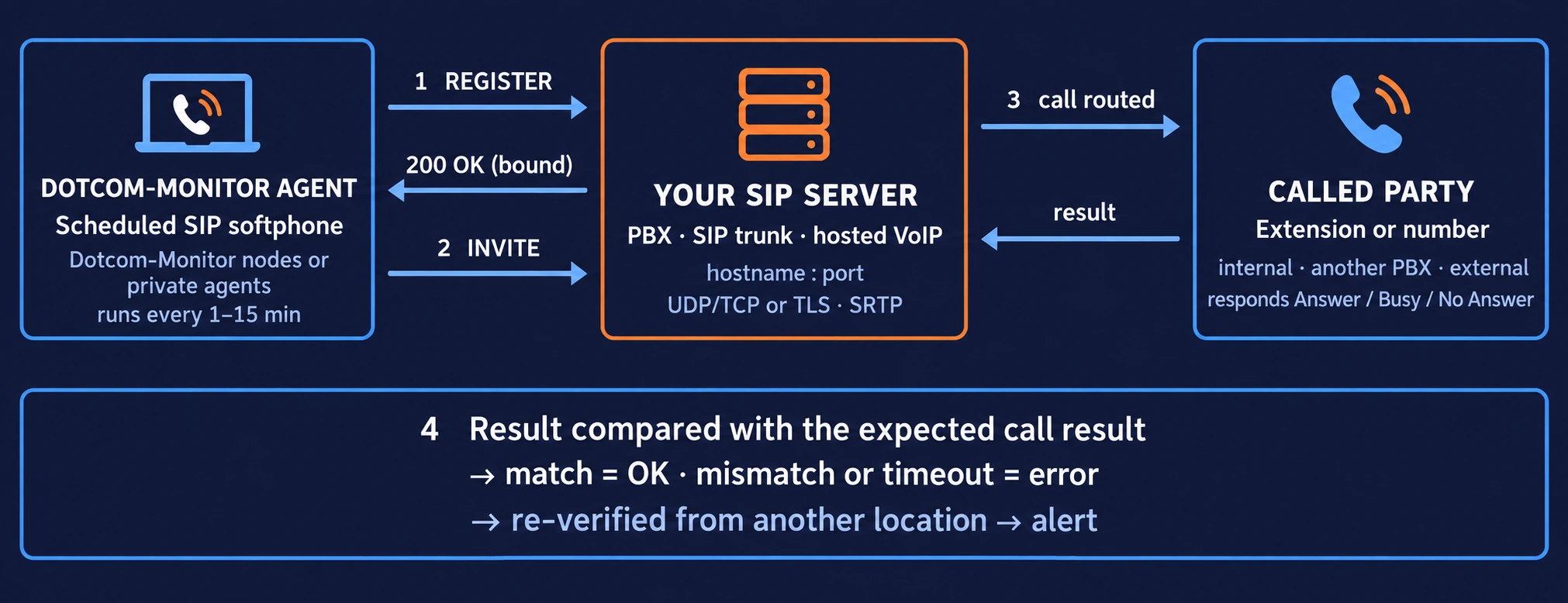
Each check is a short SIP session between a Dotcom-Monitor agent and your server: register, call, compare the result, report. It repeats on the interval you set, as often as every minute.
The Agent Resolves and Connects to Your SIP Server
You give it a hostname or IP and a port. If your server requires a secure transport, the agent negotiates TLS first. DNS resolution can use the agent's default resolver or a mapping you define, which matters when the PBX answers on an internal name.
It Registers as an Extension
With the Action Type set to Perform Register or Perform Register and Call, the agent sends a SIP REGISTER with the user name, authorization name, password and display name you configured, the same fields you would enter in a softphone, creating the binding between the SIP address and the agent's location as described in RFC 3261 §10. A rejected or unanswered registration is a failure on its own, before any call is attempted.
It Places the Call
With the Action Type set to Perform a Call or Perform Register and Call, the agent sends an INVITE to the Phone Number you specified: an internal extension, a number on another PBX written as number@domain, or an external number such as 15554441234. Your server routes it like any other call.
It Compares the Outcome With What You Expected
You set the Expected Call Result to Answer, No Answer or Busy. A monitor pointed at a staffed queue expects Answer; one pointed at a deliberately busy test extension expects Busy. A different outcome, an error response from the server, or no response inside the Time Validation Threshold is recorded as an error with the response and timing attached.
Errors Are Verified, Then Alerted
Before an incident opens, the platform re-runs the failed check from another monitoring node. If that one fails too, the alert goes out through your alert rules (email, SMS, phone call, Slack, Microsoft Teams, PagerDuty, webhook) with the evidence from each node. If it succeeds, the event is logged in the report and nobody is paged.
SIP Monitoring: Every Setting in the Task, and What It Verifies
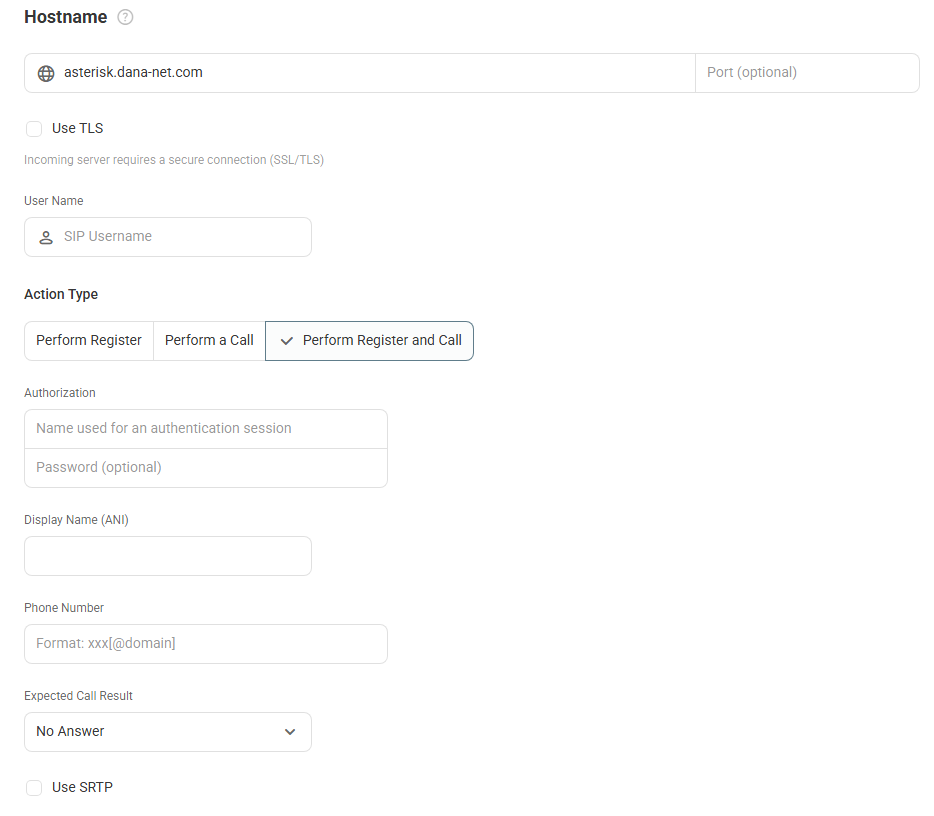
A VoIP/SIP monitoring task is one device in your Dotcom-Monitor account, configured with the same details you would put into a SIP softphone: server, port, extension credentials, and the number to dial. You can combine registration and a call in one task (many systems require registration before they will route a call), or run either alone. For SIP trunk monitoring, a register-only task is the lightest way to confirm the trunk is accepting endpoints. The full field reference is in the knowledge base: Configure VoIP and SIP Monitoring Tasks.
- Registration check (SIP REGISTER). Proves the server is up, reachable on the configured port and accepting the credentials. This is the first thing that breaks after a certificate rotation, a password change or a firewall rule edit.
- Call-setup check (SIP INVITE). Proves the dial plan still routes the number you care about to the place you care about, and that the far end responds.
- Expected-result check. Answer, Busy or No Answer, set per task. The monitor tests the specific behavior you rely on, not just any response.
- Response-time threshold. A registration or call that completes but takes longer than your limit is flagged as slow before it becomes a failure.
- TLS and SRTP. Run the check over the secure transport your production endpoints use rather than a plaintext connection that may be configured differently.
Setting | What you enter | What it lets the check verify |
|---|---|---|
Hostname / Port | Domain or IP of the PBX or VoIP provider; port is optional if the server uses the default | Reachability of the server on the port endpoints use |
Use TLS | On if the server requires SSL/TLS transport | TLS negotiation on the signaling path, the same transport your secured endpoints use |
User Name | The SIP username of the extension provisioned for monitoring | The identity the check registers and calls as |
Action Type | Perform Register, Perform a Call, or Perform Register and Call | Registration only, call only, or both in sequence, matching what your system requires |
Authorization | Authentication name and password (password optional) | Registration succeeds per RFC 3261 §10; credentials and endpoint provisioning are intact |
Display Name (ANI) | The caller name presented on the call | What the called party or its logs see as the caller |
Phone Number | An extension, or number@domain for a number on another PBX, or an external number | Dial plan and routing to the target you specify, internal or external |
Expected Call Result | Answer, No Answer or Busy (dropdown) | The called party behaves the way it should; anything else is an error |
Use SRTP | On if media is encrypted | SRTP (RFC 3711) negotiation for the test call, matching how your production endpoints are configured |
Time Validation Threshold | Maximum seconds to wait for a response | Slow registrations and slow call setup are flagged, not just failed ones |
DNS Options | Resolver mode and custom host-to-IP mappings | Tests through the name your endpoints resolve, including internal names via a private agent |
Action Type sets whether the task registers, calls, or does both; many PBXes require registration before they will route a call.
VoIP Failures a Scheduled SIP Check Catches
Voice failures are quiet. There is no 500 error; the phone does not ring, and the first signal is a customer who gave up. A scheduled SIP check surfaces these failures first.
PBX or SIP Trunk Unreachable
The server is down, the SIP port is blocked, or a route change cut the path from one region. Registration fails on the next check.
Registration Rejected
A TLS transport that stops negotiating, a rotated password not pushed to endpoints, a deleted extension. Phones silently drop off the system; the monitor sees the rejected REGISTER on the next interval.
Call Routing Broken
A dial-plan edit, a mis-set forwarding rule or a full queue turns Answer into Busy or No Answer. Because you set the expected result, the mismatch triggers an alert.
Provider-Side Outage
Your hosted VoIP or SIP trunk carrier has a partial outage that only affects some regions or some POPs. Checks from more than one monitoring node show whether the outage affects everyone or one region, usually before the provider’s status page does.
Slow Call Setup
Registration or INVITE completes, but well past your threshold. Rising latency on a trunk shows up as threshold errors in the report before it becomes hard failures.
Voicemail and IVR Endpoints
Point a task at the voicemail pilot or an auto-attendant extension with Expected Call Result set to Answer. If the application server behind it stops answering, the check fails.
Inter-Site and Inter-PBX Links
Call an extension on a second PBX (number@other_domain) to confirm the SIP trunk between sites is still passing calls, not just registrations.
Maintenance Verification
After a PBX upgrade or firewall change, the next scheduled check is a test result on the secure path, with no manual softphone test.
Through Your Firewall, or From a Private Agent Inside It
Like any softphone connecting from outside, the monitoring node needs to reach the SIP port. Dotcom-Monitor’s monitoring nodes have published IP addresses; allowlist the ones you use on a session border controller or firewall that restricts SIP registration by source. Running the task from more than one node shows whether a failure is specific to one network path or affects every caller.
If the PBX is not exposed to the internet, install a private agent, the monitoring node software on a machine inside your network. It runs the SIP task against internal names and addresses, appears in your account as another node, and reports into the same dashboards and alerts. Running one public node and one private agent against the same PBX separates “the PBX is down” from “the internet path to the PBX is down”.
Verified Alerts and Response Time Reports
Verified Alerts
A single failed SIP check from one location may be one bad route, not an outage. Dotcom-Monitor re-runs a failed task from another location before opening an incident. Only a confirmed failure reaches your alert channels (email, SMS, voice call, Slack, Microsoft Teams, PagerDuty, webhooks), routed through escalation schedules to the next person if the first does not respond. The alert lists which locations failed, what the server returned and how long it took.
Response-Time Reports and SLA Evidence
Every check writes a result and a response time into your reports and dashboards: uptime percentage for the period, response time trend per location, and an error log with the server’s response for each failure. This is the record to bring to a SIP trunk provider when their SLA says 99.99% and your data says otherwise.
Everything the Platform Gives Every Monitor
- Scheduling from every minute to every 15 minutes per task, with maintenance windows so planned PBX work does not page anyone.
- Filters that require a failure to repeat, or to occur from N locations, before an alert fires.
- Reports and dashboards shared with your team, or white-labeled for the clients of an MSP.
- REST API to create SIP tasks for every trunk from a script, and to pull results into your own tooling.
- Secure Vault for SIP passwords: stored encrypted, never shown in the UI or reports.
- One account for VoIP alongside DNS, SSL, port, ping, email and website monitoring. A voice outage and a DNS outage appear on the same status board.
VoIP Monitoring, SIP Monitoring and Phone Number Monitoring, Side by Side
Three different kinds of product get sold as “VoIP monitoring”. They answer different questions, and most telephony teams need two of them. The table shows where each fits and which one this page covers.
VoIP / SIP monitoring This page · Dotcom-Monitor | Phone number monitoring Sister service · phonenumbermonitoring.com | Call quality analytics Packet capture / endpoint agents · not Dotcom-Monitor | |
|---|---|---|---|
Question it answers | Is my PBX, SIP trunk or VoIP provider accepting registrations and setting up calls right now? | Does my published number ring, get answered, and route through the IVR correctly? | How good was the audio on live calls: jitter, packet loss, MOS? |
How it tests | Scheduled SIP softphone: REGISTER, INVITE, compare result to Answer / Busy / No Answer | Calls dialed over the PSTN from an outside line; speech recognition on what answers | Passive analysis of RTP streams on your network or on the handsets |
What you need | SIP hostname, port and credentials; monitoring IPs allowlisted or a private agent | The phone numbers | SPAN port, agents on endpoints, or a probe inside the network |
Where it runs from | Dotcom-Monitor monitoring nodes or a private agent inside your network | External telephone lines | Inside your network only |
Best for | IT / network / telephony teams responsible for the SIP infrastructure | Operations teams responsible for customer-facing numbers and IVRs | Voice engineers tuning QoS on the LAN/WAN |
Blind spot | Audio quality on live calls | Why the PBX behind the number failed | Whether an outside caller can reach you at all |
Get it | Separate product category |
Running both Dotcom-Monitor services. SIP monitoring on the trunk plus phone number monitoring on the main inbound numbers covers the full path: infrastructure health from the inside, reachability from the outside. When the phone line check fails and the SIP check passes, the problem is with the carrier or the number, not your PBX, and you know that before you open a ticket.
VoIP Monitoring Is Part of the Internet Infrastructure Plan
SIP tasks are billed under Internet Infrastructure (ServerView), the same plan that covers DNS, SSL certificate, port, ping, traceroute, FTP and email server checks. One target is one SIP task; mix VoIP targets with any of the others in the same plan. Every plan includes alerting, reports and the API.
- 5 to 300 targets per plan
- Check intervals from 15 minutes down to 1 minute
- Private agents available as an add-on for PBXes behind a firewall
- 30-day free trial with full platform access, no credit card
Phone Number Monitoring
Test calls to your toll-free, landline and mobile numbers, with IVR verification, from our sister service.
Network Monitoring
Ping, traceroute and TCP port checks against the hosts and routes your SIP traffic depends on.
Private Agents
Run the same SIP task from inside your firewall against a PBX the internet cannot reach.
VoIP and SIP Monitoring Questions
What Is VoIP Monitoring?
VoIP monitoring is the continuous, automated checking that a voice over IP system can accept endpoint registrations, set up calls and connect them to the right destination. Dotcom-Monitor does this synthetically: a monitoring agent acts as a SIP softphone, registers on your server, places a test call on a fixed interval, compares the outcome with the expected result and alerts on any difference. Some products use the same term for passive call-quality analytics (jitter, packet loss, MOS); that is a different tool, described in the comparison table.
What Is SIP Monitoring, and How Is It Different From VoIP Monitoring?
SIP is the Session Initiation Protocol, the signaling standard (RFC 3261) that VoIP systems use to register endpoints and set up, modify and end calls. SIP monitoring tests those signaling operations directly: can a client register, can it get a call routed, how long does each step take. Nearly all VoIP platforms use SIP, so SIP monitoring is how VoIP monitoring is done in practice. On Dotcom-Monitor the two terms describe the same task. The task type in the product is called VoIP/SIP.
Is This the Same as Testing With a SIP Softphone?
Close to it. A VoIP/SIP monitoring task uses the same inputs you would enter in a desktop softphone (server, port, extension username and password, transport, the number to dial) and performs the same two operations: REGISTER, then INVITE. The differences are that it runs on a schedule as often as every minute, from a monitoring node outside your network or a private agent inside it, compares each result with the outcome you expect, keeps the history, and alerts on failure. If a softphone can register and dial on your system, the monitor can test that path without anyone watching a screen.
Does Dotcom-Monitor Place an Actual Call?
It places a SIP call: an INVITE sent through your server to the number or extension you configure, routed the same way as a call from a desk phone. The check records the signaling outcome (Answer, Busy or No Answer) and the time it took. It does not dial your number from an outside telephone line over the PSTN; that is what phone number monitoring does.
Does It Measure Jitter, Packet Loss or MOS?
No. Dotcom-Monitor’s VoIP monitoring measures availability, registration success, call-setup result and response time from each monitoring location. It does not capture RTP media or compute audio-quality metrics such as jitter, packet loss or Mean Opinion Score. For call quality on live calls you need a packet capture appliance or endpoint agent inside your network. Many teams run both: synthetic SIP checks to confirm the system is reachable and routing correctly from the outside, and a quality tool on the LAN for audio.
Which PBXes, SIP Trunks and VoIP Providers Can It Monitor?
Any SIP server that will accept a REGISTER or an INVITE from an external SIP client, which covers on-premises PBXes, session border controllers, carrier SIP trunks and hosted VoIP platforms alike. You supply the hostname or IP, the port, and a set of SIP credentials provisioned for monitoring. If your SBC or firewall restricts registration by source address, allowlist the monitoring location IPs you use, or run the task from a private agent inside your network.
Can I Monitor a PBX That Is Not Exposed to the Internet?
Yes, with a private agent. It is the same monitoring software installed on a machine inside your network, so it can register on an internal PBX by its internal name and address. It appears in your account as an additional location and feeds the same reports and alerts. The DNS Options setting in the task lets you map a hostname to an internal IP when the name does not resolve publicly.
How Often Does It Check, and From Where?
As often as every minute and as seldom as every 15 minutes, per task. Each task runs from the Dotcom-Monitor monitoring nodes you select, from a private agent inside your network, or both. Each node reports its own result and response time.
What Happens When a Check Fails?
The failure is recorded with the server’s response and the timing, and the platform re-runs the task from another location. If the second location also fails, an alert is sent through your configured channels (email, SMS, voice call, Slack, Microsoft Teams, PagerDuty, webhook) following your escalation schedule, with the detail from each location attached. If the second location succeeds, the event is logged in the report as a single-location error and nobody is paged.
How Is This Different From Phone Number Monitoring?
SIP monitoring tests your infrastructure from the inside of the protocol: it registers on your server with SIP credentials and verifies that registration and call routing work. Phone number monitoring tests reachability from the outside: it dials your published numbers over the public telephone network and verifies that they ring, are answered and route correctly through an IVR. Use SIP monitoring when you are responsible for the PBX or trunk; use phone number monitoring when you are responsible for the numbers customers call. They are complementary, and the two services are run by sister companies.
Is There a Free VoIP Monitoring Tool?
Open-source SIP testing tools exist and are useful for a one-off check from a workstation. They lack scheduling, execution from multiple locations, verified alerting and history. Dotcom-Monitor offers a 30-day free trial with full platform access and every check type, with no credit card. That is the fastest way to find out if a synthetic SIP check catches the failures you care about.
How Much Does VoIP Monitoring Cost?
SIP tasks are part of the Internet Infrastructure plan, which starts at $40 per month for 5 targets and scales to 300 targets, with check intervals from 15 minutes down to 1 minute. A target is one SIP task. The same plan covers DNS, SSL, port, ping, traceroute, FTP and email checks, so a small telephony estate rarely needs a plan of its own. Current tiers are on the pricing page.
Start Monitoring Your PBX or SIP Trunk
Start a 30-day free trial, add a VoIP/SIP task with your server and a test extension, and see the first registration and call results within minutes. No credit card required.
Full platform access during the trial: all check types, no credit card required.