



Organizations Worldwide
Platform Uptime SLA
Global Monitoring Locations
Website Monitoring Leader
End-to-end monitoring for custom scenarios follows a complete business process from the first click to the final confirmation — even one that spans several systems and channels. Where uptime checks and standard monitors stop, a custom script keeps going: filling forms, parsing a confirmation email, following a link inside it, and submitting an SMS verification code, all as one automated run from real browsers on a schedule. If you can describe the journey a real user takes, it can be monitored.
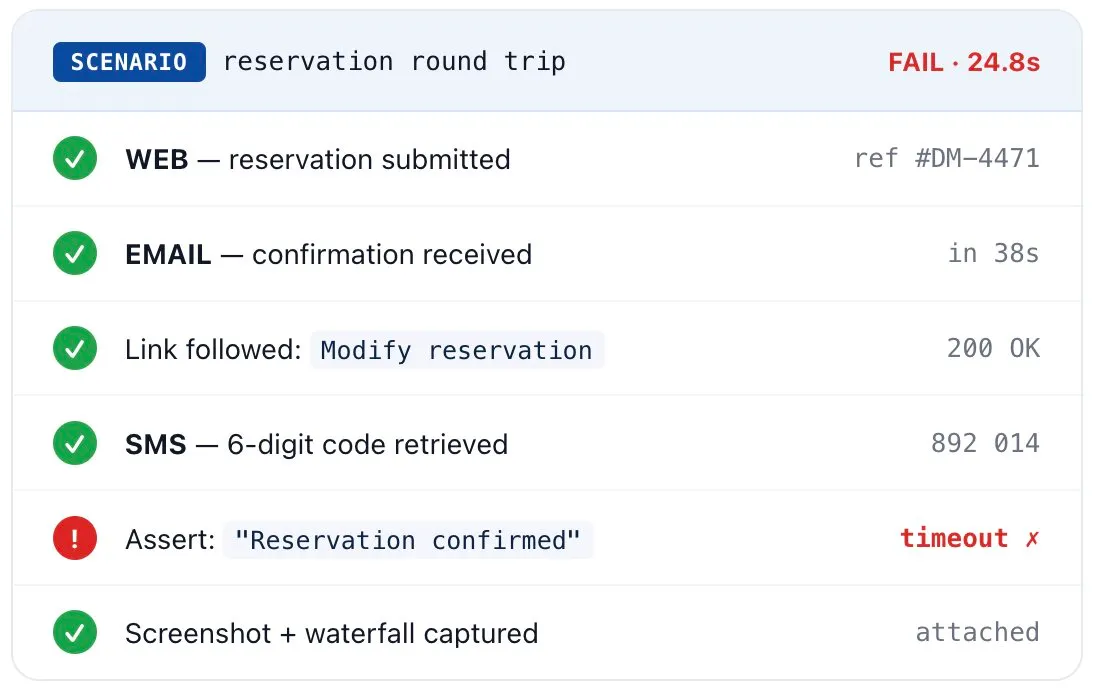
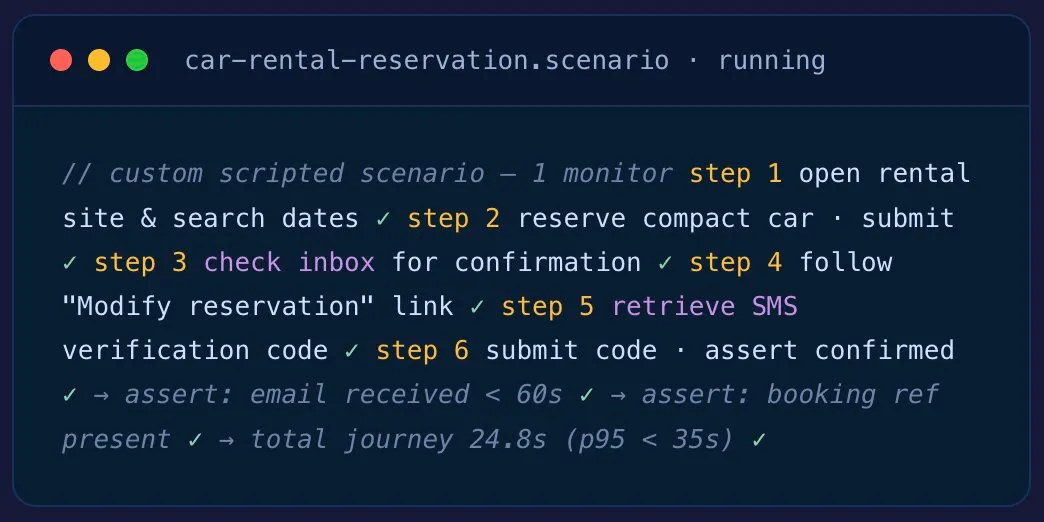
No single product checks this whole journey. A custom script does — booking a car, verifying the confirmation email, following its link, and applying an SMS code, all on a schedule. Here’s the full scenario, step by step.
Open the rental site, enter pickup/drop-off locations and dates, search availability, select a compact class, and submit the reservation form — in a real browser, so the booking widget's JavaScript runs exactly as it would for a customer.
Store the booking reference shown on the confirmation screen so later steps (and the alert payload) can use it. Assert the page actually returned a reference rather than a silent error.
Watch a monitored inbox for the confirmation message. Validate it arrives within your SLA window, comes from the right sender, and the subject and body contain the booking reference captured in step 2.
Extract the management link from the email and click through to the self-service page — verifying the exact path a customer uses to change a booking actually resolves and loads.
The modify page triggers an SMS one-time code. Read the 6-digit code from the text message and submit it — clearing the verification gate the same way a real user would.
Confirm the final "Reservation confirmed / updated" state and capture total journey time. If any step fails, the run is marked failed with the exact step, a screenshot, and the full network waterfall attached to the alert.
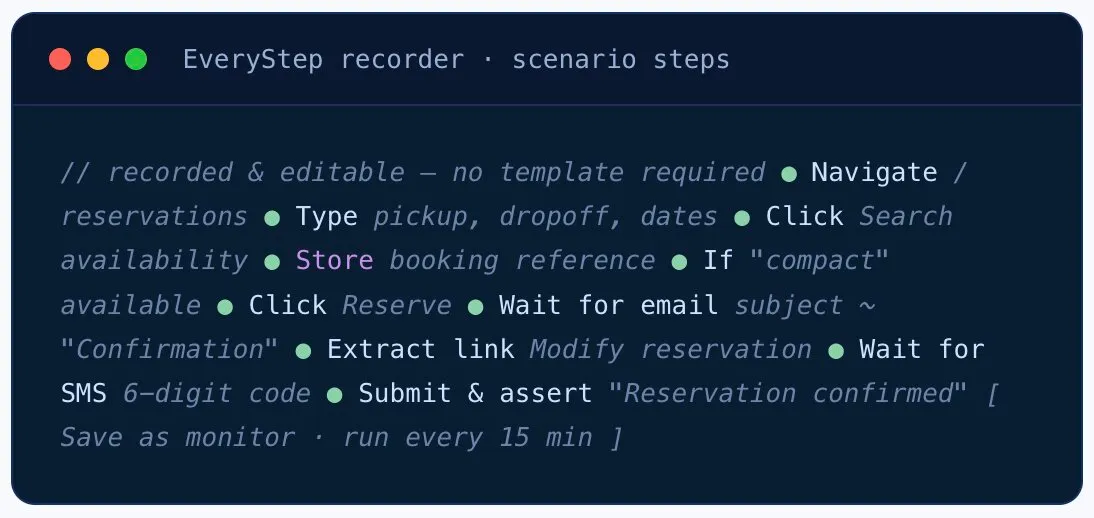
Record and edit scenarios yourself with the EveryStep Web Recorder, or hand it to our Professional Services team — we scope, build, validate, and maintain the whole thing and give you back a working monitor.
We map the journey with you — every step, channel, account, and the assertions that define “working”.
The scenario is recorded and refined — dynamic data, conditional logic, email and SMS steps wired in.
We run it across locations and devices, tune thresholds, and confirm it catches real failures without false alarms.
It goes live on a schedule from 30+ locations or a Private Agent, with alerts routed to your tools.
When your app changes, the scenario is updated — so the monitor keeps reflecting the real journey.
Add to cart, apply a promo, log in, pay in a sandbox, and validate the order-confirmation email — the full path to revenue, not just the homepage.
That’s the point. If you can describe the journey, we can script it. Bring us the scenario standard monitoring can’t cover.
Walk a monitoring engineer through your flow — web, email, SMS, internal apps, the lot — and leave with a scripted scenario running against your environment. No sales pitch.
Execute custom scenarios from 30+ owned monitoring locations to catch regional latency, DNS, CDN, and third-party issues against your public-facing journeys.
For internal processes that never leave your network — intranet portals, internal apps, integration steps — deploy a Private Agent inside your VPC or datacenter. Outbound-only connection, no inbound firewall rules.
On-prem / VPC

All reviews sourced from Capterra verified reviews. Ratings as of October 2026.
A bespoke synthetic monitor scripted to follow a specific business process end to end — even one that spans multiple systems and channels. Where standard uptime or transaction checks stop, a custom script keeps going: filling forms, parsing a confirmation email, following a link, and entering an SMS code, all as one automated run on a schedule from real browsers.
Multi-step journeys with conditional logic, dynamic data, and cross-channel steps — a car-rental reservation that checks a confirmation email and an SMS code, an e-commerce checkout through payment, a banking login with MFA/OTP, an airline booking with a held seat, or any internal business process that touches several apps in sequence.
Yes. One scripted scenario can complete a web transaction, read the resulting email from a monitored inbox, follow a link inside that email, and retrieve and submit an SMS verification code — validating the entire round trip as a customer would experience it.
Either. You can record and edit scenarios yourself with the EveryStep Web Recorder, or our Professional Services team will scope, build, validate, and maintain a custom solution for you — handing back a working monitor and alerting setup.
Yes. Scenarios run in real browsers (Chrome and others) so JavaScript, single-page apps, dynamic content, and client-side logic all behave exactly as they do for your users — not just raw HTTP requests.
Yes. Deploy a Private Agent inside your network or VPC and run the same custom scenario against internal apps and integrations. The agent makes outbound-only connections, so no inbound firewall rules are required.
OTP and MFA codes delivered by email or SMS are retrieved inside the same scenario and submitted automatically. For test accounts you can use shared secrets / TOTP. CAPTCHA is intentionally adversarial to automation — we typically work with you to allowlist the synthetic monitor’s accounts or test path so the genuine journey can still be measured.
You get the exact failing step, a screenshot at the point of failure, the full waterfall of network requests, console errors, step-by-step timing, and the response or email/SMS content that was checked — routed to PagerDuty, Slack, Teams, SMS, email, or a webhook.
Standard synthetic monitoring covers common web flows like logins and checkouts. End-to-end custom scenarios handle the long-tail that doesn’t fit a template — cross-channel steps spanning email and SMS, third-party dependencies, unusual auth, conditional branching, and internal multi-system processes — scripted and maintained specifically for your business.
New to synthetic monitoring, or need standard journeys and API checks? Start with the full Synthetic Monitoring platform →
Bring us the scenario standard monitoring can’t cover. A monitoring engineer will scope it with you and have a working monitor running by the end of the call — web, email, SMS, and internal apps included.