



Organizations Worldwide
Platform Uptime SLA
Global Monitoring Locations
Website Monitoring Leader
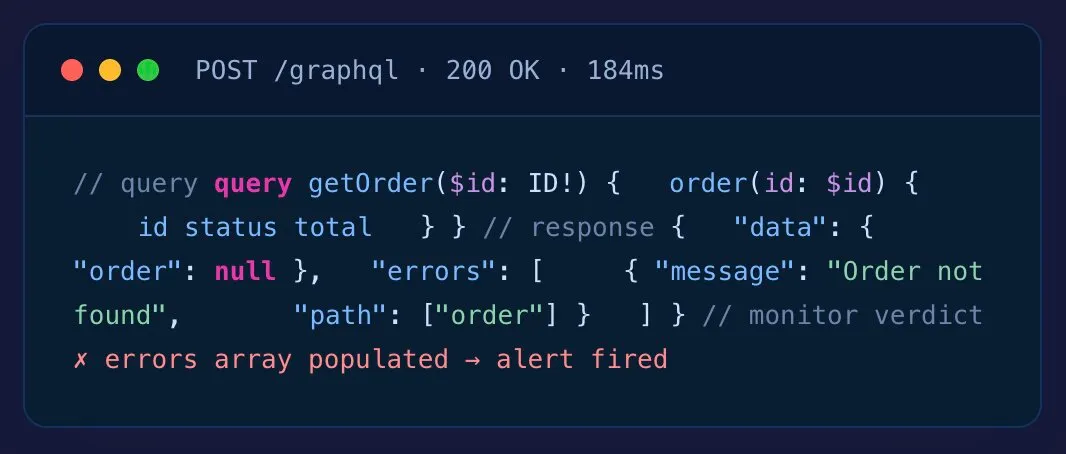
GraphQL API monitoring is the query-aware testing of GraphQL endpoints from outside your infrastructure — inspecting the response body’s errors array and data shape (since HTTP status is usually 200 even on failure), tracking query latency, and alerting when failures occur.
GraphQL’s big win — one endpoint, flexible queries — is also why uptime-only monitoring lies to you. The failure mode that matters lives in the response body, not the status code.
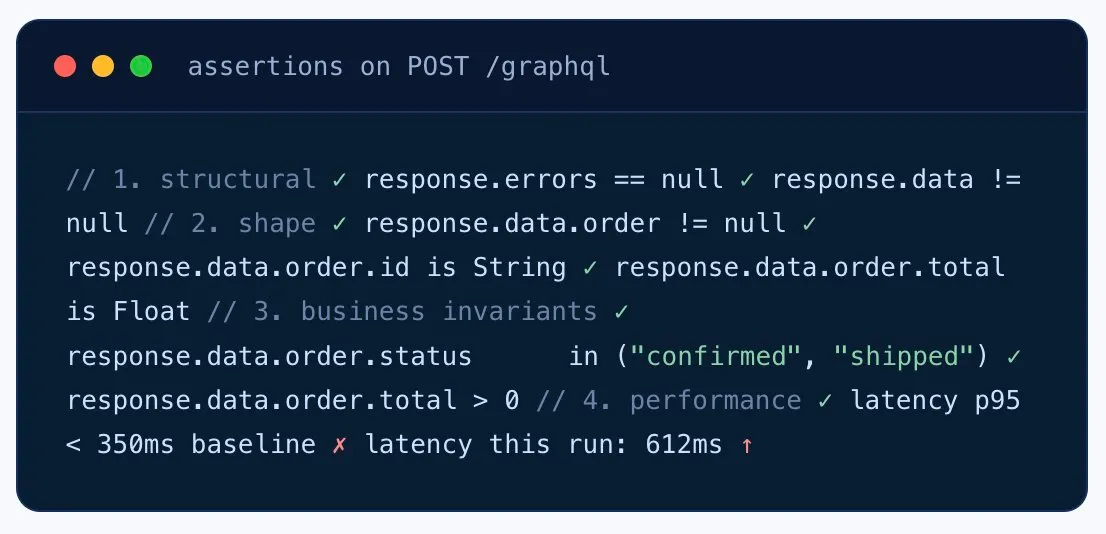
Send a defined query payload, then assert against the response body. Every monitor knows whether the errors array showed up, whether data contains the shape you expected, and whether business invariants hold.
errors[].length > 0.
data tree to catch null fields and missing keys.
data.order.status == "confirmed".
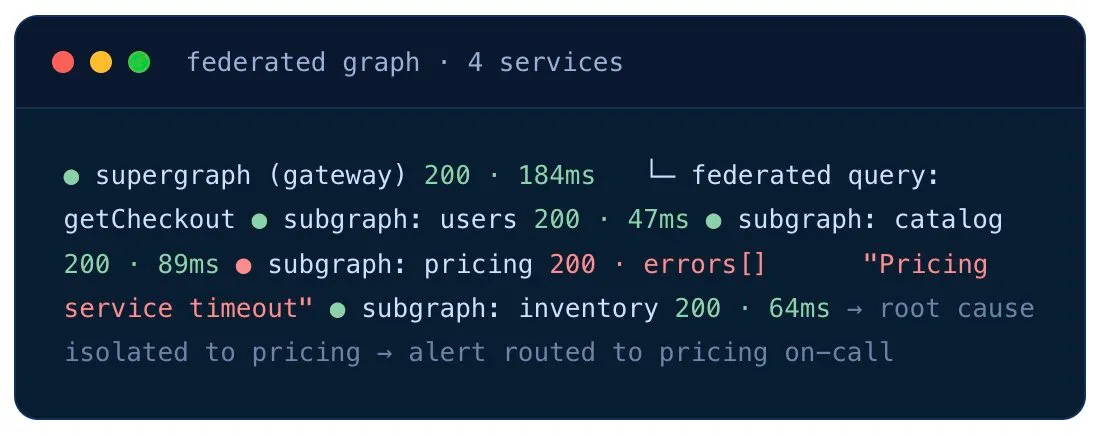
A federated GraphQL setup hides downstream service failures behind the gateway. Monitor the supergraph to detect customer-facing failure — and the individual subgraphs to pinpoint which service is the culprit.
The single GraphQL endpoint your mobile app depends on. Catch the silent partial failure that returns 200-with-errors and ships a blank screen to users.
Supergraph + subgraphs monitored separately. When the federated query breaks, the subgraph monitors tell you which downstream service to wake up.
placeOrder, processPayment, submitClaim — the mutations that move money or state. Monitor each one individually, asserting on the data invariants.
Run the monitor from CI after every deploy. Catch the schema change that silently nulls a field, or the resolver rename that breaks the mobile app.
Track latency P95/P99 per query. Spot the expensive resolver creeping above baseline before the mobile app reviews tank.
For WebSocket-based GraphQL subscriptions, check that the connection establishes, receives messages, and stays alive — using our WebSocket monitoring.
A performance engineer will walk you through GraphQL monitoring with errors-array detection and federation routing — no sales pitch, just a working monitor by the end of the call.
30+ owned monitoring locations across six continents. Spot the regional CDN issue or the edge gateway routing fault that local testing misses.
For internal BFF GraphQL services and backend-only graphs, deploy a Private Agent inside your VPC — same monitoring depth, no inbound firewall rules.
Global monitoring locations
Continents covered
Minimum check interval
For behind-firewall

4.5
83 reviews
4.6
4.6
All reviews sourced from Capterra verified reviews. Ratings as of October 2026.
Want to kick the tires without committing? Free Forever plan available — up to 25 targets, 2 monitoring locations, 7 days of data retention. Get started free → or Compare plans
Most GraphQL implementations return HTTP 200 even when the query fails. Failures live inside the response body — in the errors array, or as nulls inside the data object — not in the status code. Uptime-only monitoring marks failing GraphQL APIs as healthy. Real GraphQL monitoring has to inspect the response payload. See REST API monitoring →
Send a specific query payload, then assert against the response body. Check whether the top-level errors array is present or populated, validate query-specific data invariants in the response, and flag nulls in non-nullable fields. Some GraphQL servers encode domain failures inside the data object rather than populating errors — both signals are checked.
Yes. Each monitor runs a defined query or mutation payload. Monitor your most critical mutations (placeOrder, processPayment) individually to track per-operation latency, error rate, and partial failure rate.
All common auth schemes: Bearer Token (the most common for GraphQL), OAuth 2.0 with automatic refresh, JWT, API Key, Basic Auth, AWS Signature v4, mTLS, and custom headers. Secrets are masked through Secure Vault. See auth matrix →
Yes. Monitor the supergraph endpoint to verify the federation gateway is healthy, and monitor individual subgraph endpoints to isolate which service is failing when a federated query breaks. Works with Apollo Federation and similar architectures.
Total query latency is tracked, with P95/P99 percentiles per query. To pinpoint individual slow resolvers, pair monitoring with your APM tracing — synthetic monitoring confirms the customer-facing slowness; APM confirms which resolver is the bottleneck.
Yes. Deploy Private Agents inside your VPC or datacenter — common for backend-for-frontend (BFF) GraphQL services that aren’t publicly exposed.
Monitoring can include queries at various depths and complexity levels to verify your throttling and complexity limits are enforced. Pair with your WAF or query-complexity middleware for full protection.
GraphQL subscriptions typically use WebSocket — see our WebSocket monitoring for connection establishment, message delivery, and keepalive checks.
Monitor the supergraph endpoint to verify the federation gateway is healthy AND monitor individual subgraph endpoints separately to isolate which downstream service fails when a federated query breaks. Both monitors share alerting routes for consolidated incident response.
GraphQL subscriptions use WebSocket transport. Use our WebSocket monitoring product to validate that the subscription connection establishes correctly, receives expected events, and stays alive across long-running sessions.
Yes. Configure persisted query identifiers (Apollo Persisted Queries or Relay-style hashes) in the request and Dotcom-Monitor will send them as the operation reference rather than the full query string.
Build monitors at increasing query depth and complexity to verify your complexity-limit middleware enforces the threshold correctly. Pair monitor configuration with your GraphQL server complexity rules.
Monitoring more than GraphQL? See the full API Monitoring platform →
30-day free trial. No credit card. Payload-aware monitoring from 30+ global locations.