Automated Synthetic Monitoring Software for Applications, APIs, and Websites

Dotcom-Monitor’s Synthetic monitoring software simulates real user behavior 24/7 to detect broken user journeys and "silent" failures before they impact your customers. Monitor websites, APIs, and complex web applications across 30+ global locations with real-browser testing, detailed video playbacks, waterfall chart reports, and proactive performance alerts.
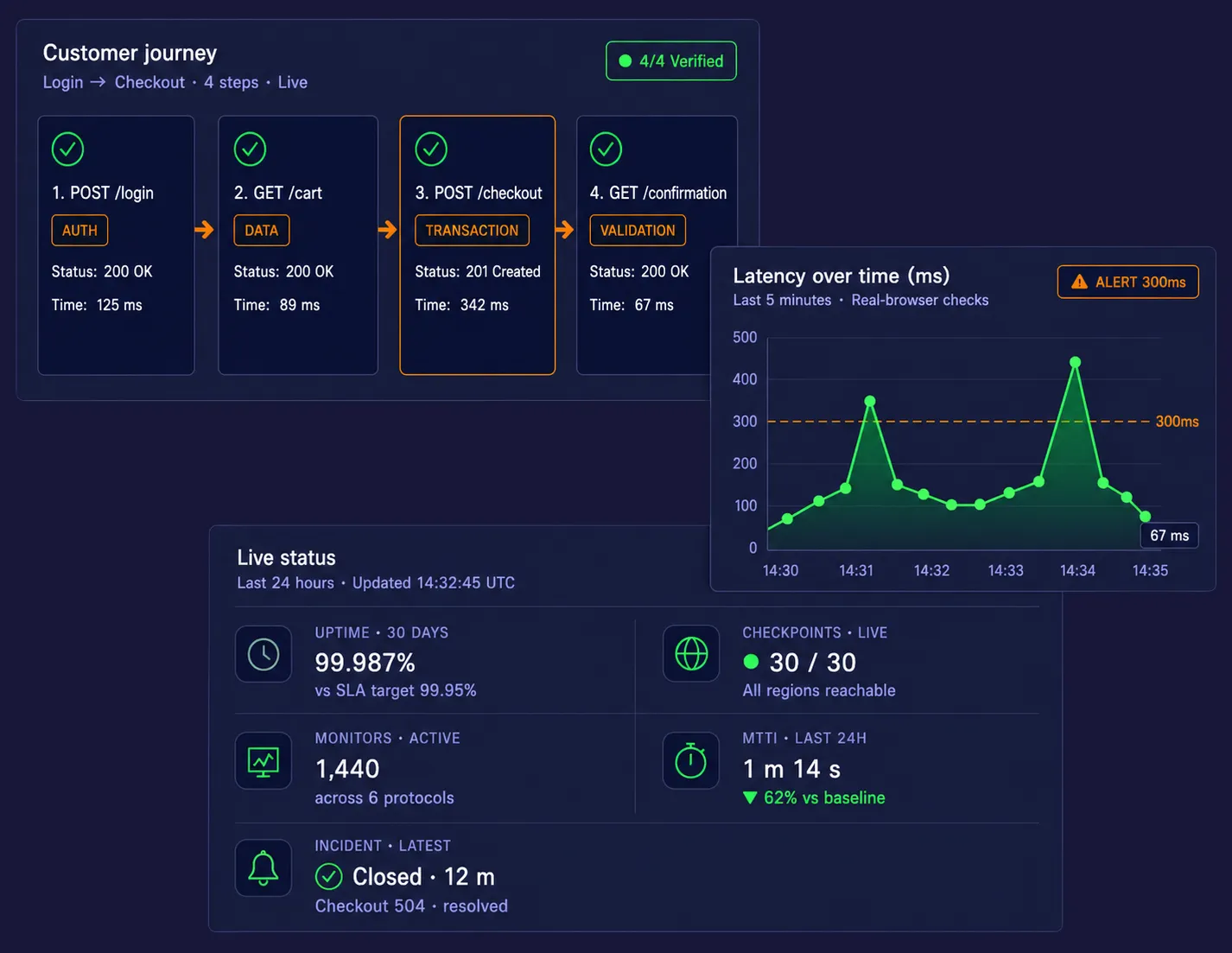
Three floating dark-mode dashboard cards on a deep navy background — a customer-journey workflow with four verified steps, a latency chart with alert threshold and two peaks, and a live-status KPI panel.

First Alerts

In 10 minutes

30-Day Trial

All features

24/7 Support

Expert team

10,000+

Organizations Worldwide

99.99%

Platform Uptime SLA

30+

Global Monitoring Locations

Since 1998

Website Monitoring Leader

Aflac logo — Dotcom-Monitor customer
Dell logo — Dotcom-Monitor customer
Comcast logo — Dotcom-Monitor customer
dish_logo
citrix_logo
62%
reduction in MTTR

“We caught a payment API regression within 90 seconds of deployment. Before Dotcom-Monitor, that would have been a P1 ticket from a customer three hours later.”

Michael Reeves
Sr. SRE, Enterprise SaaS Platform
$140K
in prevented downtime losses

“Synthetic monitoring on our checkout flow alone paid for the platform in the first month. We now detect auth failures before a single user is affected.”

Sarah Kim
VP Engineering, B2B Fintech

4.5/5

Capterra

80 reviews

4.5/5

G2 | Easiest to Use
Users Love Us · 2025

4.5/5

Software Advice
Recommended

What Is Synthetic Monitoring

Synthetic monitoring is the continuous, automated testing of websites, APIs, and user journeys using scripted browser and API checks — detecting downtime, broken workflows, and performance regressions from multiple global locations before real users are affected.

Get started in minutes

Set Up Your Synthetic Monitoring Software in Just 3 Steps

No agents to install. No code changes. Set up your first synthetic monitoring and get alerted before your users notice anything is wrong.

Record

Open the EveryStep Recorder and click through your site.

Deploy

Choose from 30+ global checkpoints.

Resolve

Get a ping the moment a journey breaks - with a video.

Step 01
Step 02
Step 03

Synthetic Monitoring Software for Web Applications

EveryStep web recorder capturing a no-code user-journey monitoring script

Record Real User Journeys with EveryStep

Use the EveryStep Web Recorder to create synthetic monitoring scripts by simply interacting with your site or application. Record complex workflows such as multi-page checkout, SSO login, account registration, gated dashboard access, and cart actions without manual scripting. This no-code approach makes it easier to deploy web application monitoring quickly while still protecting the revenue-generating paths that matter most.

Test in Real Browsers, Not Simplified Simulations

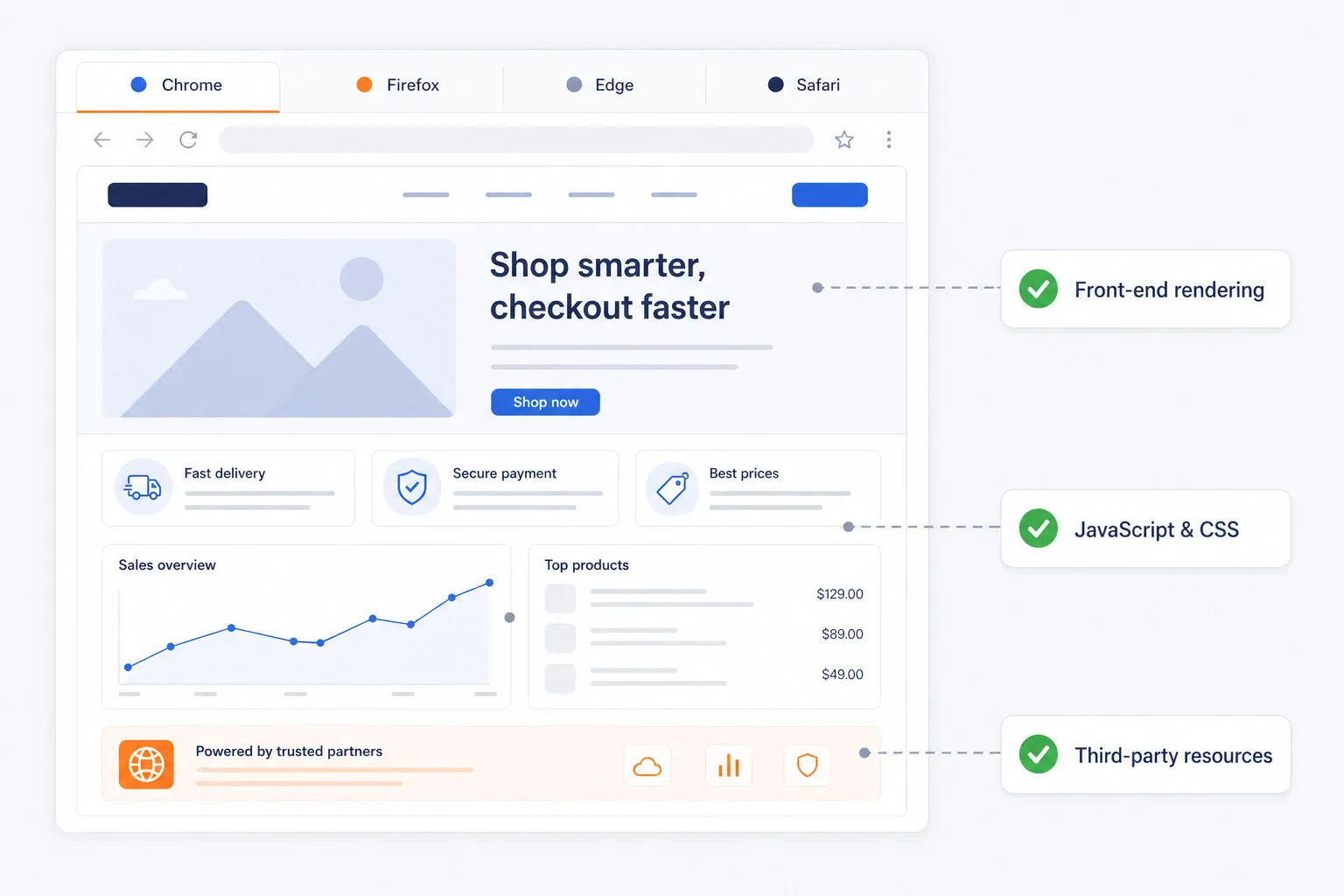
Basic uptime checks cannot catch front-end rendering problems, JavaScript errors, CSS issues, or slow third-party resources. Dotcom-Monitor executes synthetic tests in real Chrome, Firefox, Edge, and Safari browsers so teams can validate performance and functionality exactly as users experience them.

This gives engineering, QA, and digital teams a more accurate view of real-world web application health.

Synthetic monitoring running in real Chrome, Firefox, Edge, and Safari browsers, validating front-end rendering, JavaScript, CSS, and third-party resources.
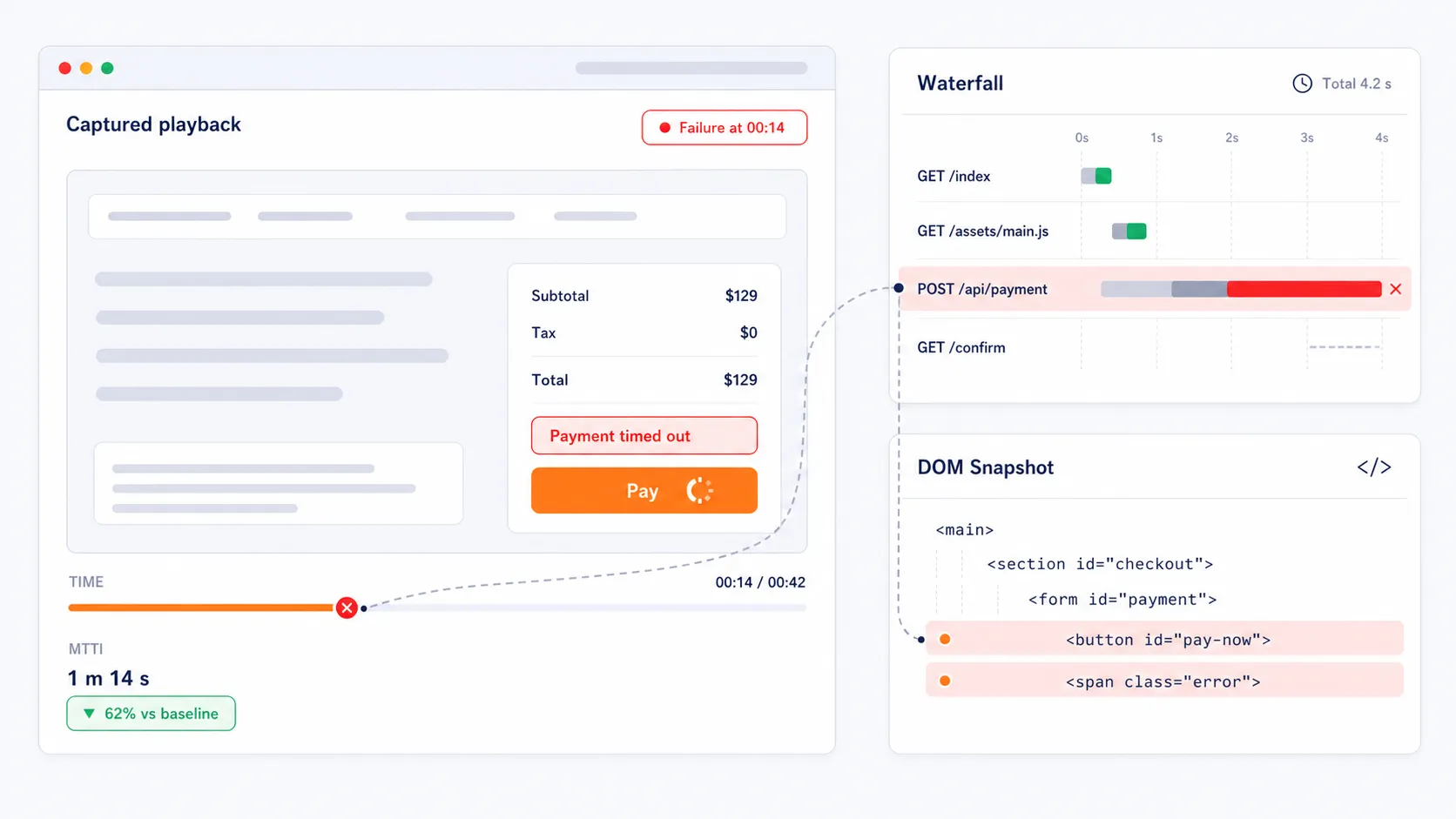
Visual diagnostics for synthetic monitoring — video playback alongside waterfall and DOM timing

Capture Visual Evidence for Faster Troubleshooting

When a transaction fails, the platform captures video playback of the failed test run, waterfall charts, and full-DOM snapshots. These visual diagnostics help teams accelerate root-cause analysis by showing the exact API call, page element, redirect, or script that caused the journey to break. Instead of guessing where the issue lives, teams get immediate evidence that reduces Mean Time to Identification.

Catch Silent Conversion Failures Before Revenue Is Lost

A site can appear available while critical actions such as login, checkout, search, or account access quietly fail in the background. These silent failures can drain conversion rates, waste paid traffic, and damage customer trust. Dotcom-Monitor helps teams detect these issues with synthetic checks that can run as frequently as every 60 seconds, giving digital teams a proactive way to protect customer experience and online revenue.

Conversion funnel showing a silent checkout failure caught by a synthetic monitor running every 60 seconds, while basic uptime still reports 200 OK.
CI/CD pipeline with synthetic smoke tests gating staging and 24/7 monitoring guarding production, protecting golden user journeys on every release.

Deploy with Confidence from Staging to Production

Synthetic monitoring is not only for production alerting. Teams can point monitors at staging environments or integrate them into CI/CD workflows to run smoke tests on critical paths before and after release. This helps prevent Day 1 bugs, protects golden user journeys, and gives teams more confidence to deploy quickly without breaking existing functionality.

Start Monitoring Your Web Applications in Less than 10 Minutes

Reduce downtime, detect issues before your customers do, and prove your SLA compliance. All features included in the trial. No credit card. Cancel anytime.

Synthetic Monitoring Software for APIs and Microservices

Synthetic API monitoring validating a REST and SOAP request and response

Validate API Availability, Accuracy, and Latency

Dotcom-Monitor monitors REST and SOAP APIs for performance and correctness, helping teams verify that endpoints return the expected payloads, status codes, and response times. By checking service behavior continuously, teams can detect problems earlier and maintain more reliable backend operations.

Detect Timeouts, Bad Payloads, and Authentication Failures Earlier

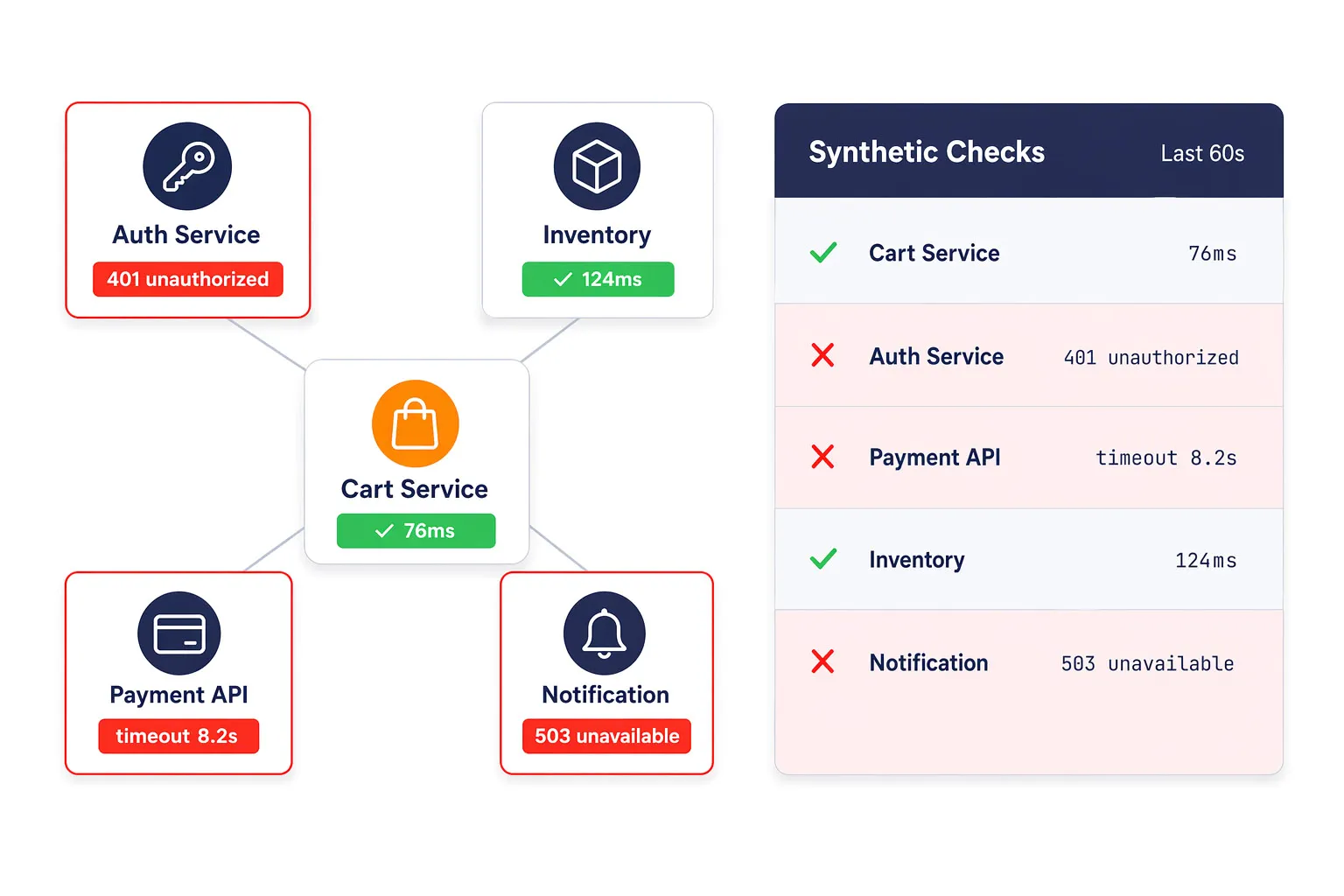
API and microservice issues often surface first as degraded functionality, slow transactions, or intermittent errors. Synthetic API checks help teams catch timeouts, failed authentication, bad responses, and service interruptions before they cascade into visible customer problems.

This is especially valuable in distributed architectures where multiple backend services influence a single user journey.

Synthetic API monitoring detecting authentication failures, timeouts, and bad responses across five backend microservices in a distributed architecture.
Synthetic monitor validating an authentication flow — credentials sent to an identity provider, JWT token issued, and a business service verifying token signature, expiry, and response schema.

Support Authentication and Service-Level Validation

Backend reliability is not just about uptime. Teams also need to validate authentication behavior, token exchanges, and business-critical service responses. Dotcom-Monitor helps verify these conditions proactively so failures can be addressed before they affect dependent applications or customer workflows.

Speed Up Root-Cause Analysis for Service Incidents

When a failure is detected, teams can review the diagnostic details needed to identify the failing service faster. This gives DevOps, SRE, and platform teams a stronger starting point for remediation and helps reduce the time spent searching for the source of a backend incident.

Monitoring service map with one failed payments service highlighted in red and a diagnostics panel showing the root cause for faster incident response.

Validate Your APIs Before Users Feel the Failure

Synthetic Web Monitoring for Websites and Public Digital Experience

World map showing 30+ Dotcom-Monitor synthetic checkpoints across continents with one degraded region highlighted to illustrate global website availability monitoring.

Monitor Website Availability from 30+ Global Locations

Dotcom-Monitor provides synthetic monitoring from more than 30 global checkpoints, helping teams understand how websites perform across major customer regions. This makes it easier to identify regional latency, localized outages, and blind spots that would be missed by single-location monitoring.

Go Beyond Uptime with Performance Visibility

Website synthetic monitoring should not stop at determining whether a page responds. Dotcom-Monitor helps teams analyze performance bottlenecks with waterfall chart reports and browser-based diagnostics that reveal slow scripts, heavy assets, and other issues that degrade page speed and user experience.

Waterfall chart report showing nine page resources with two long bars highlighted as render-blocking and slow third-party scripts, plus Core Web Vitals readout.
Synthetic monitoring report showing Core Web Vitals scores and search-visibility impact

Improve Core Web Vitals and Search Visibility

Search performance and digital experience are closely connected. Dotcom-Monitor helps teams monitor conditions that influence metrics such as Largest Contentful Paint and Cumulative Layout Shift in controlled environments. By identifying slow-loading third-party resources and CDN performance early, teams can improve site stability, protect SEO performance, and deliver faster experiences.

Turn Reliability Data into Useful Reporting

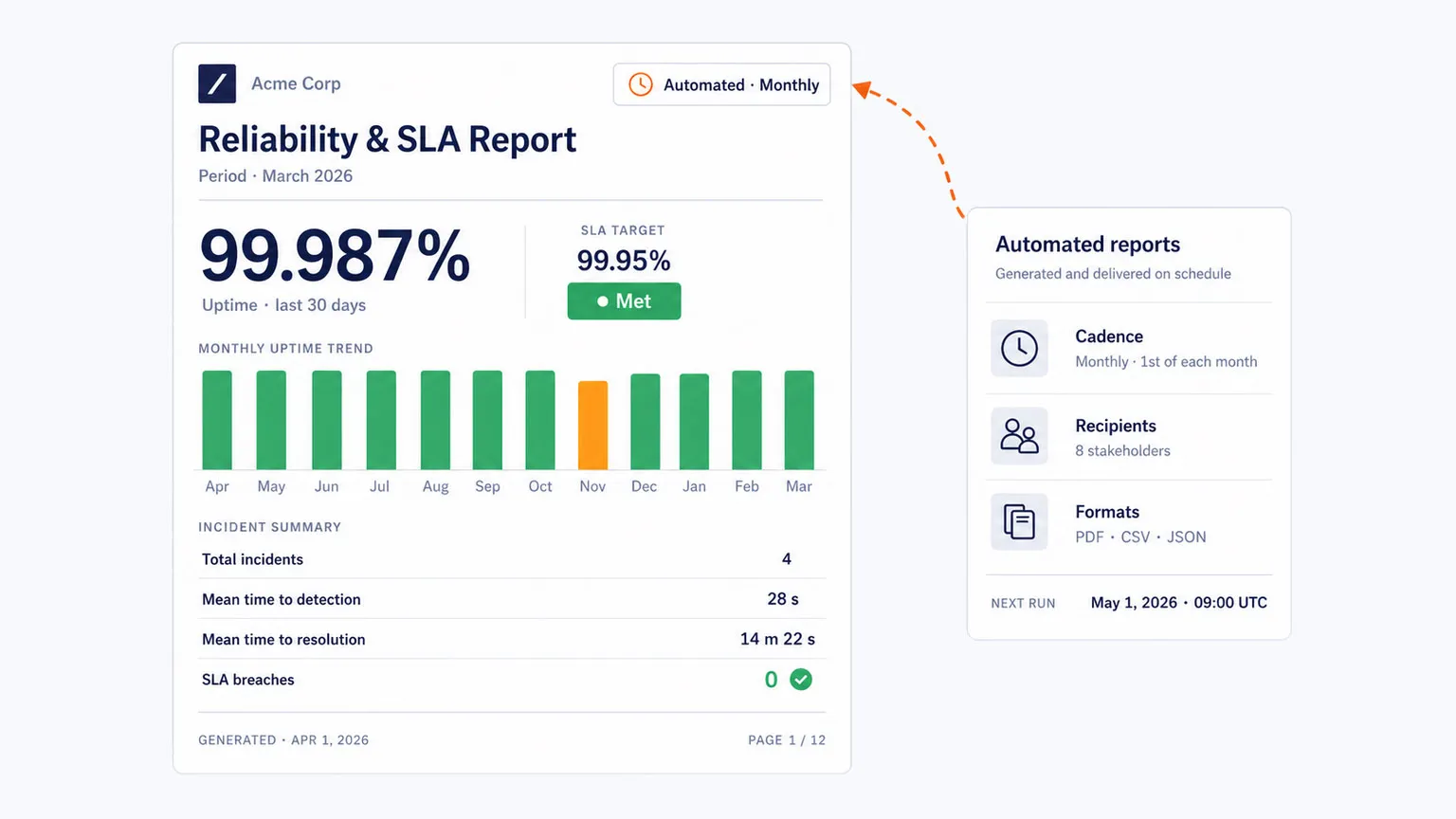
For enterprise organizations and service providers, reliability often needs to be documented, not just observed. Dotcom-Monitor supports automated dashboards and SLA-oriented reporting that help teams demonstrate uptime and performance commitments with data collected from a global monitoring network.

Automated synthetic monitoring SLA report with availability and reliability metrics

Start Monitoring Website Availability Globally

Synthetic Monitoring for Authentication, Internal Apps, and Advanced Enterprises

Sequence diagram showing a six-step SSO and MFA authentication handshake — user, app, IdP, MFA provider, service — verified end-to-end with a synthetic check.

Monitor SSO and MFA Authentication Flows

Single Sign-On and Multi-Factor Authentication workflows often rely on chained redirects, identity providers, token exchanges, and gated sessions that can fail in hard-to-diagnose ways. Dotcom-Monitor can simulate these multi-step authentication journeys so teams can identify broken handshakes, redirect issues, and access failures before users are locked out of critical systems.

Deploy Private Agents Behind the Firewall

Many enterprise applications, including internal employee portals, proprietary tools, intranets, and ERP systems, sit behind corporate firewalls. Dotcom-Monitor supports private synthetic agents, also called Private Nodes, that can be deployed within your own environment to monitor internal applications from a secure internal vantage point.

Corporate firewall perimeter containing a private synthetic agent monitoring four internal apps — intranet, ERP, HR portal, and wiki — connected to the Dotcom-Monitor cloud through a single authorized outbound channel.
Webpage mockup with three highlighted third-party elements — consent banner, ad iframe, chat widget — annotated with their blocking time and layout shift, alongside a ranked third-party impact panel.

Isolate Third-Party Script Impact and DOM Instability

Modern digital experiences depend on analytics tags, chat widgets, external scripts, and other third-party elements that can block rendering and introduce layout instability. Real browser synthetic monitoring helps teams isolate which external resource is slowing the experience or affecting page stability so they can optimize loading strategy and reduce user friction.

Reproduce Intermittent Failures During High-Traffic Events

Intermittent Ecommerce and SaaS application issues can be difficult to capture during peak traffic windows. Synthetic monitoring helps reproduce user-facing failures by repeatedly executing the full transaction logic, making it easier to capture evidence of API slowdowns, frontend errors, or backend performance issues that only appear under pressure.

24-hour synthetic check timeline across three transactions with failures clustering inside an afternoon traffic peak window, paired with a captured-failure diagnostic card showing a 504 timeout in the checkout API.

Ensure Your Business Infrastructure is Up & Running

Why Teams Choose Dotcom-Monitor for Synthetic Monitoring

Synchronized diagnostics view aligning video playback, waterfall data, and event log on one timeline with a single playhead at the failure moment, paired with the contextual alert card that fired the incident.

Reduce Mean Time to Identification

Outages become more expensive the longer teams spend finding the problem. With visual diagnostics, synchronized playback, waterfall data, and contextual alerts, Dotcom-Monitor gives teams a fast-starting point for troubleshooting.

No-Code Synthetic Transaction Monitoring

Teams can record complex workflows without writing scripts manually, making it easier to launch monitoring quickly and keep coverage aligned with how a real user browses through your website.

Storyboard of six recorded transaction steps — click, type, click, click, click, verify — laid out as visual cards with target thumbnails, alongside a recording session card showing zero lines of code required.
One Dotcom-Monitor alert fanning out to four destination cards labeled Slack, PagerDuty, Microsoft Teams, and ServiceNow, each rendered in the same design language with generic icons.

Get Proactive Alerts in the Tools Your Team Already Uses

Dotcom-Monitor integrates proactive alerts into existing workflows through Slack, PagerDuty, Microsoft Teams, and ServiceNow, helping teams respond faster when performance or availability problems are detected.

Correlate Front-End Experience with Infrastructure Signals

Dotcom-Monitor supports visibility across websites, applications, APIs, and infrastructure-level checks such as DNS, FTP, and TCP. This helps teams connect backend health and network behavior to the actual digital experience users receive.

Four-tier health stack — Front-End, Application, API, Infrastructure — with a single correlation cursor at 14:42 showing a DNS spike propagating to a Core Web Vitals slowdown, paired with a correlated-incident card mapping trigger to symptom.
Get answers

Frequently Asked Questions

Yes, Dotcom-Monitor allows you to deploy Private Agents (also known as Private Nodes) specifically to monitor applications from behind your corporate firewall. This capability is essential for tracking the performance and availability of internal employee portals, intranets, or HR tools that are not accessible via the public internet.

A private synthetic agent is a lightweight software instance installed on your own local server or private cloud that acts as a secure internal vantage point. Unlike public monitoring nodes that live in global data centers, a private agent mimics the experience of an actual employee or internal system from within your own network infrastructure.

The primary difference lies in the direction of the observation: Application Performance Monitoring (APM) is an “inside-out” strategy that uses agents installed on servers to track internal code execution, database queries, and hardware resource usage to identify backend bottlenecks. In contrast, Synthetic Monitoring is an “outside-in” approach that uses scripts to simulate end-user behavior – such as logging in or checking out – to proactively detect front-end failures and slow load times before real users encounter them.

Synthetic monitors are categorized by the technical depth of the check: Web Uptime monitors handle basic protocol checks like DNS, FTP, and SSL certificate expiration. Web API monitors validate the functionality of REST, SOAP, and WebSocket responses. Web Application (UserView) monitors utilize a full browser engine to simulate multi-step transactions. Finally, Media Streaming monitors verify the availability and quality of audio and video playback.

For enterprise-grade reliability, you should monitor from 3 to 5 locations covering every major geographic region where your customers reside. This multi-node approach is critical because it enables “Double-Check” logic, where a failure reported by one node is immediately verified by others.

What Our Customers Say

"I absolutely love the comprehensive monitoring services Dotcom-Monitor provides. The real-time alerts and detailed performance analytics have been a game-changer for our website's uptime and speed. The global monitoring feature ensures that our site is optimized everywhere, and the intuitive dashboard makes it easy to track performance. Their customer support is exceptional — always responsive and efficient."
Tomer C.
Managing Director · Facilities Services
Verified Capterra review · March 2025
"One of Dotcom's best features is the push/pull API capabilities that provide us with network performance data. We use this to monitor for performance issues as well as page loading stats. Dotcom-Monitor allows us to monitor multiple services within one interface and platform. It's allowed us to operate more efficiently."
Gregory S.
Manager · Broadcast Media
Verified Capterra review · May 2020
"I have been thoroughly impressed with the level of detail and comprehensiveness of the reports generated by the software. Moreover, the support team at Dotcom-Monitor has exceeded my expectations. On almost a daily basis, I reach out with various questions and they have consistently demonstrated unwavering patience, providing detailed and insightful answers."
Shirin R.
Software Test Engineer · Computer Software
Verified Capterra review · February 2023
"I'm a network analyst and use Dotcom tools inside the ISP I work, it's a really good and reliable tool for monitoring things along the network, and testing network components, I usually use it to make diagnostics of servers latency, and dns resolve time."
Leonardo J.
IT & Network Infrastructure Analyst Internet
Verified Capterra review · October 2022

One Synthetic Monitoring Software | Zero Blind Spots

No credit card required. All premium features included. 24×7 expert support.