Home » 解决方案 » 合成监控

自动合成监控软件 适用于应用程序、API 和网站

Dotcom-Monitor 的合成监控软件全天候模拟真实用户行为,以检测破损的用户路径和“静默”故障,避免影响您的客户。通过真实浏览器测试、详细视频回放、瀑布图报告和主动性能警报,在 30 多个全球地点监控网站、API 和复杂的网络应用程序。
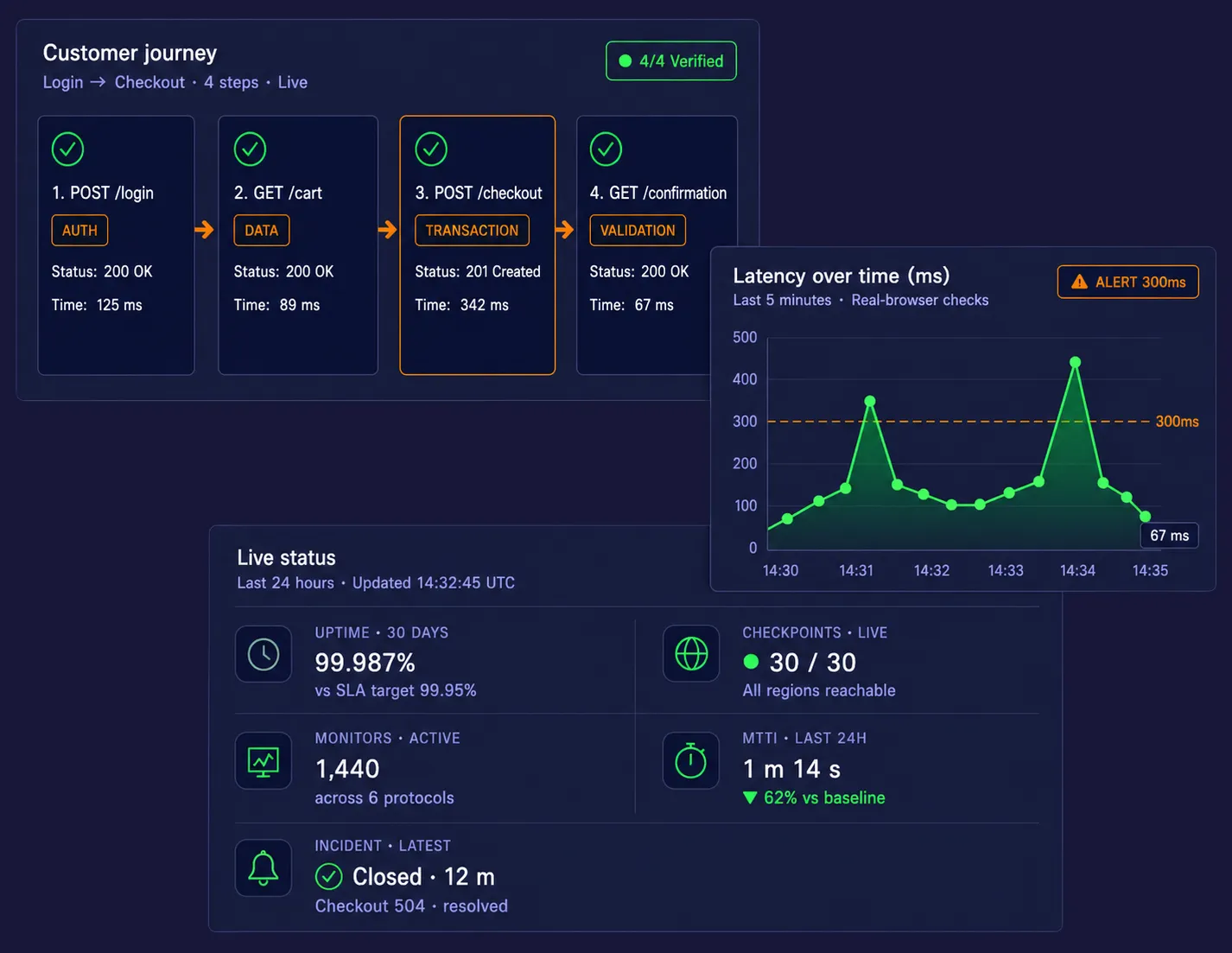
Three floating dark-mode dashboard cards on a deep navy background — a customer-journey workflow with four verified steps, a latency chart with alert threshold and two peaks, and a live-status KPI panel.

首次警报

10 分钟内

30 天试用

全部功能

全天候支持

专家团队

10,000+

全球机构

99.99%

平台正常运行时间 SLA

30+

全球监控地点

自 1998 年以来

网站监控领导者

Aflac logo — Dotcom-Monitor customer
Dell logo — Dotcom-Monitor customer
Comcast logo — Dotcom-Monitor customer
Dish Network logo — Dotcom-Monitor customer
Citrix logo — Dotcom-Monitor customer
62%
MTTR 降低

“我们在部署后 90 秒内捕捉到支付 API 的回归。在使用 Dotcom-Monitor 之前,这通常是客户三小时后提交的 P1 工单。”

Michael Reeves
高级 SRE,企业 SaaS 平台
$140K
防止的停机损失

“仅我们的结账流程合成监控就在第一个月就抵消了平台费用。我们现在能在任何用户受影响之前检测到认证失败。”

Sarah Kim
B2B 金融科技工程副总裁

4.5

Capterra

82 条评价

4.5
G2 | 最易使用
用户喜爱我们 · 2025

4.5

Software Advice

推荐

几分钟内开始使用

仅需 3 步设置您的合成监控软件

无需安装代理。无需更改代码。设置您的第一个合成监控,在用户察觉问题之前收到警报。

录制

打开 EveryStep 录制器并点击浏览您的网站。

部署

从 30 多个全球检查点中选择。

解决

在旅程中断的瞬间收到提醒——带视频。

步骤 01
步骤 02
步骤 03

Web 应用的合成监控软件

EveryStep Web Recorder capturing a no-code user journey across sign-in, checkout, and dashboard screens for synthetic monitoring.

使用 EveryStep 记录真实用户旅程

使用 EveryStep Web Recorder 通过简单地与您的网站或应用交互来创建合成监控脚本。记录复杂的工作流程,如多页面结账、SSO 登录、账户注册、受限仪表盘访问和购物车操作,无需手动编写脚本。这种无代码的方法使得快速部署 Web 应用监控 变得更容易,同时保护最重要的营收路径。

在真实浏览器中测试,而非简化模拟

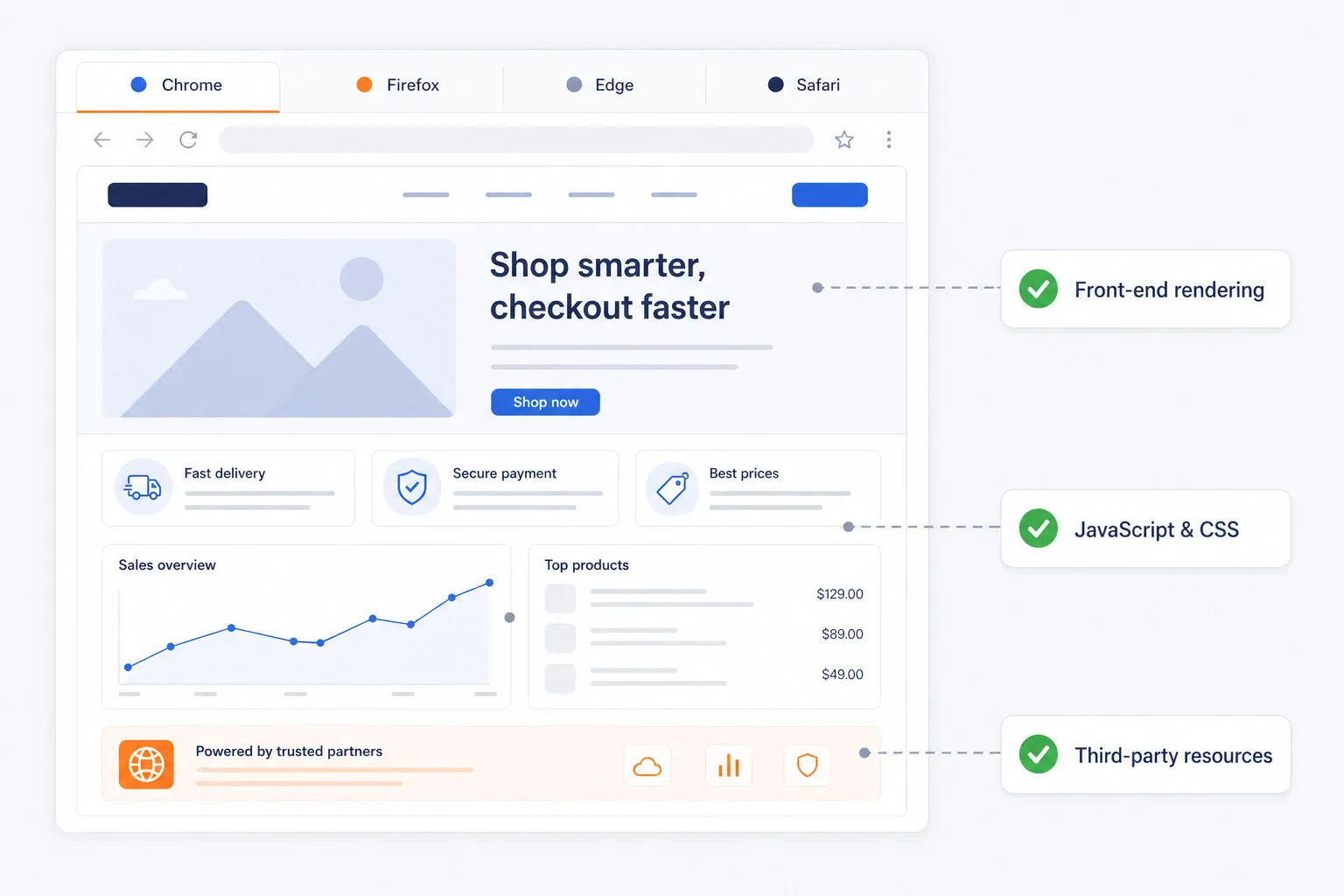
基础的正常运行时间检测无法捕捉前端渲染问题、JavaScript 错误、CSS 问题或第三方资源缓慢。Dotcom-Monitor 在真实的 Chrome、Firefox、Edge 和 Safari 浏览器中执行合成测试,使团队能够精确验证性能和功能,正如用户体验到的一样。

这为工程、QA 和数字团队提供了一个更准确的现实世界 Web 应用健康视图。

Synthetic monitoring running in real Chrome, Firefox, Edge, and Safari browsers, validating front-end rendering, JavaScript, CSS, and third-party resources.
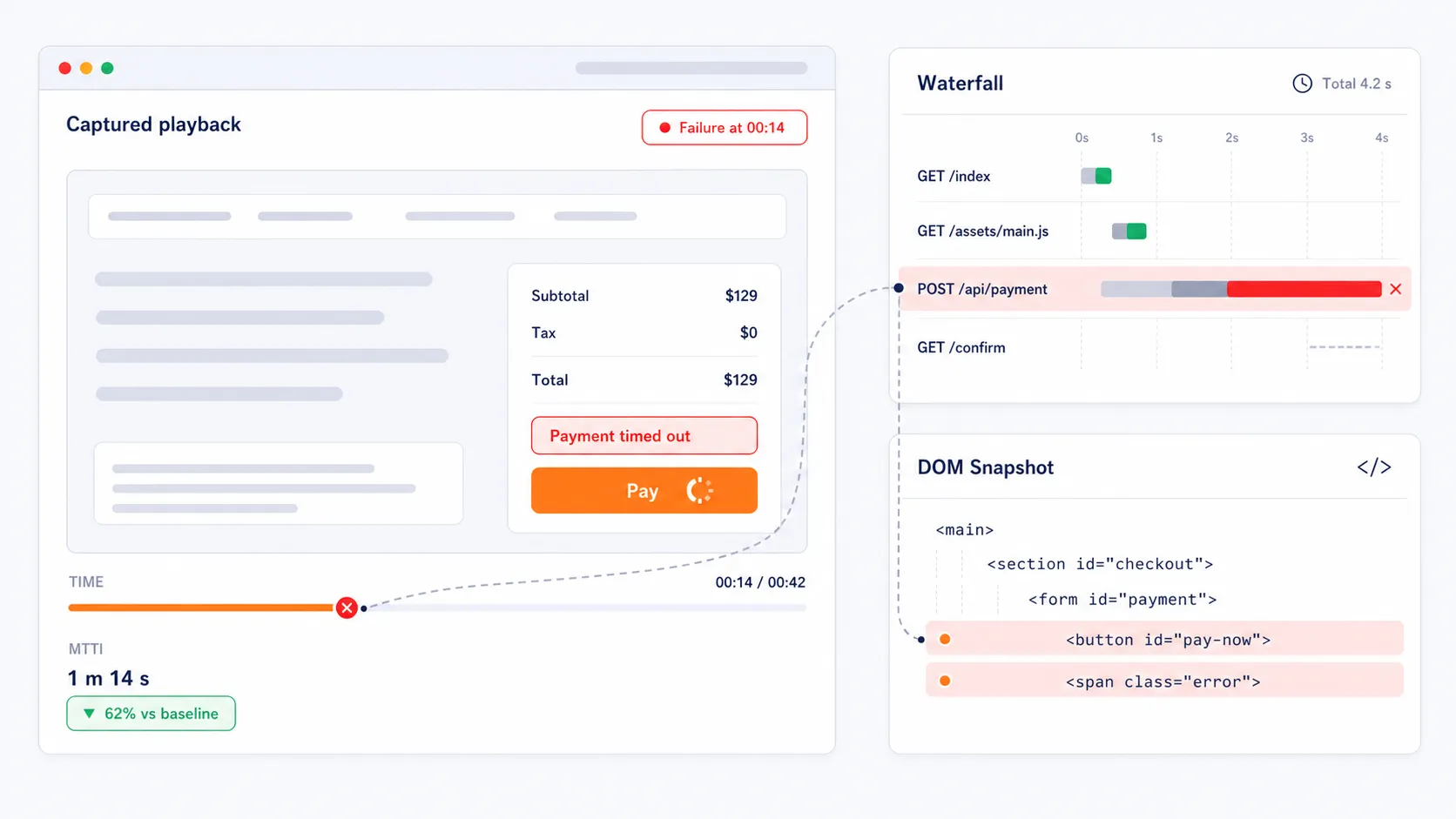
Visual diagnostics from a failed synthetic monitoring transaction — video playback, waterfall chart, and DOM snapshot pinpointing the root cause to reduce MTTI.

捕捉视觉证据,加快故障排除

当事务失败时,平台会捕获失败测试运行的视频回放、瀑布图和完整 DOM 快照。这些视觉诊断帮助团队通过显示导致旅程中断的准确 API 调用、页面元素、重定向或脚本,加速根因分析。团队不再需要猜测问题所在,能够立即获得证据,减少平均识别时间。

在收入损失前捕获隐性转换失败

网站可能看起来可用,但关键操作如登录、结账、搜索或账户访问在后台悄悄失败。这些隐性故障会降低转化率,浪费付费流量,损害客户信任。Dotcom-Monitor 帮助团队通过合成检测发现这些问题,检测频率可高达每 60 秒一次,为数字团队提供主动保护客户体验和在线收入的方式。

Conversion funnel showing a silent checkout failure caught by a synthetic monitor running every 60 seconds, while basic uptime still reports 200 OK.
CI/CD pipeline with synthetic smoke tests gating staging and 24/7 monitoring guarding production, protecting golden user journeys on every release.

自信部署,从测试环境到生产环境

合成监控不仅用于生产环境告警。团队可以将监控指向测试环境,或将其集成到 CI/CD 工作流中,在发布前后对关键路径进行烟雾测试。这有助于防止首日BUG,保护关键用户旅程,并让团队更加自信快速部署且不破坏现有功能。

10 分钟内开始监控您的 Web 应用

减少停机时间,提前发现问题,证明您的 SLA 合规性。所有功能均包含在试用版中。无需信用卡。随时取消。

用于 API 和微服务的合成监控软件

Synthetic monitoring validating a REST API request and response — checking status code, payload schema, and response time, with continuous re-checks every 60 seconds.

验证API可用性、准确性和延迟

Dotcom-Monitor监控RESTSOAP API的性能和正确性,帮助团队验证端点是否返回预期的有效载荷、状态码和响应时间。通过持续检查服务行为,团队可以更早发现问题,保持更可靠的后端运营。

更早检测超时、错误的有效载荷和身份验证失败

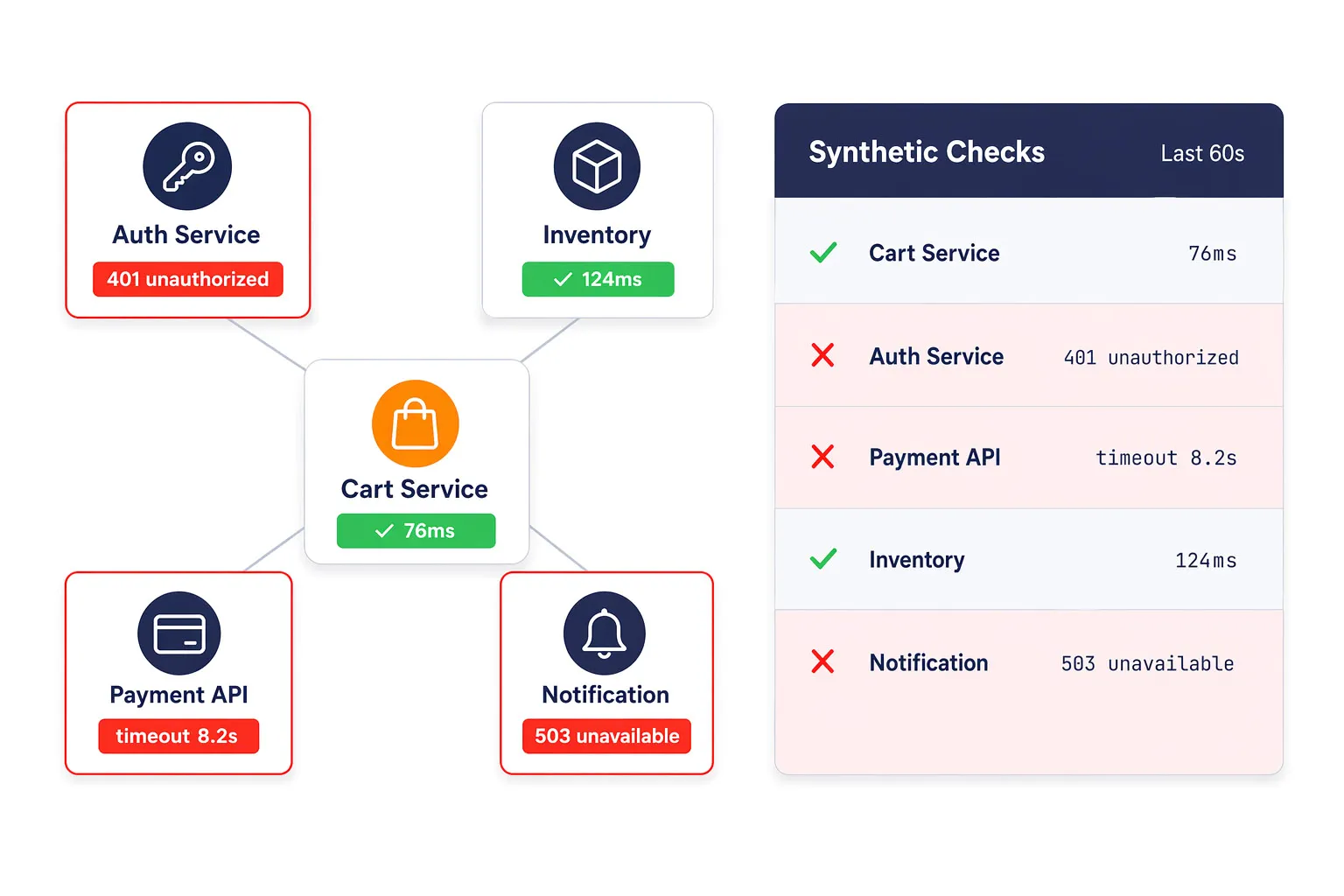
API和微服务问题通常首先表现为功能下降、交易缓慢或间歇性错误。合成API检查帮助团队在问题扩散成客户明显感知之前捕捉超时、身份验证失败、错误响应和服务中断。

这在多个后端服务影响单一用户旅程的分布式架构中尤其有价值。

Synthetic API monitoring detecting authentication failures, timeouts, and bad responses across five backend microservices in a distributed architecture.
Synthetic monitor validating an authentication flow — credentials sent to an identity provider, JWT token issued, and a business service verifying token signature, expiry, and response schema.

支持身份验证和服务级别验证

后端可靠性不仅仅是关于正常运行时间。团队还需要验证身份验证行为、令牌交换以及业务关键服务响应。Dotcom-Monitor帮助主动验证这些条件,从而在故障影响依赖应用或客户工作流之前解决问题。

加快服务事件的根本原因分析

当检测到故障时,团队可以查看诊断细节,以更快识别出故障服务。这为DevOps、SRE和平台团队提供了更强的修复起点,并有助于减少寻找后端事件源头的时间。

Monitoring service map with one failed payments service highlighted in red and a diagnostics panel showing the root cause for faster incident response.

在用户感知故障之前验证您的API

面向网站和公共数字体验的合成网页监控

World map showing 30+ Dotcom-Monitor synthetic checkpoints across continents with one degraded region highlighted to illustrate global website availability monitoring.

从30多个全球地点监控网站可用性

Dotcom-Monitor提供来自30多个全球检查点的合成监控,帮助团队了解网站在主要客户区域的性能表现。这使得识别区域性延迟、本地化故障和单点监控可能遗漏的盲区变得更容易。

超越正常运行时间,实现性能可视化

网站合成监控不应仅止于检测页面是否响应。Dotcom-Monitor帮助团队通过瀑布图报告和基于浏览器的诊断分析性能瓶颈,揭示缓慢脚本、大型资源和其他影响页面速度及用户体验的问题。

Waterfall chart report showing nine page resources with two long bars highlighted as render-blocking and slow third-party scripts, plus Core Web Vitals readout.
Core Web Vitals scorecard with LCP, CLS, and INP all in the green zone connected to a search performance card showing improving rank, impressions, and click-through rate.

提升核心网页指标和搜索可见性

搜索性能和数字体验密切相关。Dotcom-Monitor帮助团队在受控环境中监控影响最大内容绘制(Largest Contentful Paint)和累计布局偏移(Cumulative Layout Shift)等指标的条件。通过及早识别加载缓慢的第三方资源和CDN性能,团队可以提升网站稳定性,保护SEO表现,提供更快的体验。

将可靠性数据转化为有用的报告

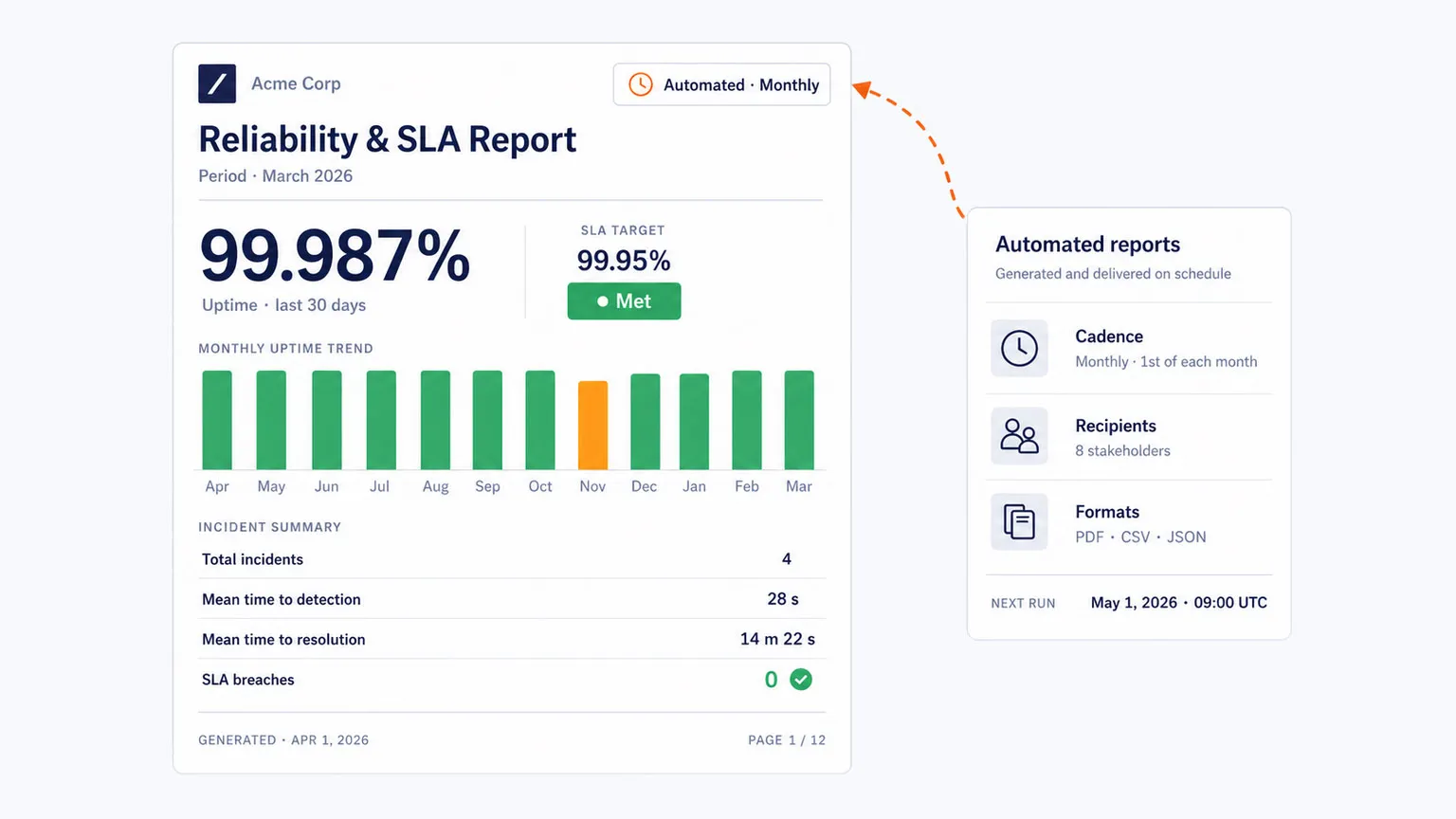
对于企业组织和服务提供商来说,可靠性往往需要被记录而不仅是观察。Dotcom-Monitor支持自动化仪表盘和面向SLA的报告,帮助团队以从全球监控网络收集的数据展示正常运行时间和性能承诺。

Automated SLA report with 99.987% uptime, monthly trend bar chart, and incident summary, paired with a schedule card showing monthly delivery to stakeholders.

开始全球监控网站可用性

用于身份验证、内部应用和高级企业的合成监控

Sequence diagram showing a six-step SSO and MFA authentication handshake — user, app, IdP, MFA provider, service — verified end-to-end with a synthetic check.

监控单点登录和多因素身份验证流程

单点登录和多因素身份验证工作流通常依赖链式重定向、身份提供者、令牌交换以及受限会话,这些环节可能以难以诊断的方式失败。Dotcom-Monitor可以模拟这些多步骤的身份验证过程,使团队能在用户被锁定访问关键系统之前识别断开的握手、重定向问题和访问失败。

在防火墙后部署私有代理

许多企业应用,包括内部员工门户、专有工具、内部网和ERP系统,都位于企业防火墙之后。Dotcom-Monitor支持私有合成代理,也称为私有节点,可部署在您的内部环境中,从一个安全的内部视角监控内部应用。

Corporate firewall perimeter containing a private synthetic agent monitoring four internal apps — intranet, ERP, HR portal, and wiki — connected to the Dotcom-Monitor cloud through a single authorized outbound channel.
Webpage mockup with three highlighted third-party elements — consent banner, ad iframe, chat widget — annotated with their blocking time and layout shift, alongside a ranked third-party impact panel.

隔离第三方脚本影响和DOM不稳定性

现代数字体验依赖于分析标签、聊天小部件、外部脚本及其他第三方元素,这些可能阻止渲染并引入布局不稳定。真实浏览器合成监控帮助团队隔离哪一外部资源减慢了体验或影响了页面稳定性,从而优化加载策略,减少用户摩擦。

复现高流量事件中的间歇性故障

高峰流量期间的间歇性电子商务SaaS应用问题难以捕捉。合成监控通过重复执行完整事务逻辑,帮助复现面向用户的故障,更容易捕获仅在压力下出现的API减速、前端错误或后端性能问题的证据。

24-hour synthetic check timeline across three transactions with failures clustering inside an afternoon traffic peak window, paired with a captured-failure diagnostic card showing a 504 timeout in the checkout API.

确保您的业务基础设施正常运行

为何团队选择Dotcom-Monitor进行合成监控

Synchronized diagnostics view aligning video playback, waterfall data, and event log on one timeline with a single playhead at the failure moment, paired with the contextual alert card that fired the incident.

缩短平均识别时间

宕机时间越长,团队花费在查找问题上的成本越高。借助可视化诊断、同步回放、瀑布图数据及上下文警报,Dotcom-Monitor为团队提供一个快速起步的故障排除起点。

无代码合成交易监控

团队可以无需手动编写脚本即可录制复杂工作流程,使得快速启动监控更容易,并保持覆盖范围与真实用户浏览网站的方式一致。

Storyboard of six recorded transaction steps — click, type, click, click, click, verify — laid out as visual cards with target thumbnails, alongside a recording session card showing zero lines of code required.
One Dotcom-Monitor alert fanning out to four destination cards labeled Slack, PagerDuty, Microsoft Teams, and ServiceNow, each rendered in the same design language with generic icons.

在团队已使用的工具中获取主动警报

Dotcom-Monitor集成主动警报到现有工作流程中,支持Slack、PagerDuty、Microsoft Teams和ServiceNow,帮助团队在检测到性能或可用性问题时更快响应。

关联前端体验与基础设施信号

Dotcom-Monitor支持网站、应用程序、API及基础设施级检查(如DNS、FTP和TCP)的可见性,帮助团队将后端健康状况和网络行为与用户实际的数字体验联系起来。

Four-tier health stack — Front-End, Application, API, Infrastructure — with a single correlation cursor at 14:42 showing a DNS spike propagating to a Core Web Vitals slowdown, paired with a correlated-incident card mapping trigger to symptom.
获取答案

常见问题

可以,Dotcom-Monitor允许您专门部署私有代理(也称为私有节点),以从公司防火墙后监控应用程序。这一功能对于跟踪内部员工门户、内联网或不可通过公共互联网访问的人力资源工具的性能和可用性至关重要。

私有合成代理是一种轻量级软件实例,安装在您本地服务器或私有云中,作为安全的内部观察点。与位于全球数据中心的公共监控节点不同,私有代理模拟真实员工或内部系统从您自身网络基础设施中访问的体验。

主要区别在于观察的方向:应用性能监控(APM)是一种“由内向外”的策略,使用安装在服务器上的代理跟踪内部代码执行、数据库查询和硬件资源使用,以识别后端瓶颈。相比之下,合成监控是一种“由外向内”的方法,使用脚本模拟最终用户行为(如登录或结账),主动检测前端故障和缓慢加载时间,防止真实用户遇到问题。

合成监控按技术检查深度分类:网页正常运行时间监控处理基本协议检查,如DNS、FTP和SSL证书过期。网页API监控验证REST、SOAP和WebSocket响应的功能。网页应用(用户视图)监控使用完整浏览器引擎模拟多步骤事务。最后,媒体流监控验证音视频播放的可用性和质量。

为了企业级的可靠性,您应从覆盖您客户所在的每个主要地理区域的3至5个地点进行监控。这种多节点方法至关重要,因为它支持“双重检查”逻辑,即一个节点报告故障时,会立即由其他节点进行验证。

我们的客户怎么说

"I absolutely love the comprehensive monitoring services Dotcom-Monitor provides. The real-time alerts and detailed performance analytics have been a game-changer for our website's uptime and speed. The global monitoring feature ensures that our site is optimized everywhere, and the intuitive dashboard makes it easy to track performance. Their customer support is exceptional — always responsive and efficient."
Tomer C.
Managing Director · Facilities Services
Verified Capterra review · March 2025
"One of Dotcom's best features is the push/pull API capabilities that provide us with network performance data. We use this to monitor for performance issues as well as page loading stats. Dotcom-Monitor allows us to monitor multiple services within one interface and platform. It's allowed us to operate more efficiently."
Gregory S.
Manager · Broadcast Media
Verified Capterra review · May 2020
"I have been thoroughly impressed with the level of detail and comprehensiveness of the reports generated by the software. Moreover, the support team at Dotcom-Monitor has exceeded my expectations. On almost a daily basis, I reach out with various questions and they have consistently demonstrated unwavering patience, providing detailed and insightful answers."
Shirin R.
Software Test Engineer · Computer Software
Verified Capterra review · February 2023
"I'm a network analyst and use Dotcom tools inside the ISP I work, it's a really good and reliable tool for monitoring things along the network, and testing network components, I usually use it to make diagnostics of servers latency, and dns resolve time."
Leonardo J.
IT & Network Infrastructure Analyst Internet
Verified Capterra review · October 2022

一款合成监控软件 | 零盲点

无需信用卡。包含所有高级功能。全天候专家支持。