Postman API Monitoring

Your Postman Collections are for Development. For Production, You Need More.
Your Postman collections are perfect for building and validating APIs. But when your APIs are live, serving customers and driving revenue, you can't afford to wait 5 minutes to discover a problem. Turn your existing Postman collections into a proactive, production-grade monitoring system.
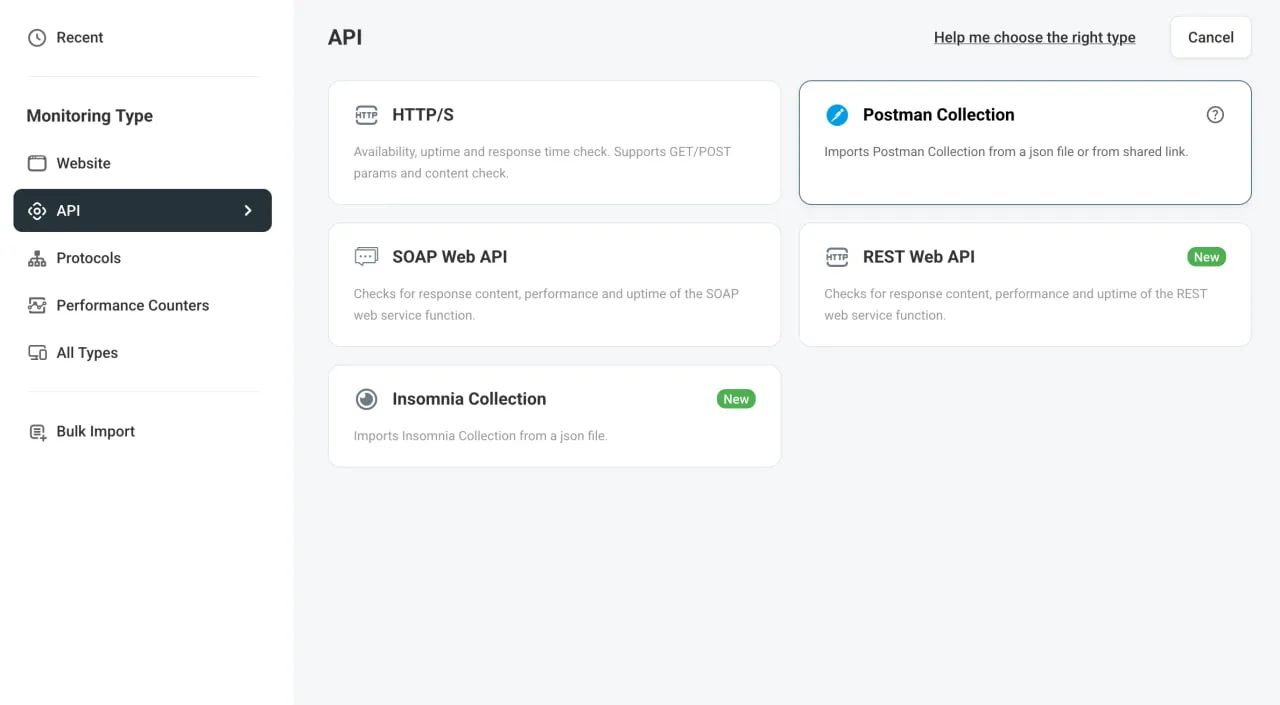
Postman API monitoring dashboard — Dotcom-Monitor interface showing collection import and monitoring configuration
Trusted by 10,000+ Organizations Worldwide​
Aflac logo — Dotcom-Monitor customer
Dell logo — Dotcom-Monitor customer
Comcast logo — Dotcom-Monitor customer
Dish Network logo — Dotcom-Monitor customer
Citrix logo — Dotcom-Monitor customer

What Is Postman API Monitoring?

Postman API monitoring is the practice of taking the Postman collections your team built for development and testing, and running them continuously from external locations to verify that your production APIs are healthy, fast, and returning correct responses. Unlike running tests manually or as part of a CI/CD pipeline, Postman API monitoring operates 24/7 — checking your APIs on a fixed schedule from real user networks around the world.

While Postman’s built-in monitors offer basic scheduled runs from a limited set of regions, production-grade Postman monitoring requires deeper capabilities: higher frequency checks, broader geographic coverage, internal network access, and enterprise-grade alerting. Dotcom-Monitor provides all of these by importing your existing Postman collections and executing them from 30+ monitoring locations worldwide — with no script rewriting required.

For a detailed step-by-step guide, see our article on setting up Postman collection monitoring.

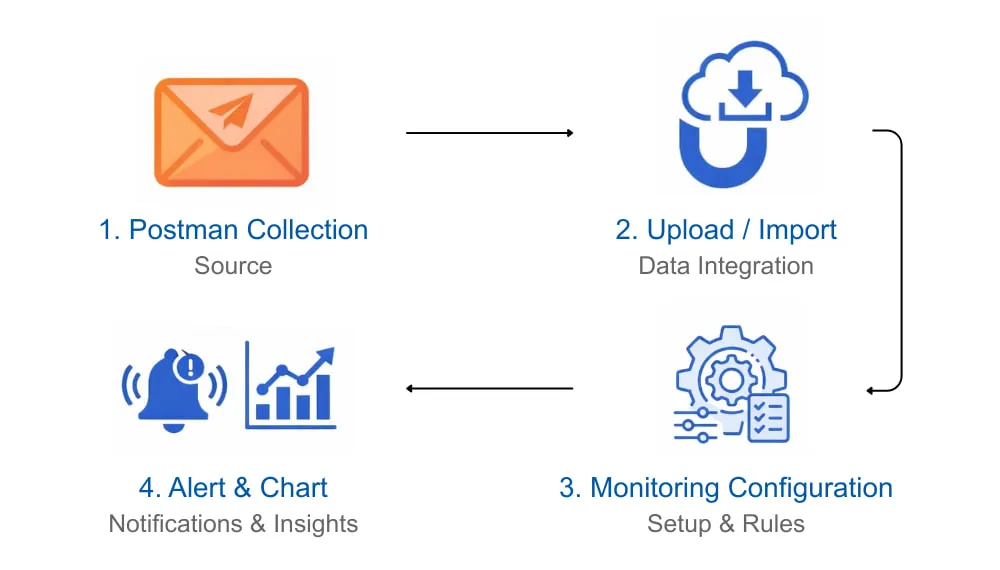
How Postman API monitoring works — 4-step workflow from collection import to production alerts

Your CI/CD Pipeline Catches Bugs. What Catches Production Failures?

APIs can fail for reasons that have nothing to do with code. Expired certificates, network configuration changes, third-party dependency outages, and authentication issues can bring your services down without a single line of code changing. Your CI/CD pipeline validates that code works at deploy time — but it cannot tell you whether your APIs are still working an hour, a day, or a week later.

Turn Postman Tests Into Always-On API Monitoring

Dotcom-Monitor transforms your Postman test assets into an always-on production monitoring solution. By running your Postman collections on a continuous schedule from external networks, we detect failures as they happen — giving you the critical visibility you need to find and fix issues before they impact your bottom line. This is what separates development-time testing from true Postman API monitoring: continuous, automated validation from the outside in.

Is Your API Slow in Singapore? Or Broken in Staging?

When an API fails, the first question is always “where?” Is it a regional latency issue affecting users in Frankfurt, a bug in your latest internal build, or a problem with a third-party partner? Without a unified view of both external and internal API health, you are flying blind and wasting valuable time during incidents.

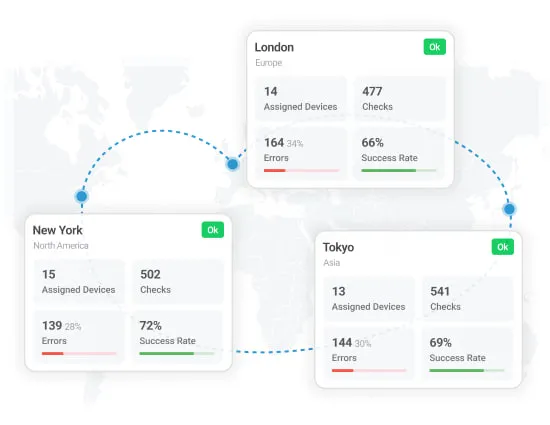
Postman monitoring locations — Dotcom-Monitor's 30+ global probe network for API performance testing

Global Postman Monitoring From 30+ Locations

Dotcom-Monitor executes your Postman collections from over 30 monitoring locations across North America, Europe, Asia-Pacific, South America, and the Middle East. This means you can measure API response times and validate responses from the same networks your actual users rely on — not just from a single data center. If your API is fast in Virginia but slow in Singapore, you will know within minutes.

30+ Global Locations

Monitor from the same networks your users rely on

Private Agents for Internal and Staging API Monitoring

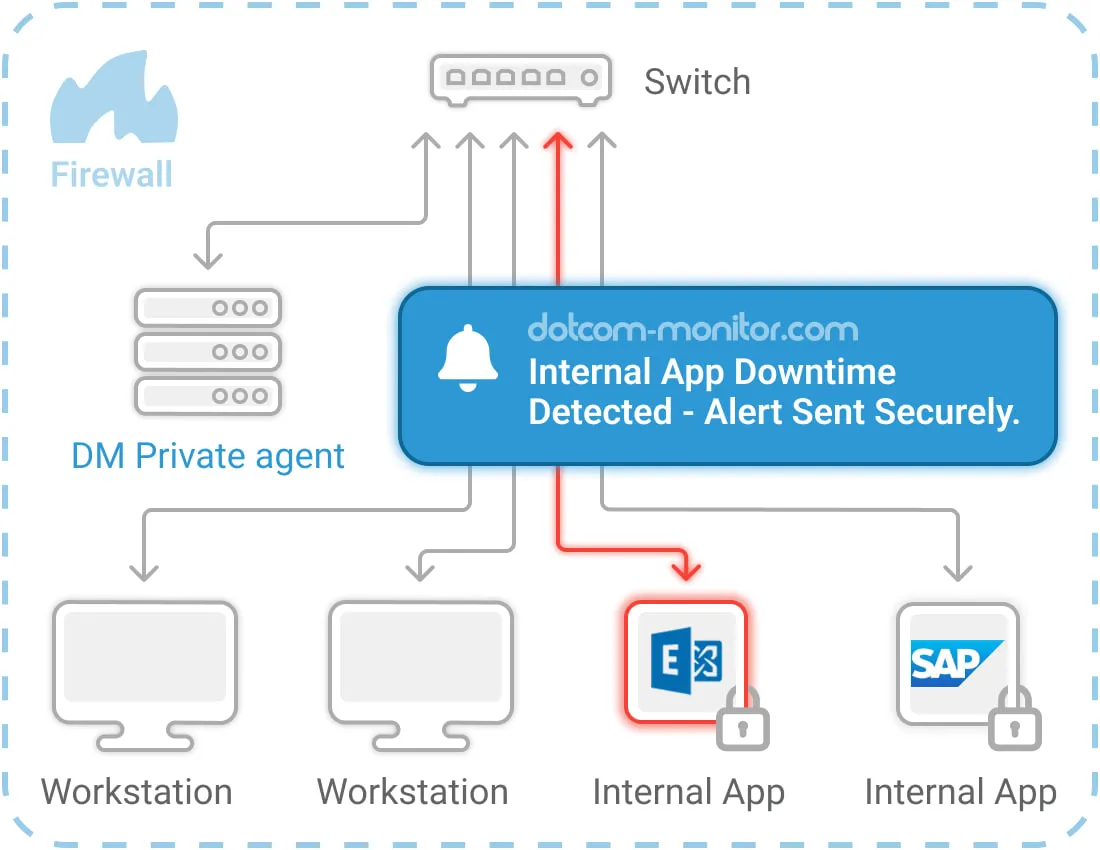
Not all APIs are public. Microservices behind your firewall, staging environments, and partner APIs on restricted networks all need monitoring too. Dotcom-Monitor’s Private Agents are lightweight software agents that you deploy inside your own network. They connect outbound to the Dotcom-Monitor cloud platform, execute your Postman collections locally, and report results securely — without opening inbound ports or exposing sensitive endpoints to the public internet. This makes Dotcom-Monitor the only Postman monitoring solution that covers both your external and internal APIs from a single platform.

Private Agents

Securely monitor internal & staging APIs

Diagram showing a private agent behind a firewall monitoring internal apps and workstations, sending a downtime alert securely to the user.

How Postman API Monitoring Works With Dotcom-Monitor

No script rewriting required. Import your existing Postman collections and start monitoring immediately. Dotcom-Monitor supports Postman environment variables, pre-request scripts, and test scripts — so your collections run exactly as they do in Postman, but on a continuous schedule from global locations.

4 Steps to Production-Grade Postman Monitoring

1. Import Your Collection

Upload via JSON export or shared public link

2. Choose Locations

Select from 30+ global locations or deploy Private Agents

3. Set Your Schedule

Monitor as often as every 1 minute

4. Monitor & Alert

Get instant alerts via SMS, email, Slack, or PagerDuty

What Happens During a Monitoring Run

During each scheduled run, Dotcom-Monitor executes every request in your Postman collection in sequence from the selected monitoring locations. Each response is validated against the assertions you defined in Postman — including status code checks, response body validation, header verification, and custom business logic tests.

Response times are recorded for every request, and the full request/response waterfall is stored for troubleshooting. If any assertion fails or a request times out, the configured alert chain is triggered immediately, ensuring the right team is notified within seconds of a failure.

For complete technical documentation on configuring Postman collection tasks, visit our Postman Collection Task knowledge base article.

Why Choose Dotcom-Monitor for Postman Monitoring?

Postman’s built-in monitor is a great start, but for production-critical APIs, you need more power, flexibility, and reach.

Feature
Postman Monitor
Dotcom-Monitor
Why It Matters
Monitoring Frequency
As low as 5 min
✅ As low as 1 min
Catch outages 5x faster
Global Locations
6 Regions
✅ 30+ Locations
True global user experience
Internal API Monitoring
Not Available
✅ Yes, with Private Agents
Monitor firewalled APIs
Alerting
Basic Notifications
✅ Advanced (Groups, Escalations)
Route issues to the right team
Historical Data
Limited Retention
✅ Long-term Retention
Prove SLA compliance

Why Postman's Built-In Monitors Are Not Enough for Production

Postman’s native monitoring feature is designed for development workflows — quick health checks during the build process. But production environments have fundamentally different requirements. A 5-minute minimum monitoring interval means up to 5 minutes of undetected downtime before your team is even aware of a problem. For an e-commerce API processing transactions, that can translate directly into lost revenue.

Postman monitors run from only 6 geographic regions, which leaves significant blind spots. If your users are in Southeast Asia, South America, or the Middle East, you have no visibility into their actual experience. Dotcom-Monitor’s 30+ locations provide true global coverage, measuring performance from the networks your customers actually use.

Perhaps most critically, Postman’s monitors cannot reach APIs behind your firewall. Internal microservices, staging environments, and partner APIs on restricted networks are completely invisible to Postman’s cloud-based monitors. Dotcom-Monitor’s Private Agents solve this by running inside your network and reporting results outbound — keeping your internal APIs internal while still providing full Postman monitoring coverage.

Finally, Postman’s alerting is limited to basic notifications. There are no escalation policies, no team-based routing, and no integration with incident management platforms like PagerDuty or Opsgenie. For production operations, where the right person needs to be notified at the right time through the right channel, this is a significant limitation.

A Monitoring Toolkit Designed for Production

Everything you need to ensure your APIs are performing as expected, 24/7.

Assertion-Based Validation

Use the same Postman assertions you already wrote to validate status codes, response bodies, headers, and business logic. Failed assertions trigger alerts automatically.

Advanced Alerting

Configure alert groups, escalation schedules, and integrate with Slack, PagerDuty, Microsoft Teams, and more. The right people respond before users notice.

Rich Reporting & History

Track uptime, failures, and response time trends. Demonstrate SLA compliance, share public status pages, and dive deep into detailed waterfall charts.

Postman Monitoring Use Cases

Organizations use Dotcom-Monitor’s Postman API monitoring for a wide range of production scenarios. Here are the most common use cases our customers rely on.

Monitoring Third-Party API Dependencies

Most modern applications depend on external APIs — payment gateways like Stripe, shipping providers like FedEx, authentication services like Auth0, and communication platforms like Twilio. When these third-party APIs experience downtime or degraded performance, your application suffers too. By running Postman collections that test your critical third-party integrations, you get immediate alerts when an external dependency fails, allowing you to activate fallback logic or notify affected users before they encounter errors.

Validating Multi-Step API Workflows

Many business-critical processes span multiple API calls: create an order, process payment, reserve inventory, send confirmation. If any step in the chain breaks, the entire workflow fails. Postman collections are ideal for modeling these multi-step workflows because they execute requests sequentially and can pass data between steps using variables. Dotcom-Monitor runs these collections continuously, ensuring that your end-to-end workflows are functioning correctly around the clock.

Post-Deployment Smoke Testing

After every deployment, your team needs confidence that the release did not break existing API functionality. By scheduling Postman monitoring runs at 1-minute intervals during deployment windows, you can detect regressions within 60 seconds of a release going live — far faster than waiting for user reports or relying on log analysis.

Internal Microservices Health Checks

In microservices architectures, dozens or hundreds of internal services communicate with each other. A failure in one service can cascade across the system. Using Private Agents, you can run Postman collections that validate internal service-to-service communication, database connectivity, and queue processing — all from behind your firewall, without exposing any internal endpoints.

Postman API Monitoring Best Practices

Getting the most out of your Postman monitoring setup requires a thoughtful approach. Follow these best practices to maximize coverage and minimize alert fatigue.

Start With Your Most Critical Workflows

Do not try to monitor every API endpoint on day one. Begin with the workflows that directly impact revenue and user experience — authentication, checkout, search, and core data retrieval. Once these are stable, expand coverage to secondary endpoints and internal services.

Set Frequency Based on SLA Requirements

Match your monitoring frequency to your uptime commitments. A 99.9% SLA allows roughly 8.7 hours of downtime per year — a 5-minute monitoring interval could miss a 4-minute outage entirely. For SLA-critical APIs, use 1-minute monitoring intervals to ensure you detect and respond to issues within your committed timeframes. For guidance on writing effective Postman test scripts, see the official Postman test documentation.

Configure Alerts to Reach the Right Team

Use Dotcom-Monitor's alert groups and escalation schedules to route notifications to the appropriate team. API failures should go to the on-call engineer via PagerDuty or Slack, not to a shared email inbox. Set escalation rules so that unacknowledged alerts are automatically routed to a backup responder.

Use Private Agents for Complete Coverage

If your architecture includes internal APIs, staging environments, or partner APIs on restricted networks, deploy Private Agents to extend your Postman API monitoring behind the firewall. This gives you a single dashboard view of both external and internal API health. Learn more about Dotcom-Monitor's full Web API monitoring capabilities.

Do not just react to alerts. Use Dotcom-Monitor's reporting to review response time trends, error rate patterns, and uptime statistics weekly. Gradual performance degradation often precedes outages — catching a slow upward trend in response times can help you prevent a failure before it happens.

Monitor Internal APIs Without Exposing Them

How Private Agents Enable Secure Postman Monitoring

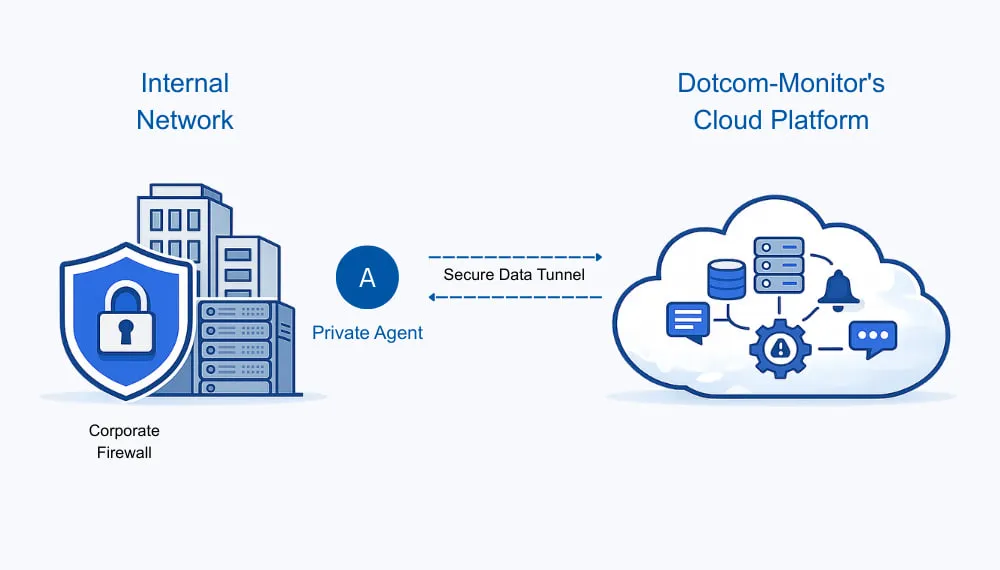
Private Agents allow you to extend Postman API monitoring to APIs behind your firewall, in staging environments, or on restricted networks — all without opening inbound ports or exposing sensitive endpoints to the public internet.

Deploy a lightweight agent inside your network. It connects outbound to Dotcom-Monitor’s cloud platform, executes your Postman collections locally, and reports results securely. Your internal APIs stay internal. Private Agents support the same Postman collection features as cloud-based monitoring — including environment variables, pre-request scripts, test assertions, and sequential request execution.

This architecture means you can monitor your entire API landscape — public, private, staging, and partner — from a single Postman monitoring dashboard, with unified alerting and reporting across all environments.

Built for the Teams That Build and Run APIs

DevOps & SRE

Detect API outages early and reduce mean time to resolution (MTTR) with detailed, actionable alerts. Integrate Postman monitoring alerts directly into your incident management workflow via PagerDuty, Opsgenie, or Slack.

Platform Teams

Monitor internal microservices and private APIs securely from behind your firewall using Private Agents. Get a unified view of your entire API infrastructure health from a single dashboard.

QA & Automation

Extend your existing Postman functional tests into continuous 24/7 API monitoring. The same assertions you use for testing become your production validation criteria — no duplicate effort required.

SaaS Teams

Validate critical production API workflows end-to-end and prove SLA compliance to your customers with long-term uptime and performance data. Share public status pages powered by real monitoring data.

Get answers

Frequently Asked Questions About Postman API Monitoring

It’s a service that allows you to import your existing Postman collections and run them as automated monitoring checks from our global network. It turns your test scripts into a reliable system for monitoring production API availability, performance, and correctness.

Yes. Our Private Agents can be installed inside your network to monitor internal, staging, or restricted APIs without exposing them to the public internet. All results are reported back to the same central dashboard.

Checks can run as frequently as every one minute, or at longer intervals depending on your needs. This is 5x more frequent than Postman’s native monitor.

While Postman does not export environment variables within the collection file itself, we provide clear documentation and support for using our Secure Vault and scripting tools to manage your variables and secrets securely.

Each HTTP request within your Postman collection is treated as a monitoring task. Our pricing is based on the number of tasks and the monitoring frequency. Contact us for a detailed quote or start a free trial to estimate your usage.

Start Your Free Postman API Monitoring Trial

Reuse the Postman collections your team already maintains and turn them into reliable, production-grade Postman monitoring in minutes. Import your first collection, choose your monitoring locations, and see results within 5 minutes — no credit card required.