Start Your 30-Day FREE Trial
Record your first monitoring script in 5 minutes. No credit card required.
- Monitor from 30+ global locations
- No credit card required
- 24x7 expert support
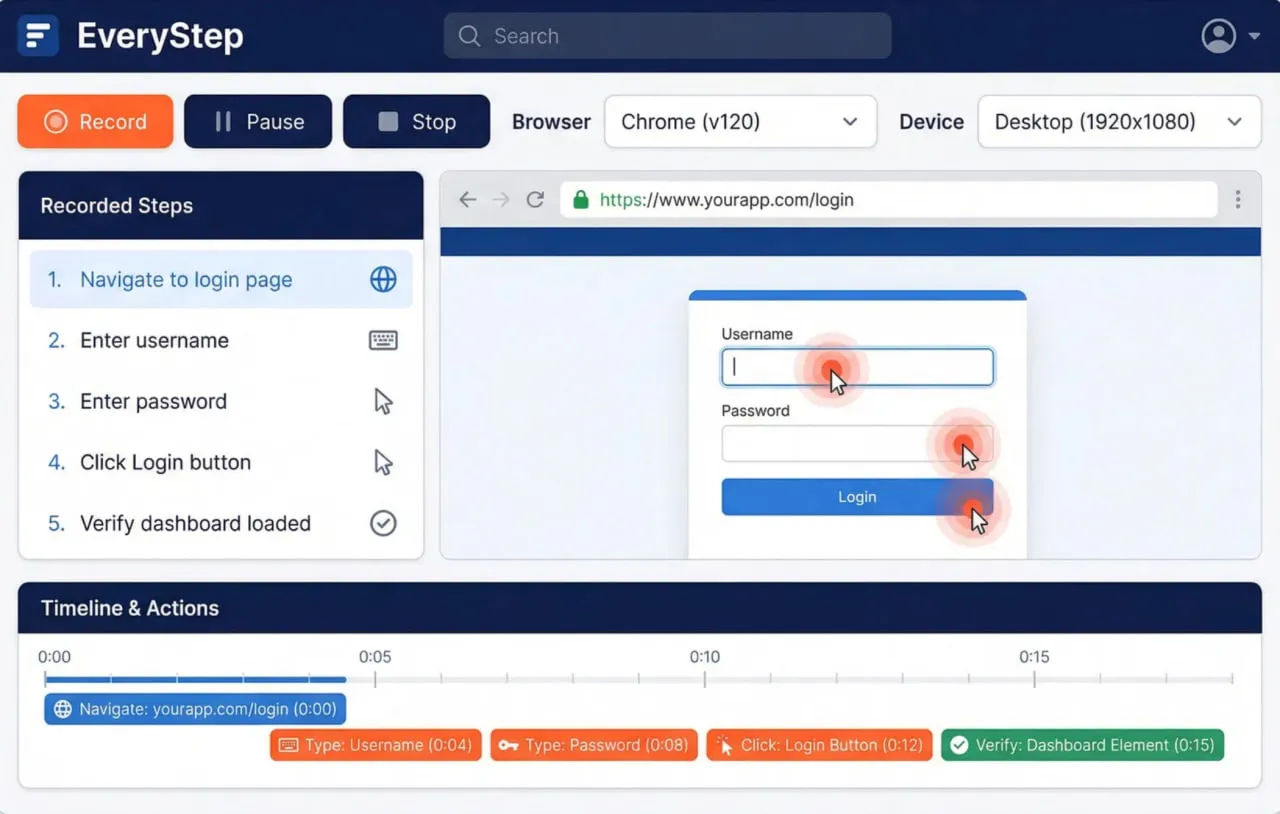





EveryStep records user interactions in real browsers (Chrome, Edge, 40+ mobile browsers)
Scripts run on the UserView monitoring platform from 30+ global locations
Monitors entire user journeys, not just single endpoints
Validates what users actually see, not just HTTP 200 responses
Record, edit, and monitor complex web application workflows with real browser automation.
Open the EveryStep Recorder (web or desktop) and navigate through your web application as a user would. EveryStep captures every click, form fill, and page navigation automatically. Takes 2-5 minutes to record a typical workflow.
Add content assertions, performance thresholds, or custom JavaScript. Insert variables for dynamic data (e.g., timestamps, random user IDs). Set Script Time Watchers to measure P95/P99 latency at each step.
Upload the script to the UserView platform. Configure monitoring frequency (1-60 minutes), select global locations (30+ available across 4 regions), and set alert channels (email, PagerDuty, Slack, Teams, webhooks).
UserView runs your script continuously from selected locations. Receive alerts within 60 seconds of failure. Access waterfall charts, screenshots, and video recordings of failed sessions to diagnose issues.
The difference: Uptime checks tell you if your server is responding. EveryStep tells you if your users can actually complete their workflows. A server can return HTTP 200 while login fails, checkout breaks, or search returns no results. EveryStep catches these failures because it monitors like a real user.
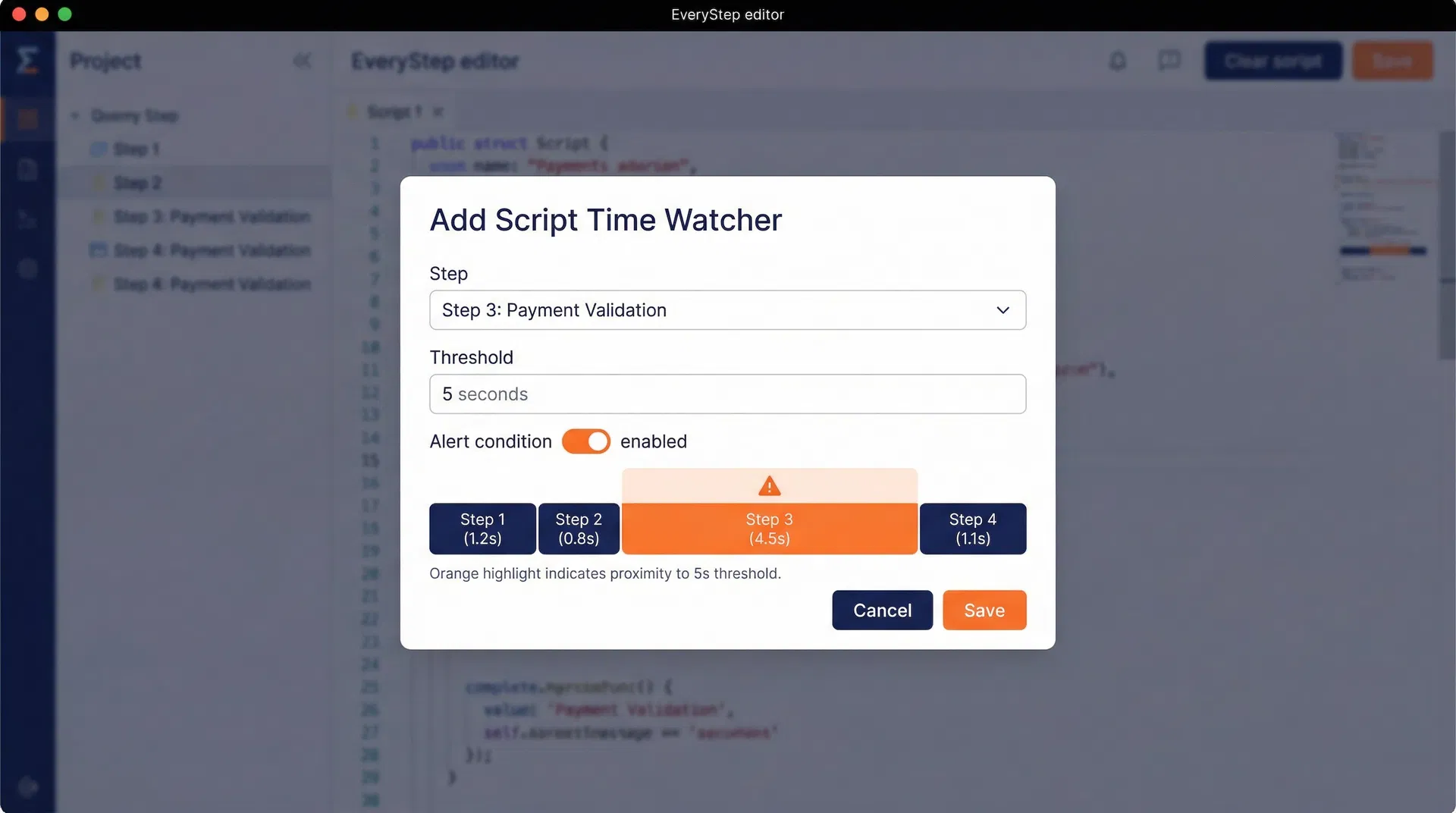
Script Time Watchers measure performance at each step of your workflow, not just the final page load. Track TTFB, DOM load, and full render times for every interaction — login, search, checkout, confirmation. Set thresholds to alert when any step degrades, even if the workflow completes.
Track TTFB, DOM load, and full page render for each step in your workflow. Identify which step is slow: login, search, checkout, or confirmation.
Set performance thresholds based on historical data (e.g., P95 < 2s). Alert when a step exceeds its baseline, even if the workflow completes successfully.
Waterfall charts show which resources (images, scripts, API calls) slow down each step. Reduce MTTR by pinpointing the exact cause of slowness.
Prove that your application meets performance SLAs (e.g., login < 3s, checkout < 5s) with documented step-level timing data from global locations.
Monitor any multi-step user workflow that impacts revenue, retention, or user experience.
Monitor the complete purchase journey: browse → add to cart → checkout → payment → confirmation. Detect cart abandonment triggers, payment gateway failures, or slow confirmation pages before they impact revenue.
Validate that users can log in via SSO, OAuth, or username/password. Monitor multi-factor authentication (MFA) flows, password reset links, and session persistence across pages.
Test that search returns results, filters apply correctly, and pagination works. Catch empty result pages, slow queries, or broken facets that frustrate users.
Monitor payment processor connectivity (Stripe, PayPal, Authorize.net). Detect when payment forms fail to load, transactions time out, or confirmation emails don't send.
Validate that new users can sign up, verify emails, and complete onboarding steps. Catch broken verification links, missing welcome emails, or failed account creation.
Monitor contact forms, support tickets, and data entry workflows. Ensure submissions reach your backend, validation errors display correctly, and confirmation messages appear.
Recommendation: Use the web-based recorder for quick script creation and cross-platform compatibility. Use the desktop recorder when you need file uploads, clipboard access, or advanced system-level interactions.
Schedule a 15-minute demo to see how EveryStep monitors your web application workflows.
Real reviews from verified Capterra users — see why teams choose Dotcom-Monitor for API and website monitoring.
4.5
80 reviews
4.6
Capterra Score reviews
4.6
Capterra Score reviews
All reviews sourced from Capterra verified reviews. Ratings as of January 2026.
Dotcom-Monitor provides the infrastructure, global locations, and alerting integrations to run your EveryStep scripts reliably.
Run scripts from North America, Europe, Asia-Pacific, and South America. Detect region-specific failures, CDN misconfigurations, or geo-blocking issues.
Receive alerts via email, PagerDuty, Slack, Teams, or webhooks within 60 seconds of failure. Integrate with your existing incident management workflow.
Dotcom-Monitor guarantees 99.99% uptime for the monitoring platform itself. Your monitors run reliably, even when your application doesn't.
Trusted by Fortune 500 companies, SaaS providers, and e-commerce platforms to monitor critical user workflows and maintain uptime commitments.
These practices help SRE and IT Operations teams get the most value from EveryStep monitoring.
Start with workflows that directly impact revenue or user retention: login, checkout, registration, password reset. Expand to secondary workflows once critical paths are covered.
Run high-impact workflows (e.g., checkout) every 5 minutes. Run lower-impact workflows (e.g., help center search) every 15-30 minutes to balance detection speed with costs.
Measure step-level performance (TTFB, DOM load, full render) for 7-14 days to establish baselines. Set thresholds at P95 or P99 to alert on degradation, not normal variance.
Don't just check if pages load — verify that expected content appears. Assert that search returns results, checkout shows the correct total, or confirmation emails mention the order ID.
Select 3-5 locations that represent your user base (e.g., US East, US West, EU, Asia-Pacific). Detect region-specific failures, CDN issues, or geo-blocking problems.
Route alerts to PagerDuty, Slack, or Teams based on severity. Create runbooks that link monitoring alerts to troubleshooting steps, reducing MTTR.
Watch video recordings of failed sessions to identify patterns: Is the same step failing repeatedly? Are failures correlated with deployments? Use insights to prioritize fixes.
EveryStep is the script creation tool (recorder/editor). UserView is the monitoring platform that runs those scripts continuously from global locations. You use EveryStep to record workflows, then deploy scripts to UserView for 24/7 monitoring.
Yes. Deploy the Dotcom-Monitor Private Agent on-premises to monitor internal applications without exposing them to the internet. The agent runs EveryStep scripts locally and reports results to the UserView platform.
Scripts can run as frequently as every 1 minute or as infrequently as every 60 minutes. Most users monitor critical workflows every 5-15 minutes to balance detection speed with monitoring costs.
Yes. EveryStep supports 40+ mobile browsers including iOS Safari, Android Chrome, Samsung Internet, and mobile Edge. You can emulate specific devices (iPhone 14, Galaxy S23) or custom viewport sizes.
Yes. EveryStep scripts can be exported as XML or JSON and integrated into CI/CD pipelines via the Dotcom-Monitor API. Run scripts on-demand during deployments to validate releases before production.
You receive an alert within 60 seconds via your configured channels (email, PagerDuty, Slack, Teams, webhooks). The alert includes a screenshot, video recording, waterfall chart, and error logs from the failed session.
Use variables and custom JavaScript in the script editor. EveryStep supports dynamic data extraction (e.g., scraping a CSRF token from one page and using it on the next), conditional logic, and loops for complex scenarios.
Yes. EveryStep monitors JavaScript-heavy SPAs built with React, Angular, Vue, or similar frameworks. It waits for AJAX calls to complete, validates dynamically loaded content, and measures client-side rendering performance.
Join 10,000+ organizations that trust Dotcom-Monitor to protect API uptime, validate transactions, and reduce MTTR. Set up in under 5 minutes.