
Most of the network your users depend on is no longer yours. DNS sits with a registrar, the front door is a CDN, identity lives with Okta or Microsoft Entra, the application runs in an AWS or Azure region, and the office reaches all of it through an ISP you did not pick. When any of those slows down, your help desk still gets the ticket.
Cloud-based network monitoring is built for this situation. It tests the paths you do not own from the places your users sit, and it gives you evidence when a provider says the fault is on your side.
The seven practices below cover the mistakes that show up most often when a team moves from an on-premises poller to a hosted service. Most of them involve checking from one location, trusting a ping, or paging on-call for a blip that a second check would have dismissed.

What Is Cloud-Based Network Monitoring?
Cloud-based network monitoring is a hosted service that runs reachability, latency, routing and service checks against your hosts and paths from monitoring locations on the public internet, and optionally from agents inside your own network. You set the targets, the interval and the thresholds in a web console. The vendor runs the checks, stores the results and sends the alerts.
The checks are the ones a network engineer runs by hand: ping for reachability and packet loss, traceroute for the hop where latency enters the path, a TCP connect to confirm a port is listening, a DNS query, an HTTP request. The difference is that they run every minute, from many places at once, and the results are kept.
A hosted service does not replace the SNMP poller most IT teams grew up with. It answers a question SNMP cannot. What does a customer in Frankfurt or a branch office in Denver get? See cloud-based vs on-premises monitoring strategies for a fuller comparison of the two models.
1. Monitor From Where Your Users Are
Pick monitoring locations that match your user base, not the region your servers happen to be in.
Cloud regions, transit providers and internet exchange peering fail regionally. An incident in AWS eu-central-1 affects your German customers while every check from a US location stays green. And if your only probe is in Virginia, the first signal is a support ticket.
Start with the countries that produce most of your traffic (your web analytics or CDN logs already have the list), add one location per continent you sell into, and compare the same check across locations. A page that loads in 1.2 seconds from Chicago and 5 seconds from Sydney is usually a CDN or peering problem, not an application problem.
Dotcom-Monitor runs every check type from a global monitoring network of 33 locations in 18 countries, and each location reports its own timings and errors, so a regional problem shows up only in that region’s results.
2. Check Every Layer of the Path, Not Just the Host
A host that answers a ping can still be down for users. The web server process can crash while the operating system keeps replying to ICMP. Or the DNS record points at the wrong address, or the certificate expires on Saturday night. Each of those passes a ping check.
So run one check per layer. Ping tells you the host is reachable and how much packet loss the path carries. A TCP port check tells you the service on port 443, 25 or 3389 is accepting connections. A DNS check tells you the record resolves to the address you expect. An HTTP check tells you the application returned 200 and the expected content. Traceroute tells you which hop added the latency.
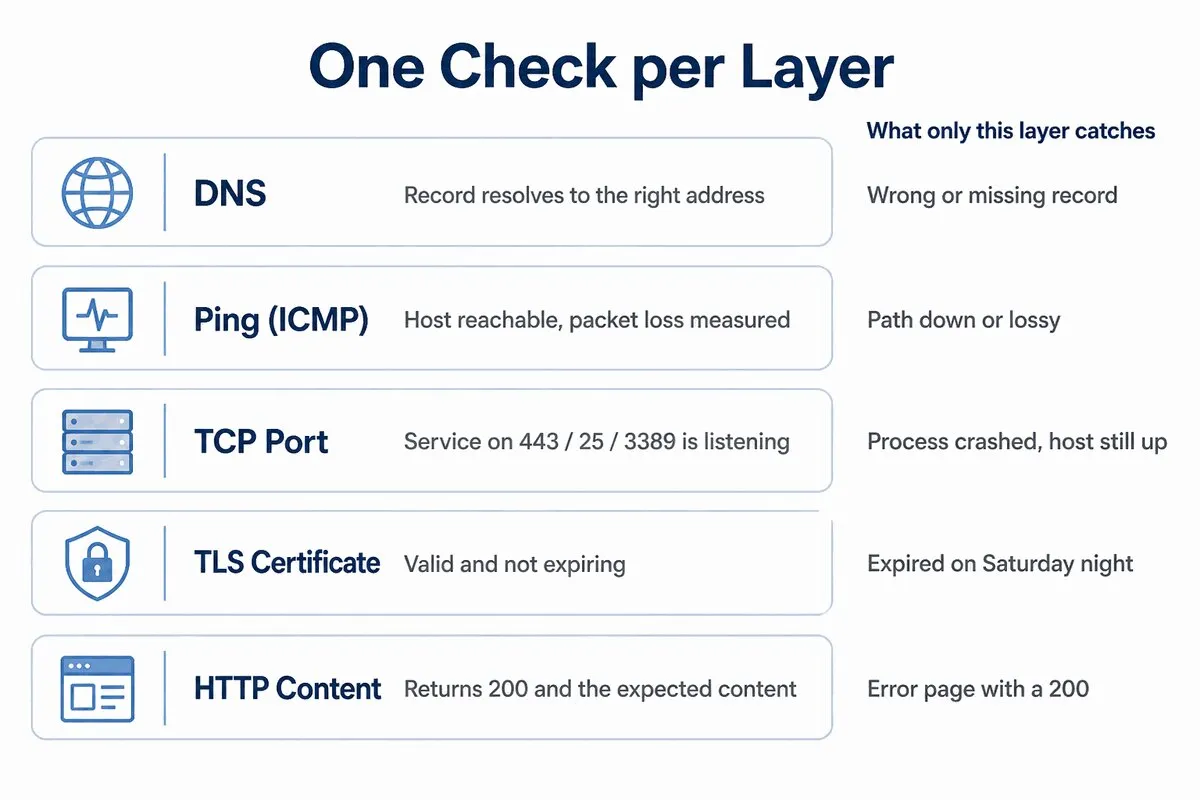
Set thresholds on latency and packet loss, not just on up or down. A link that drops 4% of packets passes an up/down check and is unusable for VoIP. In most networks, brownouts are more common than outages. And a check that records round-trip time on every run is the cheapest way to see them.
Dotcom-Monitor’s network monitoring runs ping, traceroute and TCP port checks against the same host as one device, and when a check fails a traceroute fires automatically so the hop-by-hop path is attached to the alert. DNS, SSL certificate, SMTP and HTTP checks live in the same account under infrastructure monitoring.
3. Pair Outside-In Checks With Inside-Out Agents
Public monitoring locations reach anything the public internet can reach. They cannot reach the intranet portal, the VPN tunnel to your AWS VPC, the branch link to HQ, or the domain controller. And they cannot tell you when your egress firewall or ISP is the problem.
A private agent fixes both gaps. It is the vendor’s monitoring software installed on a host inside your network, running the same checks from behind the firewall and reporting over an outbound HTTPS connection. It needs no inbound firewall rules and no vendor VPN.
The useful part is running the same check from both sides. Public fails and internal passes: the fault is between your perimeter and the internet. Both fail: the target is down. Internal fails and public passes: your egress path or internal DNS is broken.
Scenario. A 400-person logistics company runs a site-to-site tunnel between its Dallas data center and an AWS VPC. Every few weeks the tunnel silently drops at 3 AM and comes back on re-key, so the morning shift sees nothing except a burst of overnight job failures. What catches it: a Dotcom-Monitor Private Agent in Dallas pinging an instance across the tunnel every minute. The packet loss threshold trips within 60 seconds and pages the network on-call, with the timestamp AWS Support later asks for.
Dotcom-Monitor Private Agents come in a lightweight Protocol Edition for ping, port, DNS and API checks and a Full Edition that also drives a real browser. Most teams put a Protocol Edition agent at each site and add a Full Edition only where a scripted login is worth it.
4. Set Check Frequency by the Cost of a Missed Minute
Check frequency sets the ceiling on how fast you can detect anything. A 5-minute interval means an outage can run for 5 minutes before the first failed check, plus verification, plus the time it takes a human to read the page. A 99.9% monthly SLA gives you about 43 minutes of downtime to spend, and a 5-minute detection gap spends 5 of them before anyone has started to respond.
To put a number on a missed minute, multiply hourly revenue through the path by the share of users affected, or use the loaded hourly cost of the staff who cannot work while it is down. Use that number to choose the interval.
So do not pick one interval for everything. Use 1-minute checks for anything with a customer-facing SLA or an on-call rotation attached. Use 5 minutes for internal services that can wait for business hours. Use 15 to 60 minutes for slow signals such as certificate expiry and DNS blacklist status.
Location scheduling matters as much as interval. In round-robin scheduling the platform rotates through your locations one per run, so a 1-minute check from 6 locations tests each location every 6 minutes. In concurrent scheduling every location runs on every cycle, which costs more and catches a regional failure on the first run. Dotcom-Monitor checks run as often as once per minute; round-robin is the default and concurrent is an add-on, and our guide to concurrent vs round-robin monitoring covers when the add-on pays for itself.
5. Confirm a Failure Before You Page Anyone
A single failed check from one location is evidence that one path between one machine and your service failed once. The internet produces that constantly: a route flap, a rate-limited edge node, a resolver hiccup. If every one of those pages someone, the on-call engineer stops trusting the pager.
Require confirmation. When one location fails, the platform should re-run the same check from other locations on other networks before it opens an incident. If the others pass, log it and move on. If they fail too, the alert should carry which locations failed and what each one saw.
Then route alerts by ownership. The network team gets the tunnel and ISP alerts, the application team gets the HTTP 500s, and the identity team gets the SSO login failures, each in the channel that team already watches: PagerDuty, Opsgenie, Slack, Microsoft Teams or a ServiceNow ticket. Suppress alerts during announced maintenance windows.
Scenario. A regional bank’s monitoring reports its online banking login as down from one European location at 2:14 AM. What catches it, and what does not: Dotcom-Monitor re-runs the check from three other locations before alerting. All three pass, so no incident is opened. The single failure is logged with its full response for the morning review, where it turns out to be a transit provider issue on one path. Nobody was paged.
Dotcom-Monitor’s alerting supports per-device escalation groups, custom thresholds on response time and error rate, and alert rules per location for teams that operate in several markets.
6. Monitor the Cloud Services You Do Not Own
Often the services with the most impact on your users are the ones you have the least visibility into: the identity provider, the CDN, the managed DNS, the payment gateway, Microsoft 365. Their status pages update after the incident, and they rarely mention the region you care about.
Monitor them yourself, from your own locations, at your own interval. Point a DNS check at your managed DNS provider and confirm your records resolve. Point an HTTP check at the CDN edge and compare it with the origin. Run a scripted login through Okta or Entra from the region where most of your staff sign in. Ping and port-check the SaaS endpoints your internal applications call.
You often hear about a vendor incident before the vendor’s status page does. You also build an independent record of the vendor’s availability to put next to the SLA credit clause in the contract. Most vendors ask for evidence before they issue a credit, and monitoring data you collected yourself qualifies.
Applications built on a cloud native architecture add managed queues, databases and service meshes to that dependency list. Decide which of those to check before the first incident rather than after. Our guide to SaaS monitoring best practices covers the application side of the same problem.
7. Keep Monitoring Independent of What It Watches
Monitoring that shares a failure domain with the thing it monitors fails at the same moment. A Nagios server in the same rack as the web tier goes dark with the rack. A monitoring stack in us-east-1 goes quiet during a us-east-1 incident. A dashboard behind the same SSO as the application is unreachable when SSO is what broke.
A hosted service solves most of this by design, because the monitoring locations, the results store and the alerting engine run on the vendor’s infrastructure. Keep it that way. Do not route alerts only through the corporate email server the monitoring is supposed to watch. Keep at least one alert channel, such as SMS or a phone call, that does not depend on your own network, and test it on a schedule, since it is rarely used.
Then check the vendor’s own uptime commitment. A service that watches your 99.9% SLA should offer at least that. Dotcom-Monitor publishes a 99.99% platform uptime SLA and runs each monitoring location on its own infrastructure in a commercial data center with published IP addresses, which lets you verify where a check came from.
How to Monitor Cloud-Based Network Services Efficiently
Efficient here means the fewest checks that still catch every failure you care about, with alerts that reach one person who can act. This sequence works for most IT teams.
- Step 1: List the paths, not the hosts. Office to Microsoft 365, customer to CDN to origin, branch to HQ, application to payment API. Each path gets a check. A host that is not on a path probably does not need a 1-minute check.
- Step 2: Assign one check per layer on each path. DNS, ping, TCP port and HTTP for a public web service. Ping and port across a tunnel. A scripted login for an identity provider.
- Step 3: Choose locations from user geography. Three to five public locations that match where users are, plus a private agent at each site with more than a few dozen staff.
- Step 4: Set intervals and thresholds from cost and baseline. One minute for anything with an SLA. Run the checks for a week first, then set latency and packet loss thresholds at roughly 1.5 to 2 times the observed baseline rather than a number picked on day one.
- Step 5: Route alerts by owner and require confirmation. One escalation group per team, confirmation from a second location before paging, and a maintenance calendar that suppresses alerts during planned work.
- Step 6: Review the report monthly. Pull the uptime and response-time report per path, compare it with the vendor SLAs, and retire checks that have not fired in six months.
Dotcom-Monitor groups checks into devices, applies locations and intervals per device, and produces scheduled uptime and SLA reports per device, which maps directly onto the per-path model above.
Which Cloud-Based Network Monitoring Tools Fit This Approach?
Cloud-based network monitoring tools split into two groups, and the split matters more than any feature list. Hosted SNMP and flow tools collect device counters from inside your network through a collector and tell you how your switches and routers are doing. Synthetic services send test traffic along the paths users take and tell you if a path works from where users are. Only the second group can test the services you do not own.
| Need | Tool type | Examples |
|---|---|---|
| Interface utilization, errors, device CPU and memory | Hosted SNMP and flow monitoring | Auvik, PRTG Hosted Monitor, LogicMonitor |
| Traffic between services inside cloud accounts | Cloud network monitoring | Datadog Cloud Network Monitoring |
| Reachability, latency and routing from where users are | Synthetic network monitoring | Dotcom-Monitor, Cisco ThousandEyes |
| Internal hosts, tunnels and branch links, plus inside-to-outside paths | Synthetic monitoring with private agents | Dotcom-Monitor Private Agents, ThousandEyes Enterprise Agents |
Most IT teams end up with one of each, sending alerts to the same channel. If you are deciding which to add first, our guide comparing synthetic and infrastructure monitoring tools walks through the tradeoffs by use case.
The Bottom Line
Cloud-based network monitoring is worth running when it tests the paths your users take, from the places they take them, at an interval that matches what a missed minute costs. Monitor from the regions where customers are, check each layer instead of trusting a ping, put an agent at every site that matters, confirm failures before paging, and keep your own record of how the cloud services you rent performed.
If you are starting from an SNMP poller and nothing else, add the external view first. Most undetected outages come from that gap, and a hosted service covers it without new hardware.
