





Home
- Infrastructure Monitoring
DNS Blacklist Monitoring — Know You’re Listed Before Your Email Stops Arriving
Blacklisting is silent. Mail is rejected at the receiving server, so nothing looks wrong from your side. Dotcom-Monitor checks your IPs and domains against 70+ DNSBLs continuously and tells you which list flagged you, within minutes.
Start 30-Day Free Trial
See Pricing

- No credit card required
- Set up your first check in under 5 minutes
- G2 Top Performer
- SOC 2 · GDPR · SSO
10,000+
Organizations Worldwide
99.99%
Platform Uptime SLA
30+
Global Monitoring Locations
Since 1998
Website Monitoring Leader


DNS Blacklist Monitoring
What Is a DNS Blacklist (DNSBL)?
A DNS blacklist (DNSBL), also called a DNS blackhole list or real-time blackhole list (RBL), is a published database of IP addresses and domains flagged for sending spam, distributing malware, or other abusive activity. Mail servers query these lists in real time before accepting a message: if your sending IP appears on a list the receiving server trusts, your email is rejected or routed to spam before it ever reaches the recipient.
Listings happen for reasons that are often outside your control — a compromised mailbox on your network, a misconfigured relay, a shared-hosting neighbor’s behavior, or a recycled IP address that carries a prior owner’s reputation. Because each blacklist operates independently with its own criteria and delisting process, an organization can be listed on one and clean on a dozen others, which is why point-in-time checks are unreliable and continuous monitoring matters.
Need a one-time check right now? Run a free email blacklist test on Dotcom-Tools — no account required.
How it works
From Listing to Alert in Minutes, Not Days
A DNSBL task polls the major blacklist databases for any IP or hostname you specify, on the interval you choose.
1
Specify the target
Enter the hostname or IP address to watch — typically your outbound mail servers, marketing sending IPs, and root domain.
2
Poll 70+ blacklists on a schedule
Each check queries the major DNSBL databases and compares the response against a clean baseline.
3
Flag the listing and name the list
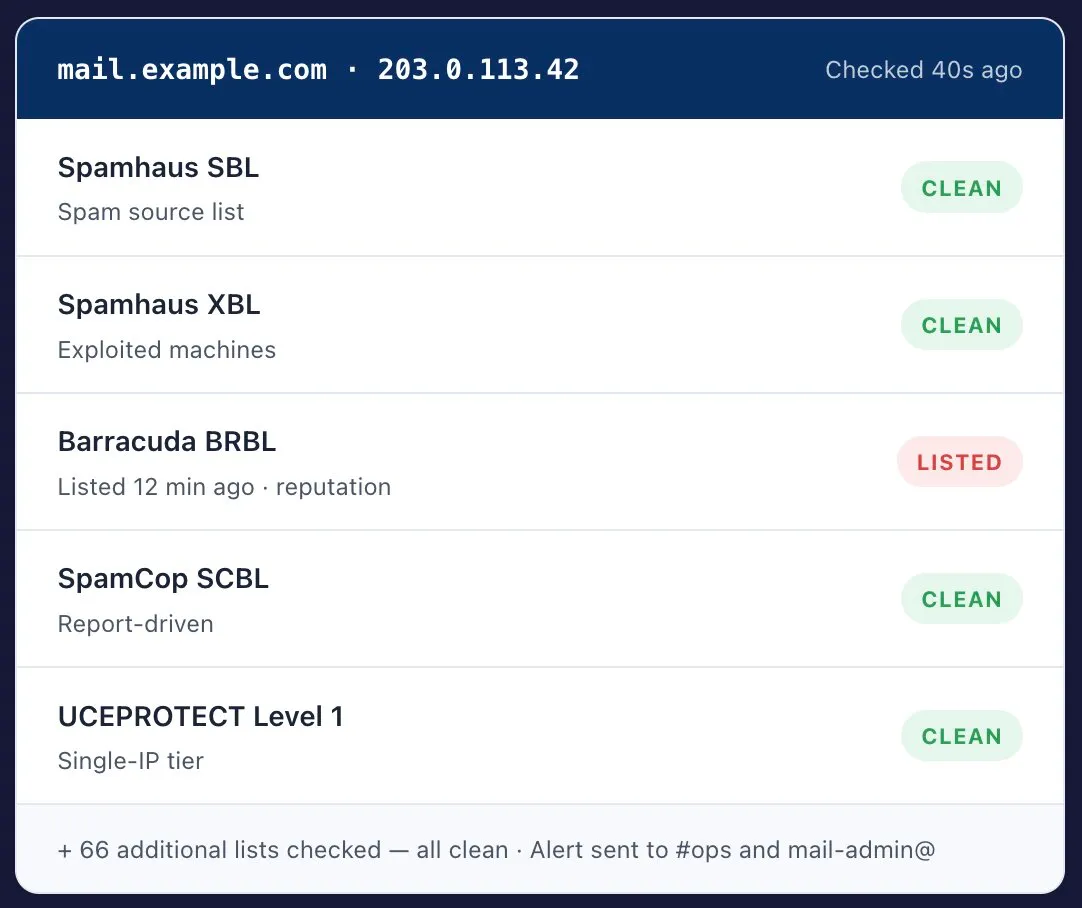
A positive match on any list raises an error and records which list flagged you, and when — the detail every delisting request asks for.
4
Route the alert to the right team
A blacklist listing is an email-deliverability incident. Send it to whoever owns mail, not only to the on-call SRE.
5
Confirm removal actually propagated
Continuous re-checks show when the listing clears across lists — and catch the re-listing that follows a partial fix.
Coverage
Major DNS Blacklists We Monitor
Each list runs independently, with its own listing criteria and its own removal process. Being clean on one says nothing about the others — which is the whole argument for checking all of them continuously.
- IP + Domain
Spamhaus (SBL, XBL, PBL, DBL)
The most widely deployed set of lists. SBL covers verified spam sources, XBL lists compromised or exploited machines, PBL covers IP ranges that should not be sending mail directly, and DBL is domain-based. A Spamhaus listing has the broadest deliverability impact of any blacklist.
- IP
SpamCop Blocking List (SCBL)
Built from user-submitted spam reports and spamtrap hits. Listings expire automatically roughly 24 hours after reports stop, which makes SCBL a fast-moving signal — you can be listed and delisted inside a day without ever noticing.
- IP
Barracuda Reputation Block List (BRBL)
A reputation-scored list used widely by Barracuda appliances in corporate mail environments. Lookups are free, with registration required for high-volume querying. Common cause of B2B mail being silently rejected.
- IP · Tiered
UCEPROTECT
Operates in tiers: Level 1 lists a single IP, Level 2 an entire subnet, Level 3 a whole ASN. Levels 2 and 3 are why a well-behaved sender on shared hosting can be blocked because of a neighbor’s behavior.
- IP
PSBL (Passive Spam Block List)
Spamtrap-driven, with automatic expiry rather than manual review. Listings clear on their own once the offending traffic stops, but recurring listings are a reliable signal that a root cause was never actually fixed.
- Domain / URI
SURBL and URIBL
URI-based rather than IP-based: they list domains that appear inside message bodies. A listing can therefore follow your domain even in mail you did not send — spam that merely links to your website is enough to trigger it.
Remediation
How to Get Removed from a DNS Blacklist
Delisting is not the hard part — staying delisted is. Lists re-flag an address quickly when the underlying cause was only partly addressed, so work the steps in order.
01
Confirm the listing and identify which list
Check the specific IP or domain against each major DNSBL and note the listing reason code the list provides. Different lists mean different root causes.
02
Find and fix the root cause
Common causes: a compromised account sending spam, an open relay or open proxy, malware on a machine behind the IP, a misconfigured mail server, or missing and incorrect SPF, DKIM, and DMARC records.
03
Verify your authentication records
Publish valid SPF, DKIM, and DMARC records before requesting removal. Most lists will re-list an IP that was delisted while the underlying problem remained.
04
Submit the delisting request through the list’s own process
Each blacklist has its own form and policy. Some — SpamCop, PSBL — expire listings automatically. Others, such as Spamhaus SBL, require a manual request explaining what you remediated.
05
Wait for propagation
Removal can take from a few hours to several days to reach all mail servers, because receiving servers cache DNSBL responses rather than querying live every time.
06
Monitor continuously afterward
Re-listing is common when the root cause was only partly fixed. Automated monitoring catches a repeat listing in minutes, instead of when customers report undelivered mail.
Capabilities
Built for Deliverability, Not Just Uptime
Immediate DNSBL Alerts
Get notified the moment a monitored IP or domain appears on any tracked list — email, SMS, Slack, PagerDuty, or webhook.
Root Cause Detail
Every alert names the specific list, the listing time, and the reason code — the exact information each delisting process requires.
Delisting Support
Reach the right DNSBL quickly with the listing evidence already assembled, instead of hunting for each list’s removal form.
Continuous Re-Checks
Confirm a removal genuinely propagated, and catch the re-listing that follows a partial fix — a pattern manual checks always miss.
Alert Routing by Team
Route deliverability incidents to whoever owns mail, with escalation rules separate from your infrastructure alerts.
REST API + 25+ integrations
Pull blacklist status into your own dashboards, or push events into the incident tooling your team already runs.

Alerting
Send Deliverability Incidents to the People Who Own Mail
A blacklist listing rarely reaches the team that can fix it. It looks like an infrastructure alert, but the remediation is a mail-configuration and reputation problem.
- Separate notification groups for deliverability vs. infrastructure
- Escalation rules with configurable delay and repeat
- Email, SMS, voice, Slack, Microsoft Teams, PagerDuty, and webhooks
- Alert content names the list, the target, and the listing time
- Maintenance windows so planned IP migrations don’t page anyone
Who uses it
Where a Silent Listing Does the Most Damage
- Transactional Email
Receipts, resets, and confirmations
Password resets and order confirmations are the mail customers notice missing first — and the mail that generates support tickets and churn when it silently disappears into a reject queue.
- Marketing Ops
Sender reputation for campaigns
A listing mid-campaign quietly destroys deliverability metrics and can get a sending domain throttled for weeks after the underlying issue is resolved.
- Shared Infrastructure
Shared hosting and cloud IP ranges
Tiered lists can flag an entire subnet or ASN because of another tenant. Monitoring tells you it happened to you, rather than leaving you to infer it from falling open rates.
DNS blacklist monitoring, included with Internet Infrastructure
DNSBL monitoring is part of the Internet Infrastructure plan — the same plan that covers DNS, port, ping, and traceroute monitoring.
Internet Infrastructure Plan
- DNSBL monitoring across 70+ public blacklists
- DNS, port, ping, traceroute, and SSL monitoring
- 30 global monitoring locations
- 36 months of data retention
- Unlimited users and alert recipients
- REST API and 25+ integrations
Starts at
$39.95
per month
Start Free Trial
Customer stories
What Teams Say After They Switch
Verified reviews from Capterra. Aggregate rating 4.5 / 5 across 83 reviews.
I have been thoroughly impressed with the level of detail and comprehensiveness of the reports generated by the software. The support team has exceeded my expectations — they consistently provide detailed and insightful answers to every question.Shirin R.Software Test Engineer · Computer SoftwareVerified Capterra review · February 2023
The real-time alerts and detailed performance analytics have been a game-changer for our website’s uptime. The global monitoring feature ensures our site is optimized everywhere, and the intuitive dashboard makes it easy to track performance. Their customer support is exceptional — always responsive and efficient.Tomer C.Managing Director · Facilities ServicesVerified Capterra review · March 2025
I use Dotcom tools inside the ISP I work — it’s a really good and reliable tool for monitoring things along the network and testing network components. I usually use it to diagnose server latency and DNS resolve time.Leonardo J.Network Infrastructure Analyst · ISPVerified Capterra review · October 2022
4.5
Capterra
83 reviews4.6
Ease of Use
Capterra Score reviews
4.6
Customer Service
Capterra Score reviews
All reviews sourced from Capterra verified reviews. Ratings as of 8月 2026.
Frequently asked questions
DNS Blacklist Monitoring — Common Questions
If your question isn’t covered here, our team responds within one business hour.
What is a DNS blacklist?
A DNS blacklist (DNSBL), also called a DNS blackhole list or real-time blackhole list (RBL), is a published database of IP addresses and domains flagged for sending spam, distributing malware, or other abusive activity. Mail servers query these lists in real time before accepting a message, and reject or spam-folder mail from any address that appears on a list they trust.
How does DNS blacklist monitoring work?
You specify the IP addresses or hostnames you want watched. Dotcom-Monitor then polls 70+ public DNSBL databases on your chosen interval and compares the result to a clean baseline. If any list returns a positive match, the check is flagged as an error, the responsible list is identified, and an alert is dispatched to your team.
Why is DNS blacklist monitoring crucial?
Blacklisting is silent. Mail is rejected at the receiving server, so nothing looks wrong from your side — no bounce you notice, no alarm in your infrastructure. Most teams discover a listing only when a customer says an invoice, receipt, or password reset never arrived, by which point days of mail may already be lost.
How does Dotcom-Monitor aid in DNSBL management?
Beyond detection, Dotcom-Monitor reports which specific list flagged you and when the listing appeared, which narrows the root cause quickly. That detail is what each blacklist’s delisting process asks for, and continuous re-checks confirm when removal has actually propagated rather than leaving you to guess.
How long does it take to get removed from a DNS blacklist?
It varies by list. Some, such as SpamCop and PSBL, expire listings automatically within roughly 24 hours once the abusive traffic stops. Others require a manual delisting request and can take several days. After removal, allow extra time for receiving mail servers to refresh their cached DNSBL results.
Why is my IP address on a blacklist when I don’t send spam?
Listings are frequently caused by something other than deliberate spam: a single compromised mailbox, a misconfigured relay or open proxy, malware on one machine behind the IP, or a recycled IP that still carries its previous owner’s reputation. On shared hosting, tiered lists such as UCEPROTECT can list an entire subnet because of a neighbor’s behavior.
How often should you check if your IP or domain is blacklisted?
Continuously, not periodically. A manual check tells you only about the moment you ran it, and a listing can appear hours later. For any address that sends transactional or marketing mail, automated checks at short intervals mean you learn about a listing in minutes rather than when customers report missing email.
What’s the difference between an IP blacklist and a domain blacklist?
IP-based lists such as Spamhaus SBL and Barracuda BRBL flag the sending server’s address. Domain and URI-based lists such as Spamhaus DBL, SURBL, and URIBL flag domains that appear inside the message body. That difference matters because a URI listing can follow your domain even in mail you did not send, such as spam that merely links to your site.
Setting up your first check? See the DNSBL task setup guide, or compare with DNS monitoring.
Find Out You’re Listed Before Your Customers Do
Set up a DNSBL check in under five minutes. 70+ blacklists, continuous polling, alerts routed to the team that owns mail.
Start 30-Day Free Trial
Schedule a Demo
- No credit card required
- 70+ blacklists, continuous polling
- Monitoring leader since 1998