
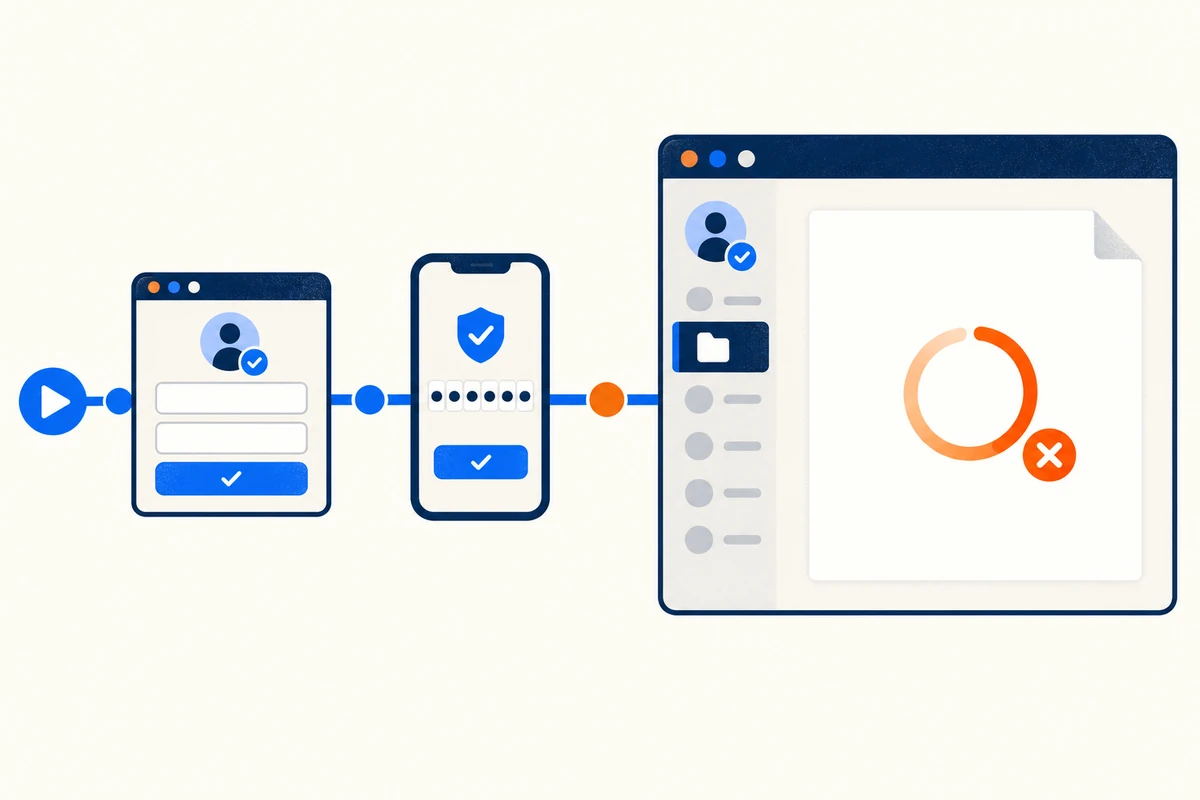
Your uptime check says the application is fine. Meanwhile, nobody can log in, because the identity provider that sits in front of it is timing out. For any application behind Identity and Access Management (IAM) authentication, the login is part of the product, and a monitor that stops at the login wall is monitoring the wrong thing. The working rule: treat authentication as user-facing application code, even when the IdP belongs to a vendor, because users never experience “app up, login down” as a partial outage—to them, the product is simply gone.
Authenticated applications are the classic synthetic monitoring blind spot. A simple HTTP check gets a healthy 200 from the public login page while the SSO redirect chain, the MFA challenge, or the token exchange behind it is broken. The only way to see what a signed-in user sees is to script the entire flow, credentials, second factor and all, and run it on a schedule.
That raises the questions this guide answers: how do you script through an SSO redirect chain, what do you do about MFA codes that are designed to defeat automation, where do the credentials live so they don’t leak, and how do you tell whether a slow login is your app’s fault or your identity provider’s?
What Is Identity and Access Management (IAM)?
Identity and Access Management is the framework of policies and services that decides who can access which resources, and proves it at sign-in. In practice it means a central identity provider (IdP) such as Okta, Microsoft Entra ID, Auth0, or Ping handles authentication for many applications through single sign-on (SSO), usually over SAML or OpenID Connect, with multi-factor authentication (MFA) layered on top. If you want the protocol mechanics in depth, see our companion piece on how identity management authentication works. For monitoring purposes, one property matters most: the login path now crosses systems you don’t fully control, and every one of them can fail independently of your application.
Why Authenticated Applications Are Hard to Monitor
Four things make IAM-protected applications harder to monitor than a public page.
The login wall blinds simple checks. An HTTP availability check can only confirm that the login page renders. Everything users actually pay for sits behind authentication, so an outage in the sign-in flow or in the application itself is invisible until someone complains.
The flow spans multiple parties. A single sign-in touches your application, your IdP, the MFA service, and often a token endpoint, each on its own domain with its own DNS, TLS, and infrastructure. Your application can be perfectly healthy while a third-party IdP outage locks everyone out. The same dependency problem shows up in applications that rely on SSO generally.
SSO is a redirect chain, not a page. SAML and OAuth/OIDC flows bounce the browser across two or three domains, exchange assertions or authorization codes, and set session cookies along the way. A request-level tool that doesn’t execute JavaScript and follow redirects like a real browser will misreport the flow at every hop.
MFA exists to stop scripts. One-time codes, push prompts, and CAPTCHAs are deliberately hostile to automation. Monitoring has to work with the IdP’s policy engine, not against it, which takes planning that a plain uptime check never needed.
Map the SSO Redirect Chain Before You Script It
Before recording anything, walk the login once in a browser with developer tools open and write down every hop. A typical SP-initiated flow looks like this: the user requests the application, gets redirected to the IdP, the IdP login page renders, credentials are submitted, an MFA challenge appears, the IdP posts a SAML assertion or returns an OAuth authorization code to your callback URL, the application exchanges it for a session, and the first authenticated page loads.
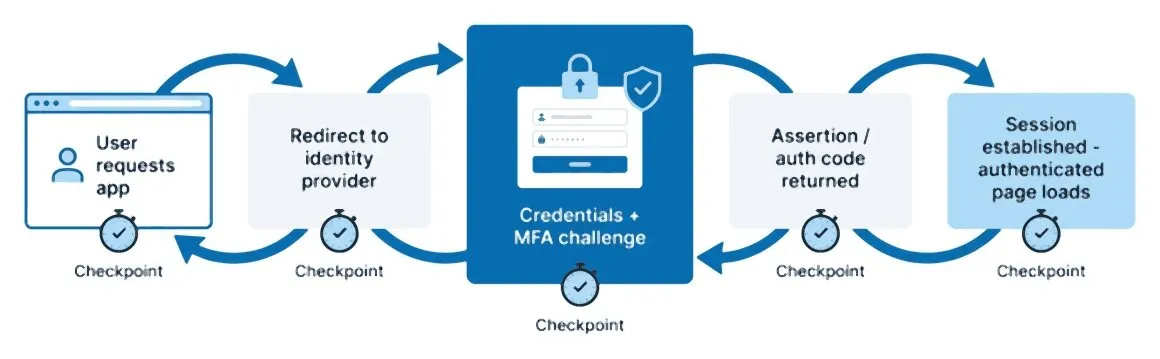
Each hop in that chain is a distinct failure point: DNS resolution for the IdP’s domain, an expired certificate on the callback URL, a slow IdP page render, a token exchange that times out. The hops you write down become the checkpoints of your script, and the boundaries where you’ll want timing splits later.
Note which domains are yours and which belong to a vendor. That distinction is what turns an alert into a routing decision: a failure on the IdP’s domain goes to the identity team or the vendor’s status page, a failure on the callback goes to your application team. If your architecture leans on OAuth for APIs as well, the token endpoint deserves its own request-level check; see monitoring JWT tokens and OAuth token endpoints for how to watch token issuance directly.
The domain map is also why the IdP’s status page can’t stand in for your own monitoring. A green “All Systems Operational” banner means the vendor’s service is up globally; it says nothing about your tenant’s SAML configuration, the certificate on your callback URL, or the network path between your users and their login page. The end-to-end script is the only check that answers the question your users are actually asking.
How to Script an Authenticated Login Flow, Step by Step
Step 1: Create a dedicated monitoring account. Set up a service-style test user in your IdP that exists only for monitoring: least privilege, no access to real customer data, and a recognizable name such as svc-synthetic-monitor so its logins are easy to identify in audit logs.
Step 2: Record the login as a multi-step browser transaction. Use a real-browser scripting tool such as EveryStep to capture the full sequence: open the application URL, follow the redirect to the IdP, enter credentials, submit, and land on the authenticated page. A real browser matters here because it executes JavaScript, follows cross-domain redirects, and carries cookies exactly the way a user’s browser does.
Step 3: Decide your MFA strategy before you finish the script. The options and their trade-offs are covered in the next section. Choose one deliberately; a script that works only because MFA happened to be cached will fail at an arbitrary point later.
Step 4: Assert on something only a signed-in user can see. Reaching a URL isn’t proof of login. Validate a post-login element, such as the dashboard heading or the account’s display name, using content assertions. Many failed logins land on a styled error page that returns HTTP 200, and only an assertion catches that.
Step 5: Extend the script one task past the login. Open a record, run a search, load a report. Authentication succeeding while the application behind it is broken is a real failure mode, and one extra step covers it. The structure is the same as any web transaction monitoring script: each user action is a step, and each step is measured.
Step 6: Set per-step thresholds and alerts. Give each step its own time budget and wire failures into your alerting rules, so a message says “MFA step exceeded threshold,” not just “login slow.”
Step 7: Run it from where your users are. External locations for a public SaaS application; a private agent inside your network for internal applications whose IdP or app tier isn’t reachable from the public internet.
Handling MFA and OTP in Synthetic Scripts
MFA is where most authenticated monitoring projects stall, because the whole point of a second factor is that a password alone, which is all a script naturally has, isn’t enough. There are four workable strategies, and the right one depends on how much of the MFA step you need to exercise versus how strictly your security team controls exceptions.
| Strategy | How it works | Trade-off | Best fit |
|---|---|---|---|
| Conditional-access exemption | IdP policy skips MFA for the test account when it signs in from known monitoring IPs | MFA step itself goes untested; requires strict IP scoping | Teams whose IdP supports network-based policies |
| TOTP seed in the script | Test account enrolls in an authenticator; the script stores the seed in a vault and computes the current code at runtime | Seed is a standing secret that must be vaulted and rotated | Fully exercising and timing the real MFA step |
| Email or SMS OTP retrieval | Script polls a test mailbox or SMS endpoint for the one-time code and types it in | Slow and delivery-dependent, so more false positives | Apps that only offer email or SMS codes |
| App passwords / bypass codes | A static secondary credential sidesteps the interactive challenge | Weakest option; many IdPs are phasing these out | Legacy applications with no better hook |
The TOTP approach deserves the default slot when your IdP allows it. Because time-based codes are generated from a shared seed by a documented algorithm, a script can produce a valid code at runtime and walk through the real challenge, which means the monitor times the MFA step instead of skipping it. For a detailed walk-through of that pattern, see how to monitor OTP-protected web applications.
Whatever you choose, scope it to the monitoring account only. An MFA exemption or bypass code applied any wider than a single least-privilege test user, restricted by source IP, turns a monitoring convenience into an attack surface. Your security team should sign off on the mechanism, and the exemption should show up in their policy reviews.
Keeping Monitoring Credentials Secure
A login monitor is a set of valid credentials executing on a schedule, and it should be treated with the same care as any other service credential.
Never borrow a human’s account. Real accounts expose real data in screenshots and recordings, break the monitor on every password change, and pollute security logs with activity nobody can attribute. The account you create instead should pass the blast-radius question: if this credential leaked, what could someone see or change before it was disabled? The right answer is boring—no admin roles, no customer records, no ability to mint durable tokens.
Vault the secrets. Passwords, TOTP seeds, and client secrets belong in encrypted storage that the script references at runtime, such as Dotcom-Monitor’s Secure Vault, never in script text, where they end up in exports, version history, and shared screens. Masking should extend to logs, screenshots, and video captures the monitor produces.
Rotate on a schedule, and calendar it. Credential rotation is good hygiene, and an expired test-account password is also the single most common source of false login alerts. Rotate the vault entry, not the scripts, so one update propagates everywhere, and set a reminder ahead of any forced-expiry policy your IdP applies.
Make synthetic logins identifiable. A clearly named account and known source IPs let your security team distinguish the monitor from credential-stuffing attempts, and let you exclude its sessions from product analytics so it doesn’t inflate usage numbers.
Session Expiry, Token Refresh, and Re-Login Logic
Sessions are where authenticated monitors quietly rot. Two opposite behaviors both cause trouble: a monitor that reuses a cached session stops testing the login at all, and a monitor that inherits a half-expired session fails in ways the application never showed a real user.
The rule that prevents both: start every scheduled run from a clean browser session, with no cookies or tokens carried over from the previous run. A clean slate forces the full redirect chain, credential submission, and MFA on every cycle, so an IdP outage surfaces on the next run instead of hiding behind a still-valid cookie.
Session persistence is worth testing too, just deliberately and separately. If your application relies on silent token refresh to keep users signed in, build a longer transaction whose later steps run after the access token’s lifetime has elapsed, and assert the user is still signed in at the end. A refresh failure shows up as users being dumped back to the login page mid-task, which is exactly the symptom this script reproduces.
At the API layer, token issuance can be watched without a browser at all: a request-level check against the OAuth token endpoint verifies that tokens are being issued and honored on every cycle. Dotcom-Monitor’s OAuth API monitoring handles that flow, and it pairs well with the browser-level script, since the two together separate “the IdP can’t issue tokens” from “the application can’t consume them.”
Per-Step Timing: Where an Authenticated Flow Slows Down
“Login took nine seconds” is not actionable. Nine seconds spent where? An authenticated flow crosses at least two organizations, so the value of the monitor depends on splitting that total at the boundaries you mapped earlier: initial redirect, IdP page render, credential validation, MFA challenge, assertion or token exchange, and the first authenticated page load.
Scripted browser steps give you exactly that split, because each step is timed independently and comes with its own waterfall of requests. Baseline each step’s normal range rather than eyeballing single runs, and alert on deviation at the step level, so a regression in one hop stands out even when the end-to-end total still looks acceptable.
Per-step timing turns an argument into a routing decision. If the IdP page render doubled, the ticket goes to the identity vendor with timestamps attached. If the post-callback page load doubled, it goes to your application team. Without the split, both teams point at each other.
The routing gets sharper if each step carries an owner tag from the day you map it: app-owned (the callback URL, session creation, the first authenticated page), IdP-owned (login page render, credential validation, token exchange), policy-owned (the MFA challenge, conditional-access decisions, consent prompts), and network-owned (DNS, TLS, proxies, private-agent reachability). An alert that reads “policy-owned step changed” opens an incident handoff instead of a war-room debate.
Step-level baselines also catch the slow-creep failure mode that binary up/down checks miss entirely: an MFA service that drifts from one second to five over a month never triggers an outage alert, but it degrades every single login, and it is plainly visible in a step-timing trend line. Watch the login flow the same way you’d watch any login page, then let the per-step data tell you which side of the SSO boundary needs attention.
The Bottom Line
Monitoring an IAM-protected application means monitoring the authentication path as part of the application, because to your users it is. The working recipe: map the SSO redirect chain, script the full login as a multi-step real-browser transaction under a dedicated least-privilege account, handle MFA deliberately with a scoped exemption or a vaulted TOTP seed, keep every secret in encrypted storage, start each run from a clean session, and split timing at every hop so failures route to the right team on the first alert.
Do that, and the login wall stops being a blind spot. You’ll know the IdP is slow before the help desk does, you’ll know whether a failure is yours or your vendor’s, and you’ll have the per-step record to prove either case.
Monitor Behind the Login Wall
Script your full SSO login as a real-browser synthetic monitoring transaction with EveryStep, vault the credentials, and time every step of the flow. Start a free trial.
