
本短指南解决了使用代理执行每个步骤脚本工具的问题:
- 打开位于“控制面板”>“管理工具”的计算机管理。
- 导航“本地用户和组” > “用户”。
- 为用户设置密码”每步脚本”。
- 从当前窗口会话注销。
- 使用用户名”每个步骤脚本”和密码登录到窗口,在步骤 3 中指定。
现在,您可以直接通过内部菜单打开每个步骤脚本工具并编辑代理设置,如下图所示
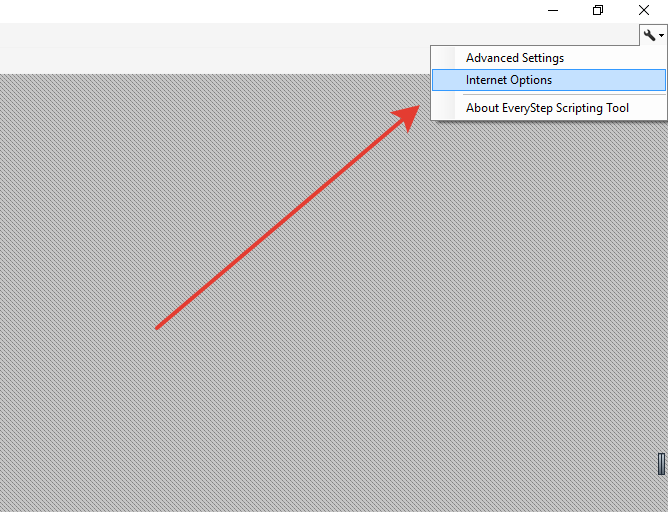
或者运行 Internet 资源管理器并在此处指定代理设置。
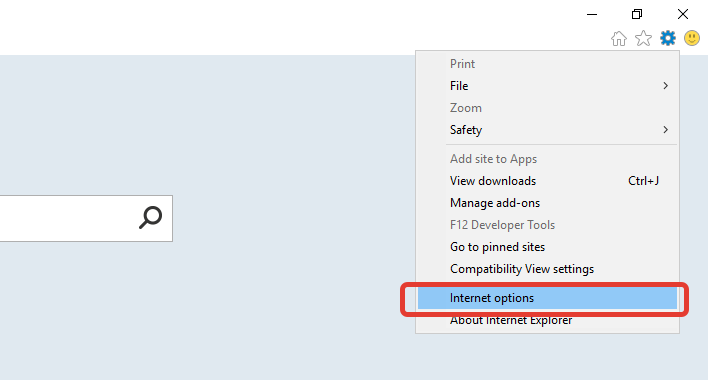
如果您的代理需要身份验证,请使用以下代码创建包含以下代码的文件”每个步骤脚本工具.config”,并保存到每个步骤脚本工具安装目录(C:_程序文件 (x86)\Dotcom-Monitor\每个步骤脚本工具):
<?xml version="1.0"?>
<configuration>
  <configSections>
    <section name="appConfiguration" type="CommonUtils.Configuration.AppConfigurationReader, CommonUtils"/>
  </configSections>
  <system.net>
    <settings>
      <socket alwaysUseCompletionPortsForConnect="false"/>
    </settings>

    <defaultProxy enabled="true"></defaultProxy>
  </system.net>

  <appConfiguration>
    <Class Name="RecorderContext" Owner="*" TypeInfo="Assembly" Type="Dotcom.Proxy.Recorder">
      <Dotcom.Proxy.Recorder.RecorderContext>
        <RequireWCFProxyAuthentication>True</RequireWCFProxyAuthentication>
      </Dotcom.Proxy.Recorder.RecorderContext>
    </Class>
  </appConfiguration>
<startup><supportedRuntime version="v4.0" sku=".NETFramework,Version=v4.5"/>
</startup>
</configuration>