
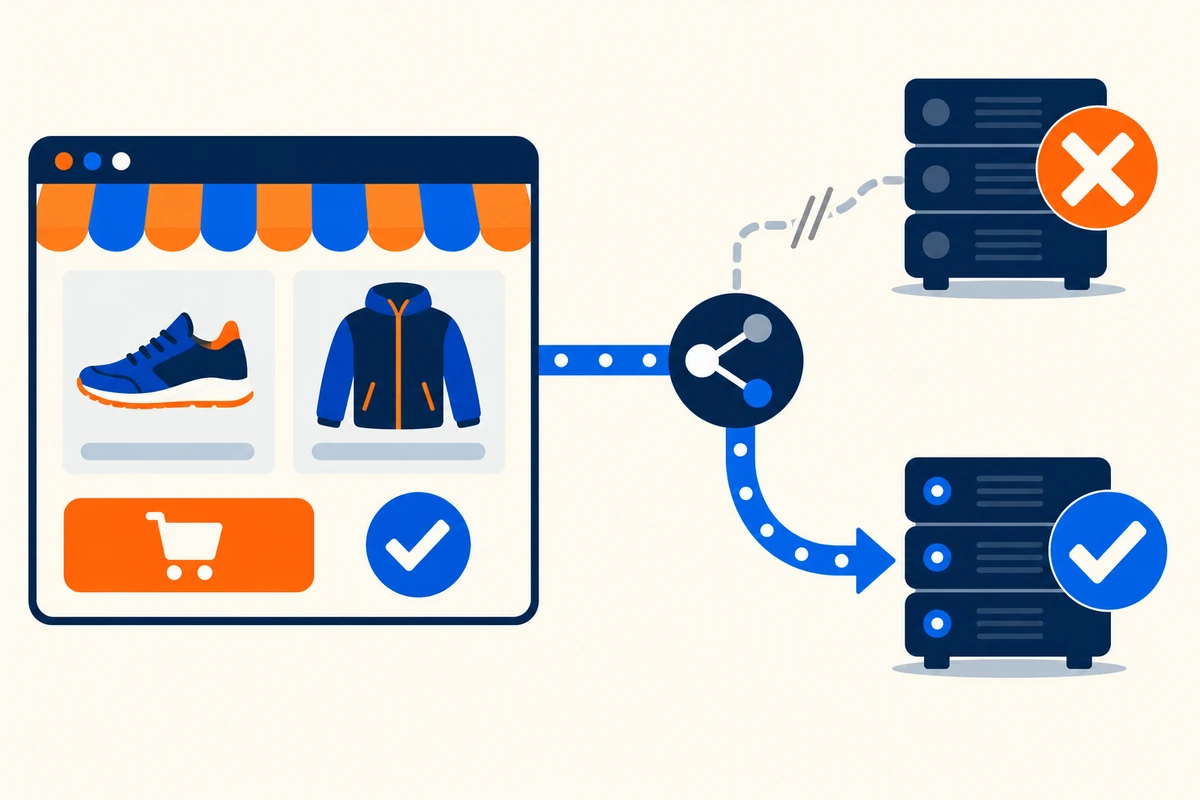
On October 20, 2025, a DNS resolution failure affecting DynamoDB endpoints in AWS us-east-1 cascaded into hours of disruption for Snapchat, Venmo, Roblox, and thousands of smaller services. None of those teams picked bad hosting or forgot to monitor. One shared dependency failed, and everything stacked on top of it went down together.
That is the uncomfortable truth about website downtime: it rarely comes from the thing you were watching. It comes from the deploy that went sideways at 4 p.m., the TLS certificate that expired on a Saturday, the traffic spike your autoscaler met thirty seconds too late. Generic advice like “choose a good host” does not survive contact with any of those.
If you want to prevent website downtime, these are the controls that do: redundancy that keeps one failure from becoming an outage, DNS that fails over, deployments that never require taking the site down, surge readiness, and monitoring that tells you before your customers do.
What an Hour of Downtime Actually Costs
Uptime targets are written in nines, and the arithmetic behind them is less forgiving than it looks. Each added nine cuts your allowable downtime by a factor of ten:
| Availability | Downtime per year | Downtime per month |
|---|---|---|
| 99% (“two nines”) | 3.65 days | 7.3 hours |
| 99.9% (“three nines”) | 8.77 hours | 43.8 minutes |
| 99.95% | 4.38 hours | 21.9 minutes |
| 99.99% (“four nines”) | 52.6 minutes | 4.4 minutes |
| 99.999% (“five nines”) | 5.26 minutes | 26 seconds |
Translate that into money and the stakes get concrete. ITIC’s annual survey has put the hourly cost of downtime above $300,000 for more than 90% of mid-size and large enterprises. Your number is easier to estimate than most teams assume: annual online revenue divided by 8,760 gives a baseline hourly figure, but outages rarely land on ordinary hours. A store doing $5M a year loses roughly $570 in a random hour and twenty times that in a peak-sale hour, before counting SLA credits, recovery labor, and the customers who do not come back.
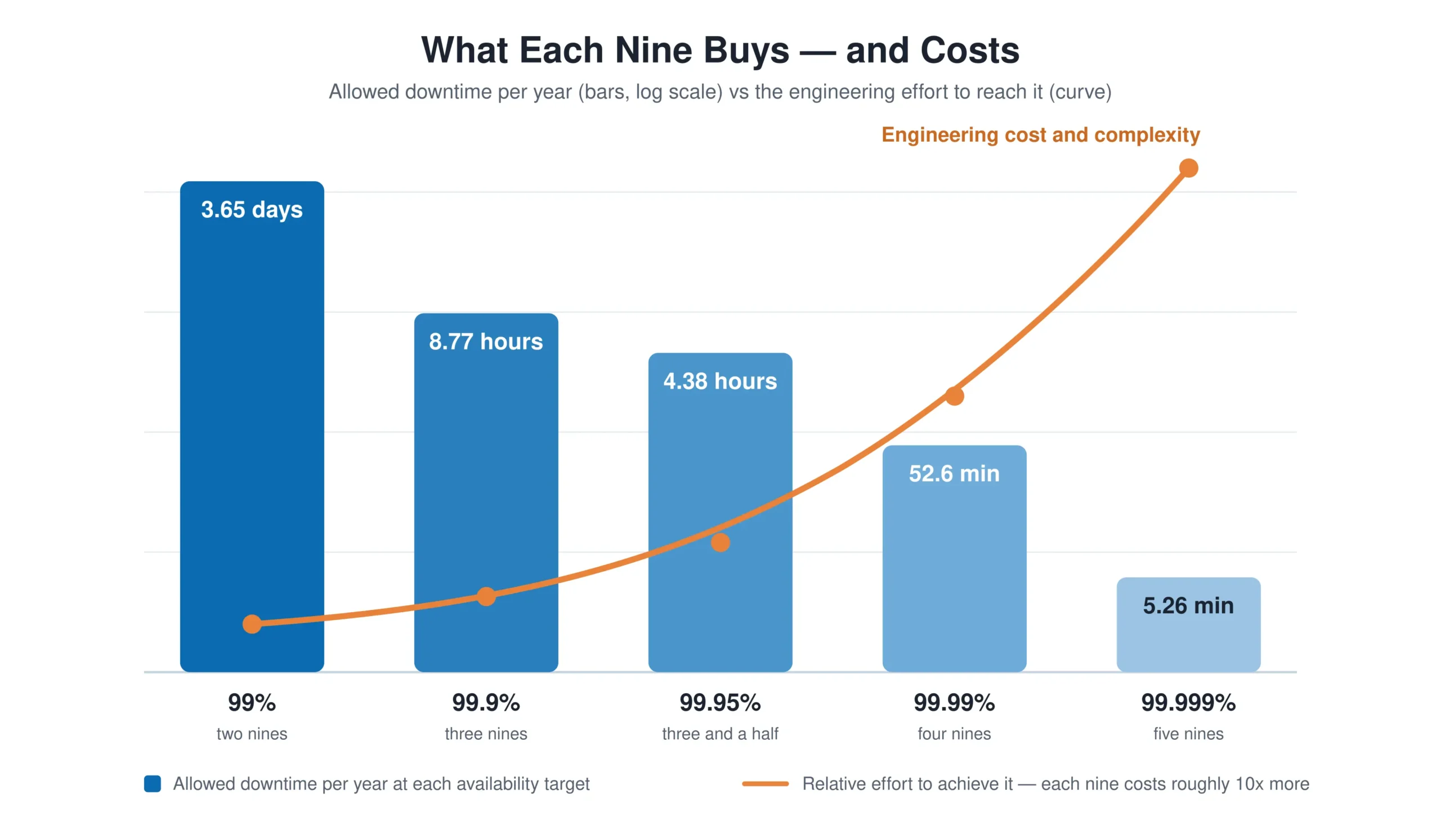
Two practical uses for this math. First, pick a target on purpose: three nines is a defensible goal for most business sites, four nines for revenue-critical paths, and five nines is a budget decision, not a default. Second, check what your vendors promise against what their credits refund; our SLA breach calculator does the conversion, and our guide to the cost of downtime goes deeper on the revenue model.
Why Websites Go Down in the First Place
Prevention starts with an honest inventory of causes. Most website outages fall into five practical buckets:
- Changes. Deploys, config edits, schema migrations, dependency upgrades. Google’s SRE research attributes roughly 70% of outages to a change in a live system, which makes your release process the single biggest downtime lever you own.
- Capacity. Traffic surges from launches, campaigns, or virality that outrun what the infrastructure can absorb.
- Infrastructure. Hardware failures, host outages, full disks, network partitions inside your provider.
- Dependencies. DNS providers, CDNs, payment APIs, auth services, expiring TLS certificates. The Fastly outage of June 2021 took Reddit, gov.uk, and the New York Times offline in seconds, and none of them had changed anything.
- Attacks. DDoS floods and exploited vulnerabilities that overwhelm or compromise the stack.
Notice what is missing: “bad hosting” as a standalone category. Hosting quality matters, but it shows up inside infrastructure and capacity, and no premium host protects you from your own deploys or your DNS provider’s bad day. The practices below map to these five buckets deliberately.
Build Redundancy So One Failure Stays One Failure
Redundancy is the difference between a component failure and an outage. The goal is simple to state and takes discipline to reach: no single point of failure between your users and your revenue.
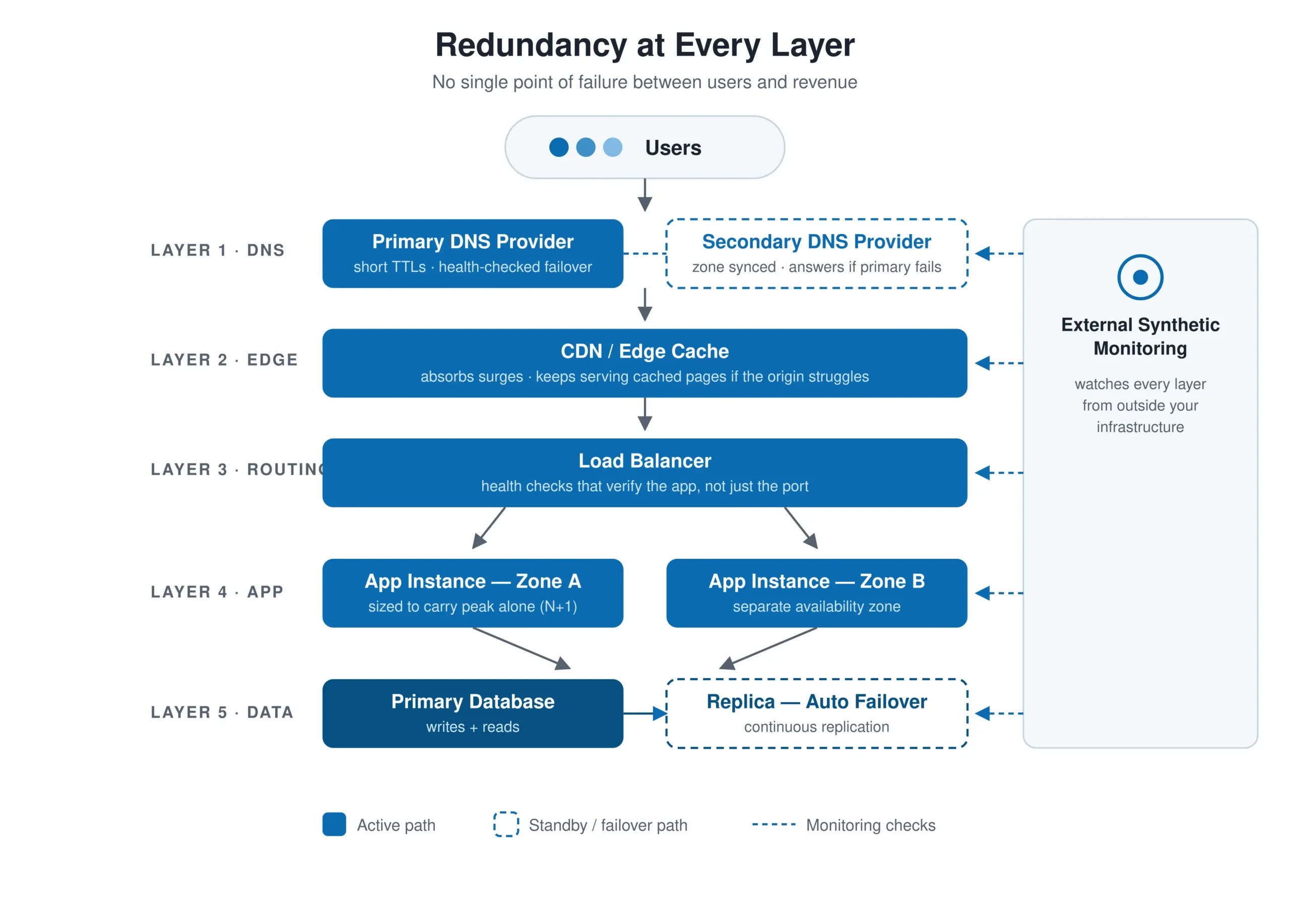
Work through the stack layer by layer:
- Application servers. Run at least two instances behind a load balancer, sized so the site survives losing one at peak traffic (the N+1 rule). Spread them across availability zones so a data-center event takes out one instance, not both.
- Load balancing with health checks. A load balancer only prevents downtime if its health checks actually verify the application, not just the port. Point them at a readiness URL that proves the app can serve traffic, keep separate synthetic checks on database-backed flows, and set thresholds so a slow instance gets pulled before users notice.
- Data. Run a database replica with automated failover, and treat backups as untested rumors until you have restored one. Recovery time from backup is a number you should know, not discover.
- Multi-region. This is the expensive tier. Most teams do not need active-active setups, but a warm standby in another location, kept current by replication and reachable by DNS failover, can turn a regional cloud outage from many hours offline into minutes, provided the failover has been tested.
Redundancy you have never failed over is a hypothesis, not a safeguard. Schedule failover drills the way you schedule backups: kill an instance in production hours on purpose and watch whether the system heals.
One caution from the incident record: redundant infrastructure often shares a control plane. Fastly had plenty of redundant hardware; a latent software bug, triggered by one valid customer configuration change, sent errors across roughly 85% of its global network at once. Treat configuration, deployment tooling, and DNS as layers that need their own redundancy story.
How to Reduce Downtime Risk When Hosting Web Applications
Hosting decisions set your downtime floor. Before signing with any provider, read the SLA as a skeptic: 99.9% still permits 8.77 hours a year of contractually acceptable downtime, and the typical remedy is a service credit worth a fraction of what the outage cost you. Look past the marketing number to the operational signals: a public status page with honest incident history, support that answers at 3 a.m. with engineers rather than scripts, and architecture options (availability zones, load balancers, autoscaling) that let you build the redundancy described above.
Then place the workload deliberately. Separate the application and database onto different instances so a memory leak in one cannot starve the other. Prefer providers and plans that let capacity scale without a migration, because replatforming under duress is how small outages become long ones.
Getting More Uptime From Your Current Hosting Provider
You rarely need to migrate to cut downtime risk. Most providers already expose the tools; few enable them by default. In rough order of payoff:
- Step 1: Turn on automated backups, then test a restore. Time it. That duration is your worst-case recovery, and finding out it is six hours during an incident is the expensive way to learn.
- Step 2: Add a second application instance behind the provider’s load balancer. Even on modest plans this is usually a checkbox and a few dollars, and it converts instance failure from an outage into a non-event.
- Step 3: Put a CDN in front of the site. Cached pages, especially with stale-if-error configured, keep serving while the origin struggles, which softens surges and short outages alike.
- Step 4: Enable autoscaling with a floor of two instances. Starting from one instance means the site is already degraded before autoscaling kicks in.
- Step 5: Monitor from outside the provider’s network. A host’s own status dashboard often lags its outages and rarely shows your specific impact. External availability monitoring catches what the provider’s internal view cannot.
- Step 6: Learn the escalation path before you need it. Know how to reach real support, what your plan entitles you to, and where the provider posts incident updates.
Make DNS a Resilience Layer, Not a Single Point of Failure
DNS is the layer teams forget because outages there are rare, and when DNS breaks it takes everything with it: perfect servers, healthy database, and not one user able to reach them. The 2016 DDoS attack on Dyn made this vivid. Twitter, Spotify, and GitHub disappeared for hours, while companies running a second DNS provider stayed reachable.
Three practices turn DNS from a hidden liability into an active defense:
- Run a secondary DNS provider. Configure a second authoritative provider that syncs your zone automatically. Most recursive resolvers retry the second set of nameservers on their own, so losing one provider typically costs you a support ticket, not your reachability.
- Set TTLs for agility. A 24-hour TTL on your main A record means a failover takes up to a day to reach every resolver. Keep records you might need to change at 300 seconds or less, and lower TTLs ahead of planned migrations.
- Use health-checked DNS failover. Most managed DNS services can probe your origin and switch records to a standby IP or region automatically. Combined with the warm standby from the redundancy section, this is the mechanism that makes multi-region actually fail over.
Then close the loop: resolution problems are invisible from inside your network, so DNS monitoring from multiple external vantage points is the practical way to confirm your records answer correctly where real users are.
How to Update Your Website Without Taking It Down
Since changes cause most outages, the highest-leverage practice in this guide is a release process that never requires downtime and can undo itself in seconds.
For routine content updates, the bar is simple: publishing through your CMS should not touch availability at all. Serve pages through a CDN or full-page cache, stage changes on a copy of the site, and push them live atomically. Schedule riskier work, like plugin and theme updates on WordPress, in a staging environment first, and always during off-peak hours.
For application releases, the industry-standard pattern is deploying alongside the live version instead of on top of it:
- Step 1: Stand up a parallel environment. Blue-green deployment keeps two identical production environments, one live and one idle. Teams on orchestrated platforms can use rolling replacement across instances instead; the principle is the same, because some version is always serving traffic.
- Step 2: Make database changes backwards-compatible. Schema migrations are why “just roll back” fails. Use the expand-and-contract pattern: add new columns and tables first, ship code that works with both shapes, and drop the old structures in a later release once nothing references them.
- Step 3: Deploy to the idle environment. Or to a canary slice of 5 to 10% of instances. Users keep hitting the current version while the new one starts up, warms caches, and connects to dependencies.
- Step 4: Smoke-test before traffic arrives. Hit the new version with synthetic checks: load the key pages, run a scripted login and checkout, verify API responses. A release that fails here costs you nothing but a redeploy.
- Step 5: Shift traffic gradually. Move 10% of traffic via load balancer weights, watch error rates and response times against the old version, then advance to 50% and 100% as the numbers hold.
- Step 6: Keep instant rollback ready. Leave the previous environment running until the release proves itself. Rollback should be one traffic switch taking seconds, not a rebuild taking an hour.
When genuine maintenance downtime is unavoidable, make it honest: return HTTP 503 with a Retry-After header so search engines treat the window as temporary, show users a page that says when you will be back, and announce it in advance. A planned 20-minute window communicated well damages you less than five unexplained minutes.
How to Prevent Website Downtime During Traffic Surges
Traffic surges are the most predictable cause of downtime because you usually create them yourself: a product launch, a campaign, a sale, an email to your whole list. Surviving them is a rehearsal problem, not a luck problem.
- Push work to the edge. A CDN serving cached pages can absorb a surge that would flatten your origin. Cutting a page from hundreds of origin requests to a handful separates scrambling to add servers from shrugging off the spike.
- Pre-scale for planned events. Autoscaling reacts in minutes; a surge from a TV spot arrives in seconds. For events you can see coming, scale to forecast capacity beforehand and let autoscaling handle the error bars.
- Load test at 2 to 3 times the forecast. Forecasts usually miss on the low side. Testing well past the expected peak reveals the real bottleneck, which is rarely the web tier and usually the database, an internal API, or a third-party call that serializes under load.
- Queue the overflow. For extreme events, a waiting room that admits users at a sustainable rate keeps the site functional for everyone admitted, which beats being down for everyone.
- Degrade gracefully. Wire feature flags so you can shed recommendations, search suggestions, and personalization under load while checkout stays up. Deciding what dies first is an architecture decision to make calmly in advance, not during the spike.
Monitoring and Alerting: Find Out Before Your Users Do
Every practice above reduces the odds of downtime. Monitoring bounds its duration, because total downtime is detection time plus response time plus repair time, and detection is the cheapest of the three to compress.
Build the monitoring layer in this order:
- Step 1: Check availability externally, from multiple regions. Internal monitoring shares fate with your infrastructure and dies with it. Independent synthetic monitoring from several geographic locations catches regional failures and provider problems your own dashboards cannot see. How checks rotate across locations matters too; see concurrent vs round-robin monitoring for the trade-off.
- Step 2: Check every layer that can fail, not just the homepage. A 200 from the homepage proves little while checkout is broken. Monitor DNS resolution, TLS certificate expiry, the APIs your frontend depends on, and full user transactions like login and purchase in a real browser.
- Step 3: Match check frequency to your uptime target. Five-minute checks cannot defend a four-nines SLA that allows 4.4 minutes of downtime a month. One-minute frequency on revenue paths, relaxed intervals on the rest.
- Step 4: Alert on symptoms, and verify before waking anyone. Page the on-call engineer for user-visible failure, not for every CPU wobble. Require confirmation from a second location before an alert fires, which eliminates most false positives. Our guide to website monitoring alerts covers escalation design and noise reduction in depth.
Do the arithmetic on your own stack: checks every five minutes plus fifteen minutes of human response means twenty minutes of downtime before repair even starts. At one-minute checks with a tight escalation path, the same incident starts shrinking in under five.
Incident Response: Shrink the Downtime You Didn’t Prevent
Some downtime will reach you anyway, and teams that rehearse for it recover in a fraction of the time. Three elements do most of the work:
- Runbooks for the predictable failures. Certificate expired, database failover, region down, DDoS in progress: each gets a checklist with exact commands and decision points. At 3 a.m., nobody improvises well.
- A status page you actually update. Silence during an outage multiplies its reputation cost. Acknowledge within minutes, update on a stated cadence, and write like a human.
- Blameless postmortems with deadlines. Every incident yields action items with owners and dates, or it yields a rerun. Track mean time to detect and mean time to recover quarter over quarter; those two numbers tell you whether this whole system is improving.
How Dotcom-Monitor Helps You Minimize Downtime
Dotcom-Monitor is the detection layer for everything this guide describes: an uptime monitoring platform that watches your site from a global network of monitoring locations, the external vantage point your own infrastructure cannot provide.
- Real-browser monitoring. Pages load in actual browser instances from external monitoring locations, capturing render times, element-level errors, and a waterfall chart plus video for root-cause work when something breaks.
- Transaction monitoring with EveryStep scripting. Record multi-step flows like login, search, and checkout, then replay them continuously from multiple regions through web application monitoring. This is the smoke test from the deployment section, running around the clock.
- Multi-protocol coverage. HTTP(S), REST and SOAP APIs, DNS resolution, TLS certificate validity and expiry, FTP, mail, and TCP/ICMP infrastructure checks, so the dependency layers get watched alongside the pages.
- Alerting built for uptime. Multi-location verification before an alert fires, escalation groups, and integrations with the paging and chat tools your on-call already uses.
Detection time is the first number in the downtime equation. Dotcom-Monitor exists to keep it small.
The Bottom Line
Minimizing website downtime is not one decision but a stack of them: redundancy so a component failure stays invisible, a secondary DNS provider so the layer everyone forgets cannot erase you, blue-green releases so the most common cause of outages (your own changes) stops causing them, rehearsed capacity for the surges you create, and external monitoring so the incidents that slip through are measured in minutes.
Start with the cheapest wins: test a backup restore this week, check your DNS TTLs today, and put external checks on your revenue path before your next deploy. Every hour of downtime you prevent is worth more than the afternoon each of these takes.
See Your Downtime Before Your Users Do
Put real-browser uptime monitoring on your site from a global network, with alerts that verify before they fire. Full platform, free to try, no credit card required. Start a free trial.
