Home » 产品 » 路由跟踪监控

Traceroute 监控:通过高级 Traceroute 分析 pinpoint 网络问题

更快识别并解决网络延迟和路由问题
Dotcom-Monitor 的 Traceroute 监控提供实时网络诊断,帮助您快速识别和排查互联网连接和延迟问题。通过强大的视觉 Traceroute,您可以清晰、图形化地展示网络路径、每跳延迟和潜在故障点。
monitor status

主动网络路由分析

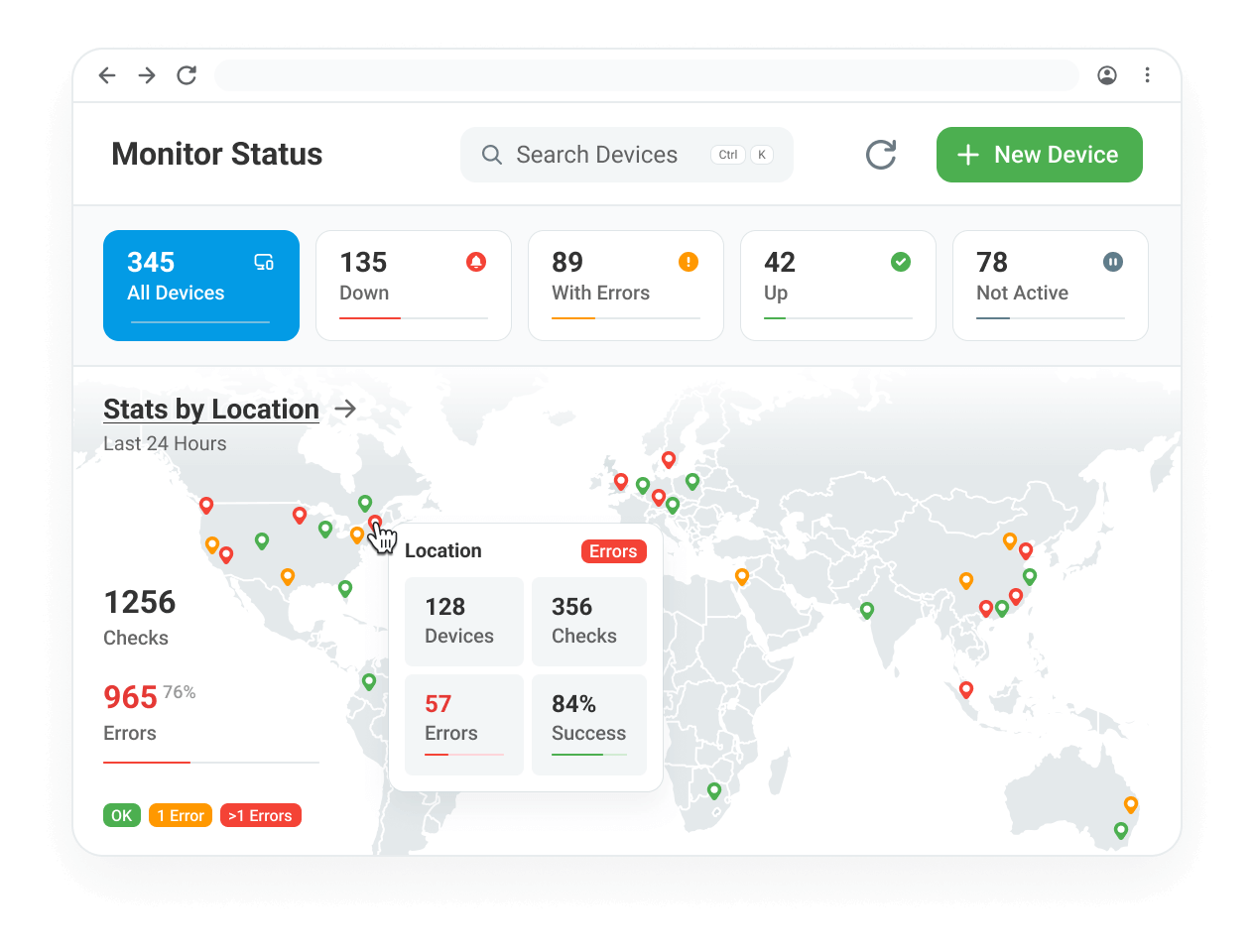
Traceroute 监控持续追踪您的数据包从全球多个位置的路由。通过分析每跳并识别错误、网络拥塞或丢包,您可以深入了解全球各地的延迟和性能瓶颈。
location checks
可视化网络路径

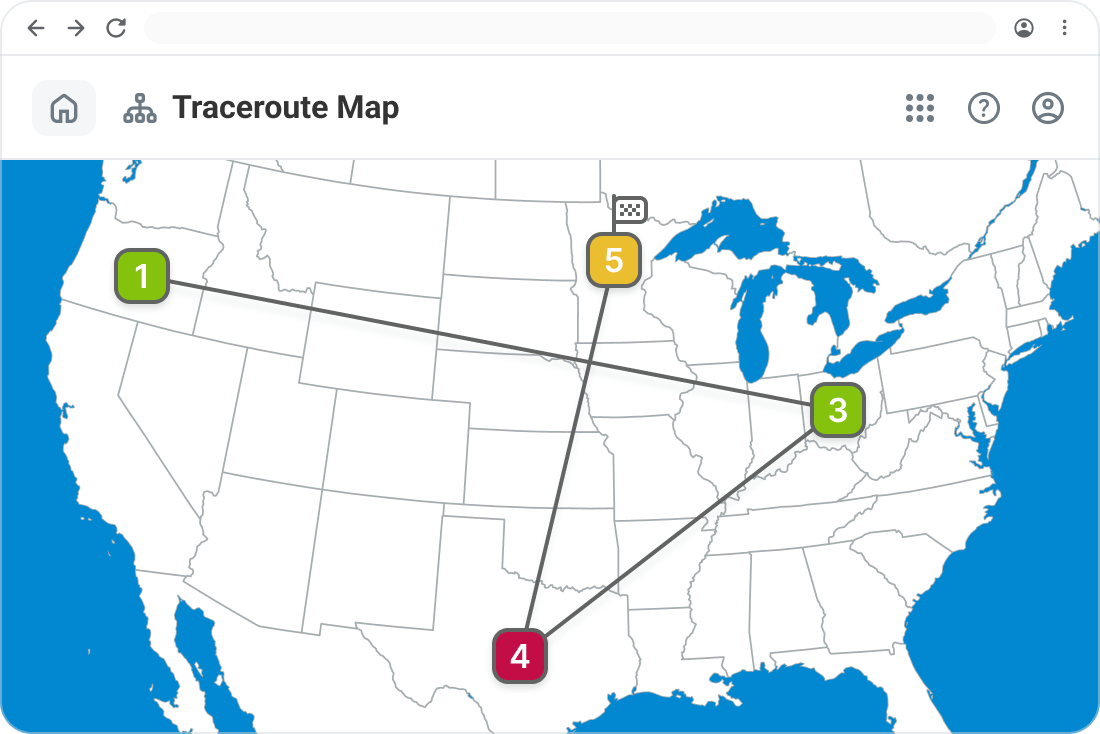
通过直观的基于地图的界面查看数据包路径中的每一跳和 IP 地址。

alerting
实时告警

当网络路径上发生异常、丢包或延迟时,立即接收通知。

zero downtime
识别丢包和延迟问题

检测导致客户性能下降的问题网络节点。

工作原理

Automatic Network Traceroute

自动网络 Traceroute 执行

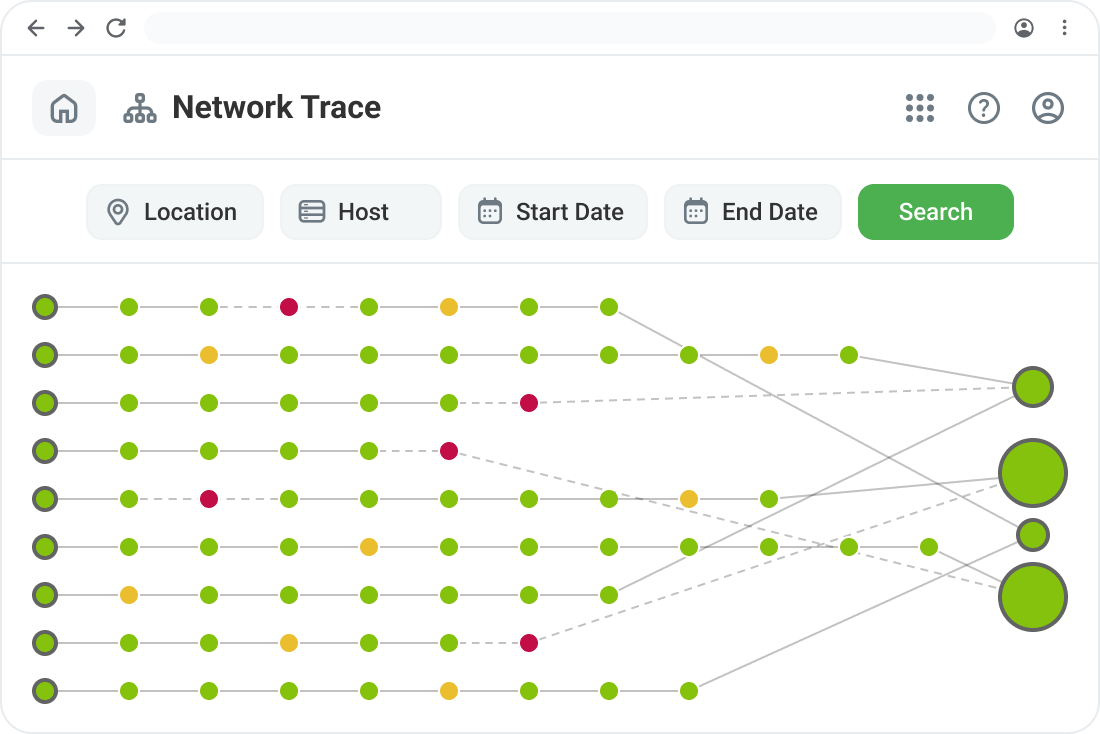
我们的监控代理按照预定时间间隔运行网络 traceroute 以跟踪路由性能。此外,当检测到网络错误时,会触发 traceroute 以提供实时诊断数据进行故障排查,确保您随时掌握相关网络路径信息。

  • 30 跳的网络路由可视化。
  • 颜色编码的性能指示器(绿色表示正常,黄色表示丢包,红色表示跳点失败)。
  • 详细的节点信息,包括主机名、IP、最小/最大/平均响应时间及错误。

视觉 Traceroute:获取清晰的网络洞察

传统 traceroute 仅提供原始数据,而 Dotcom-Monitor 的 Visual Traceroute 通过网络路径的图形化展示增强了故障排查。

  • 地图视图:理解数据包流动并地理定位故障点。
  • 历史数据:对比过去的 traceroute,识别持续和历史路由问题。
  • 可定制的监控位置:从不同区域测试连通性,查看用户如何全球访问您的网络和服务。
Visual Traceroute Map
performance engineering experts

使用案例:为何需要 Traceroute 监控

网络工程师、IT 管理员和网站所有者依赖 Traceroute 监控来:

  • 诊断因网络延迟导致的网站或应用性能缓慢。
  • 识别影响客户体验的 ISP 路由问题。
  • 监控多云网络性能以检测配置错误。
  • 排查防火墙、VPN 和内部网络路径问题。
global monitoring

核心功能一览

private location monitoring
自动 Traceroute

遇到性能问题时自动触发。

万维网
全球测试地点

监控来自多个区域的路由。

绩效报告
颜色编码可视化

即时识别问题区域。

报告
网络路由追踪

深入了解网络路由路径,逐跳性能及丢包检测。

网络网络
基于地图的视图

轻松解读和诊断路由问题。

警报
可自定义警报

当网络状况变化时收到通知。

capterra
star rating
get-app
star rating

全球企业的信赖选择

我们的客户依靠 Dotcom-Monitor 确保其用户获得卓越体验,帮助维持高度的信任和忠诚度。这就是为什么我们承诺确保 Dotcom-Monitor 超出您的期望。
"I absolutely love the comprehensive monitoring services Dotcom-Monitor provides. The real-time alerts and detailed performance analytics have been a game-changer for our website's uptime and speed. The global monitoring feature ensures that our site is optimized everywhere, and the intuitive dashboard makes it easy to track performance. Their customer support is exceptional — always responsive and efficient."
Tomer C.
Managing Director · Facilities Services
Verified Capterra review · March 2025
"One of Dotcom's best features is the push/pull API capabilities that provide us with network performance data. We use this to monitor for performance issues as well as page loading stats. Dotcom-Monitor allows us to monitor multiple services within one interface and platform. It's allowed us to operate more efficiently."
Gregory S.
Manager · Broadcast Media
Verified Capterra review · May 2020
"I have been thoroughly impressed with the level of detail and comprehensiveness of the reports generated by the software. Moreover, the support team at Dotcom-Monitor has exceeded my expectations. On almost a daily basis, I reach out with various questions and they have consistently demonstrated unwavering patience, providing detailed and insightful answers."
Shirin R.
Software Test Engineer · Computer Software
Verified Capterra review · February 2023
"I'm a network analyst and use Dotcom tools inside the ISP I work, it's a really good and reliable tool for monitoring things along the network, and testing network components, I usually use it to make diagnostics of servers latency, and dns resolve time."
Leonardo J.
IT & Network Infrastructure Analyst Internet
Verified Capterra review · October 2022
获取答案

常见问题

以下是一些关于路由追踪监控的常见问题。如有其他疑问,欢迎联系我们

路由追踪监控是一种网络诊断工具,追踪数据包在互联网上的传输路径,识别出现缓慢、丢包或故障的位置。Dotcom-Monitor 的可视化路由追踪提供了这些路径的图形表示,使故障排查快速高效。

与传统路由追踪工具不同,可视化路由追踪以基于地图的界面展示网络路径,并通过颜色编码指示。这使 IT 团队能够迅速定位问题区域,分析历史趋势,且更有效地解决网络问题。

可以!Dotcom-Monitor 支持从多个全球地点进行路由追踪测试,帮助您了解不同区域的网络路径差异,并检测特定地点的路由问题。

路由追踪可以按照预定间隔运行,间隔可配置为每1分钟至每3小时,允许您根据具体需求定制监控频率。

掌控您的网络性能
路由追踪监控确保您不必猜测网络问题发生在哪里。无论您是在管理全球基础设施还是排查本地连接问题,Dotcom-Monitor 都能实时显示每跳、ISP 及路由详情。