
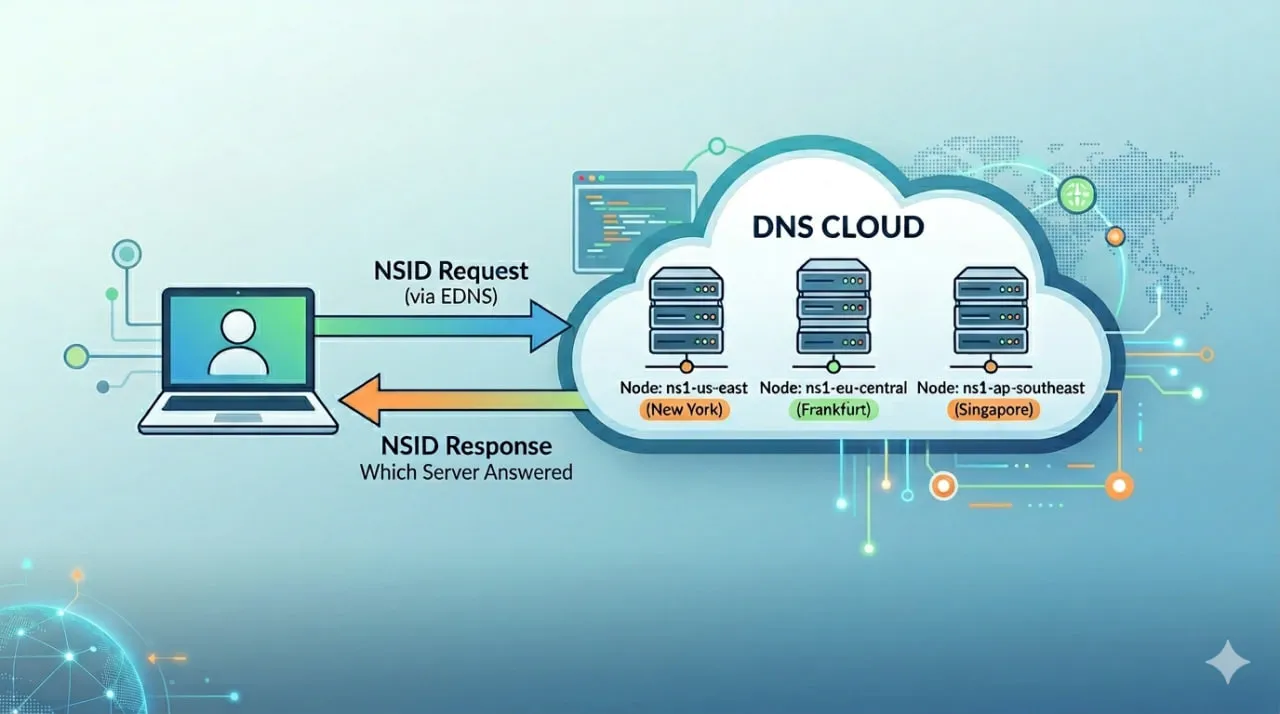
¿Qué es DNS NSID? (Respuesta Rápida)
NSID (Identificador de Servidor de Nombre) es una extensión de DNS que permite a un servidor DNS incluir un identificador en su respuesta, revelando exactamente qué servidor manejó la consulta.
Se usa comúnmente para:
- Identificar nodos DNS detrás de IPs anycast
- Solucionar respuestas DNS inconsistentes
- Verificar el enrutamiento entre regiones y proveedores
El Problema: DNS No Te Dice Quién Respondió
Aquí un escenario del mundo real:
- Mismo dominio
- Misma consulta DNS
- Diferentes respuestas según la ubicación
Realizas verificaciones desde Nueva York y Frankfurt. Las respuestas no coinciden. O tal vez sí, pero el comportamiento aún parece extraño.
Ahora te quedas preguntando:
👉 ¿Qué servidor DNS respondió realmente?
El monitoreo DNS tradicional no te lo dirá. Muestra:
- Éxito en la resolución
- Tiempo de respuesta
- IP devuelta
Pero no la identidad del servidor que respondió.
Ese es el vacío que llena NSID.
Cómo Funciona DNS NSID
Cuando NSID está habilitado:
- Una consulta DNS incluye una solicitud NSID (a través de EDNS)
- El servidor DNS procesa la consulta
- La respuesta incluye un valor NSID
Este valor representa el servidor que manejó la solicitud.
Puede aparecer como:
- Un identificador legible (por ejemplo, región o nombre de host)
- Un valor en crudo o codificado (dependiendo del proveedor)
Por Qué NSID Importa en la Solución de Problemas DNS
El DNS moderno es distribuido y dinámico. Una sola IP puede representar docenas de servidores backend.
Sin NSID:
- Ves resultados inconsistentes
- Adivinas qué está pasando
Con NSID:
- Sabes qué servidor respondió
- Puedes rastrear problemas a nodos o regiones específicas
¿Para Qué Se Usa DNS NSID?
DNS NSID se usa comúnmente para:
- Identificar servidores DNS detrás de redes anycast
- Solucionar respuestas DNS inconsistentes
- Verificar la propagación DNS entre regiones
- Depurar configuraciones DNS multi-proveedor
- Analizar el comportamiento de CDN y DNS de borde
Casos de Uso en el Mundo Real
1. Depuración de DNS Anycast
Misma IP, diferentes servidores detrás.
NSID te permite:
- Ver qué nodo manejó la solicitud
- Confirmar el comportamiento del enrutamiento
2. GeoDNS y Deriva Regional
Diferentes regiones devuelven resultados diferentes.
NSID te ayuda a:
- Identificar qué nodos DNS regionales están respondiendo
- Validar la propagación entre ubicaciones
3. Failover DNS Multi-Proveedor
¿Usas varios proveedores DNS?
NSID muestra:
- Qué proveedor respondió
- Si realmente ocurrió un failover
4. Problemas de Resolución CDN y de Borde
Los CDN dependen mucho del enrutamiento DNS.
NSID te permite:
- Identificar qué resolutor manejó la solicitud
- Correlacionar el comportamiento DNS con problemas de rendimiento
Monitoreo NSID en Dotcom-Monitor
Dotcom-Monitor ahora incluye visibilidad NSID en los resultados del monitoreo DNS, dándote una visión directa de qué servidor DNS respondió a cada consulta.
Lo que esto significa en la práctica:
- Captura valores NSID en crudo de las respuestas DNS
- Disponible en todas las verificaciones DNS
- Recolectado desde ubicaciones globales de monitoreo
- Mostrado directamente en los resultados para solución de problemas
👉 Configura el monitoreo DNS:
https://www.dotcom-monitor.com/wiki/knowledge-base/add-edit-a-dns-task/
Ejemplo: NSID en Distintas Regiones
Ejecuta la misma consulta DNS desde varias ubicaciones:
Frankfurt:
- Respuesta: 192.0.2.1
- NSID: ns1-eu-central-1
Nueva York:
- Respuesta: 192.0.2.1
- NSID: ns1-us-east-1
Misma respuesta — diferentes servidores.
Esa es una visibilidad que no tenías antes.
Cómo NSID Mejora el Monitoreo Sintético
La mayoría de las herramientas de monitoreo se detienen en:
- ¿Se resolvió?
- ¿Qué tan rápido?
Pero los sistemas modernos necesitan más.
NSID agrega:
👉 Qué sistema respondió
Combinado con monitoreo global, esto te ayuda a:
- Detectar inconsistencias en el enrutamiento
- Validar la arquitectura DNS
- Solucionar problemas específicos de regiones
Cómo Usar NSID para Solución de Problemas DNS
Sigue este proceso simple:
- Realiza verificaciones DNS desde múltiples ubicaciones geográficas
- Compara las direcciones IP devueltas
- Compara los valores NSID entre los resultados
- Identifica cuáles servidores DNS respondieron
- Correlaciona inconsistencias con regiones o nodos específicos
¿Todos los Servidores DNS Soportan NSID?
No.
- El soporte NSID depende de la configuración del servidor DNS
- Algunos proveedores lo desactivan
- Algunos devuelven valores no legibles
Pero cuando está disponible, es una de las señales más útiles para depurar DNS.
Reflexiones Finales
Los problemas DNS hoy no son solo “funciona o no funciona.”
Son:
- Regionales
- Específicos de proveedor
- Específicos de nodo
NSID te da visibilidad del sistema real detrás de la respuesta.
Y combinado con el monitoreo sintético global, se convierte en una herramienta práctica de depuración real — no solo una característica de protocolo que la mayoría de equipos nunca usa.
