
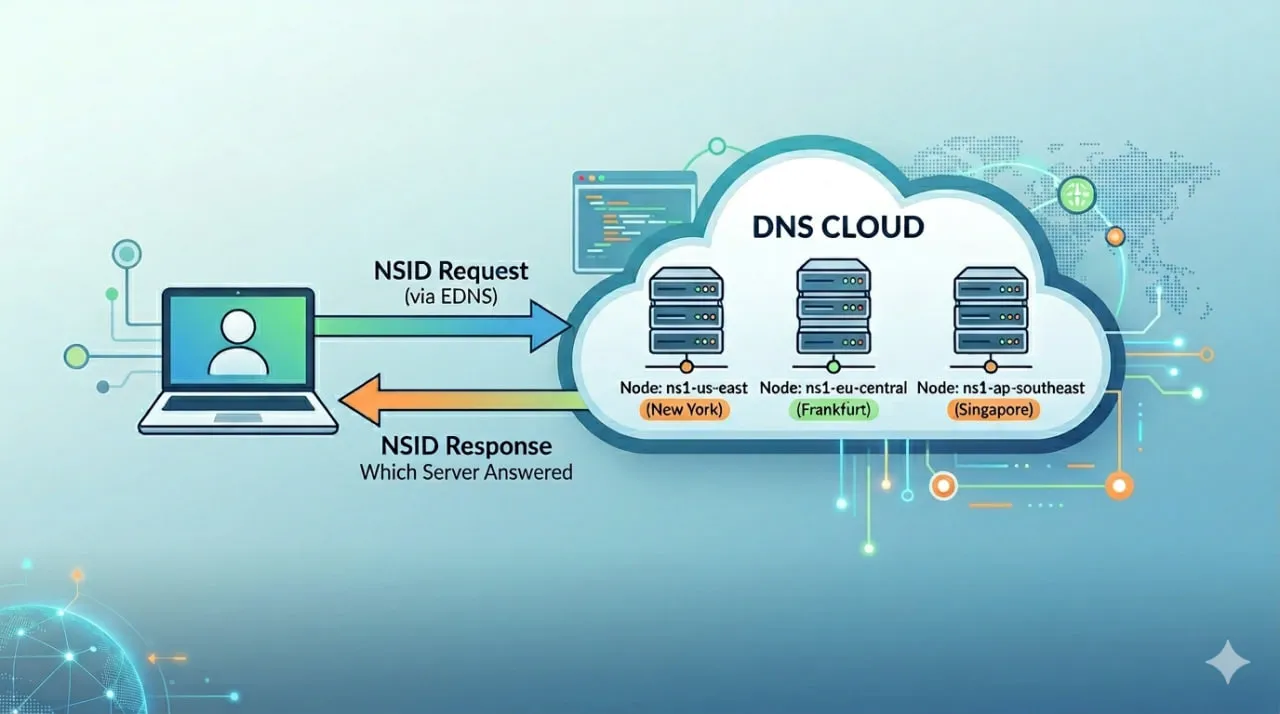
O que é DNS NSID? (Resposta rápida)
NSID (Identificador do Servidor de Nomes) é uma extensão do DNS que permite que um servidor DNS inclua um identificador em sua resposta, revelando exatamente qual servidor respondeu à consulta.
É comumente usado para:
- Identificar nós DNS por trás de IPs anycast
- Solucionar problemas de respostas DNS inconsistentes
- Verificar roteamento entre regiões e provedores
O Problema: O DNS Não Diz Quem Respondeu
Aqui está um cenário do mundo real:
- Mesmo domínio
- Mesma consulta DNS
- Respostas diferentes dependendo da localização
Você executa verificações de Nova York e Frankfurt. As respostas não coincidem. Ou talvez coincidam — mas o comportamento ainda parece estranho.
Agora você fica se perguntando:
👉 Qual servidor DNS realmente respondeu?
O monitoramento DNS tradicional não informa isso. Ele mostra:
- Sucesso da resolução
- Tempo de resposta
- IP retornado
Mas não a identidade do servidor que respondeu.
Essa é a lacuna que o NSID preenche.
Como o DNS NSID Funciona
Quando o NSID está habilitado:
- Uma consulta DNS inclui um pedido NSID (via EDNS)
- O servidor DNS processa a consulta
- A resposta inclui um valor NSID
Esse valor representa o servidor que lidou com o pedido.
Pode aparecer como:
- Um identificador legível (por exemplo, região ou nome do host)
- Um valor bruto ou codificado (dependendo do provedor)
Por Que o NSID é Importante na Solução de Problemas DNS
O DNS moderno é distribuído e dinâmico. Um único IP pode representar dezenas de servidores backend.
Sem NSID:
- Você vê resultados inconsistentes
- Você apenas supõe o que está acontecendo
Com NSID:
- Você sabe qual servidor respondeu
- Você pode rastrear problemas até nós ou regiões específicas
Para Que Serve o DNS NSID?
O DNS NSID é comumente usado para:
- Identificar servidores DNS por trás de redes anycast
- Resolver problemas de respostas DNS inconsistentes
- Verificar propagação DNS entre regiões
- Depurar configurações DNS com múltiplos provedores
- Analisar CDN e comportamento do DNS de edge
Casos de Uso no Mundo Real
1. Depuração de DNS Anycast
Mesmo IP, servidores diferentes por trás dele.
O NSID permite que você:
- Veja qual nó atendeu à solicitação
- Confirme o comportamento do roteamento
2. GeoDNS & Variação Regional
Regiões diferentes retornam resultados diferentes.
O NSID ajuda você a:
- Identificar quais nós DNS regionais estão respondendo
- Validar a propagação entre locais
3. Failover DNS com Múltiplos Provedores
Usa múltiplos provedores de DNS?
O NSID mostra:
- Qual provedor respondeu
- Se o failover realmente ocorreu
4. Problemas de Resolução em CDN & Edge
CDNs dependem muito do roteamento DNS.
O NSID permite que você:
- Identifique qual resolvedor tratou a solicitação
- Correlacione o comportamento do DNS com problemas de performance
Monitoramento NSID no Dotcom-Monitor
O Dotcom-Monitor agora inclui visibilidade NSID nos resultados de monitoramento DNS, dando uma visão direta de qual servidor DNS respondeu a cada consulta.
O que isso significa na prática:
- Captura valores NSID brutos das respostas DNS
- Disponível em todas as verificações DNS
- Coletado de locais globais de monitoramento
- Exibido diretamente nos resultados para solução de problemas
👉 Configure o monitoramento DNS:
https://www.dotcom-monitor.com/wiki/knowledge-base/add-edit-a-dns-task/
Exemplo: NSID entre Regiões
Execute a mesma consulta DNS de múltiplos locais:
Frankfurt:
- Resposta: 192.0.2.1
- NSID: ns1-eu-central-1
Nova York:
- Resposta: 192.0.2.1
- NSID: ns1-us-east-1
Mesma resposta — servidores diferentes.
Essa é uma visão que você não tinha antes.
Como o NSID Melhora o Monitoramento Sintético
A maioria das ferramentas de monitoramento para em:
- “Resolveu?”
- “Quão rápido?”
Mas sistemas modernos precisam de mais.
O NSID adiciona:
👉 Qual sistema respondeu
Combinado com monitoramento global, isso ajuda você a:
- Detectar inconsistências de roteamento
- Validar a arquitetura DNS
- Resolver problemas específicos de regiões
Como Usar o NSID para Solucionar Problemas DNS
Siga esse processo simples:
- Execute verificações DNS de múltiplas localizações geográficas
- Compare os endereços IP retornados
- Compare os valores NSID entre os resultados
- Identifique quais servidores DNS responderam
- Correlacione inconsistências com regiões ou nós específicos
Todos os Servidores DNS Suportam NSID?
Não.
- O suporte ao NSID depende da configuração do servidor DNS
- Alguns provedores o desativam
- Alguns retornam valores não legíveis
Mas quando disponível, é um dos sinais mais úteis para depuração DNS.
Considerações Finais
Os problemas de DNS hoje não são apenas “ativo ou inativo”.
Eles são:
- Regionais
- Específicos de provedores
- Específicos de nós
O NSID dá visibilidade do sistema real por trás da resposta.
E quando combinado com o monitoramento sintético global, torna-se uma ferramenta prática e real para depuração — não apenas um recurso de protocolo que a maioria das equipes nunca usa.
