Pesquise “como monitorar um número de telefone” e a maioria dos resultados trata de vigilância. Aplicativos espiões, rastreadores GPS, rastrear quem ligou para você. Esse é um problema diferente para outro leitor.
Este guia é para o lado operacional. Você possui números de telefone que clientes, pacientes ou cidadãos discam para te alcançar, e você precisa saber no momento em que um para de funcionar. Um tronco SIP morto, um menu IVR que direciona para lugar nenhum, uma linha gratuita retornando sinal de ocupado às 2 da manhã. O painel do seu site diz que tudo está verde, porque o site está normal. O telefone não está.
Existem duas maneiras de detectar esse tipo de falha, e elas testam camadas diferentes. Uma faz a ligação de fora, como um chamador real. A outra verifica o sinal SIP de dentro, no servidor. Ambas são úteis, e a questão interessante é quando usar cada uma. Este guia mostra como cada método funciona, o que detecta, o que perde, e como configurá-los juntos.
O Que Significa Monitorar um Número de Telefone?
Em operações, monitorar um número de telefone significa uma coisa: provar, numa programação, que o número ainda funciona. Não quem é o dono. Não o que foi dito numa ligação. Apenas se quem disca para ele consegue se conectar para onde deve.
Isso parece simples até contar as formas como um número pode quebrar enquanto nada mais parece errado. O tronco SIP se desregistra após uma mudança do lado da operadora. Uma atualização de firmware no PBX remove a rota de entrada para uma faixa de DID. Um provedor de número gratuito tem uma falha regional, então os chamadores em um estado recebem ocupado rápido enquanto os demais conectam normalmente. Um script IVR é editado e a opção 3 agora volta ao menu principal em vez de alcançar o faturamento. Um descompasso de codec deixa a ligação conectada, mas o áudio distorcido.
Nenhum desses aparece nos painéis do seu site ou servidor. O número simplesmente falha silenciosamente, e você descobre quando um cliente reclama ou um vendedor percebe que a fila ficou silenciosa. O monitoramento de número existe para reduzir essa lacuna de horas para minutos, testando a linha da mesma maneira e com a mesma frequência, 24 horas por dia.
As Duas Formas de Monitorar um Número de Telefone
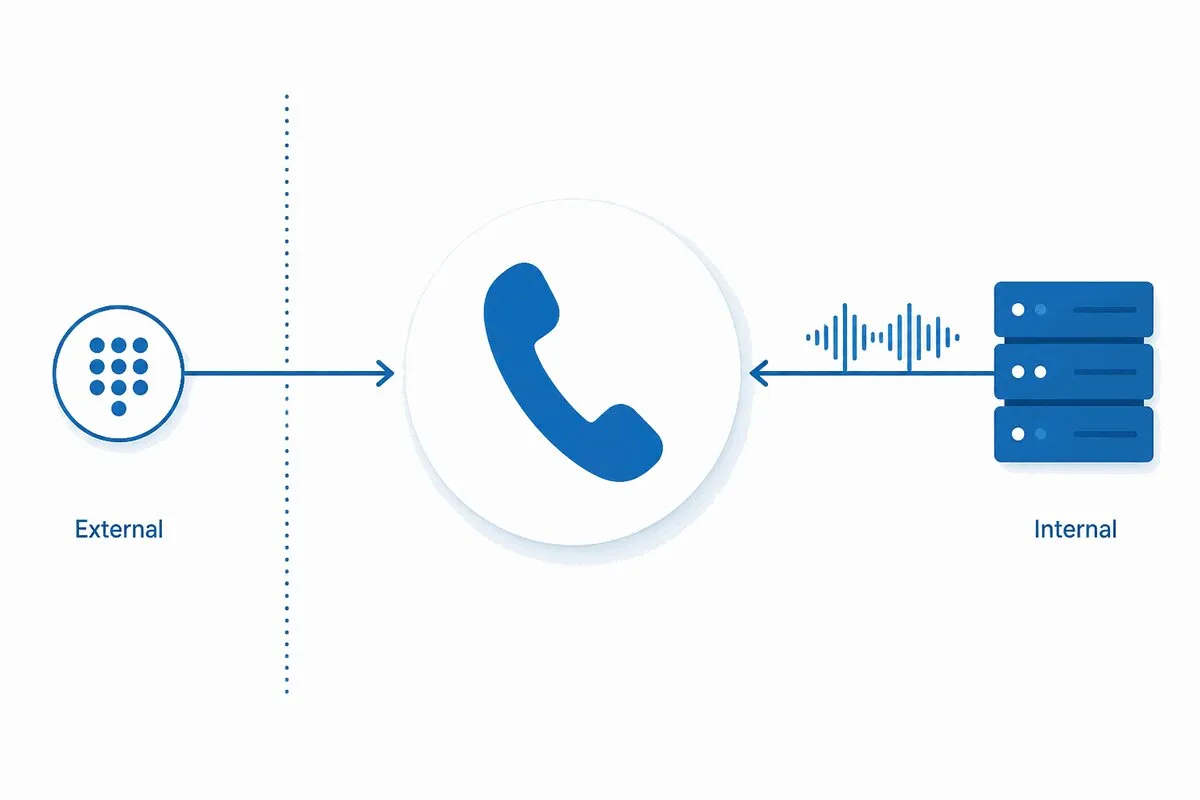
Toda ligação passa por duas camadas amplas, e cada método de monitoramento mira uma delas.
A primeira camada é a experiência da chamada: o que o chamador real ouve. O número toca, algo atende, o IVR fala o que deve, o áudio está limpo? Você testa isso de fora fazendo uma ligação real. Este é o monitoramento por discagem interna.
A segunda camada é o sinal por trás. Antes que qualquer áudio flua, o SIP negocia a chamada. Ele registra o endpoint, envia um INVITE, e troca códigos de estado para configurar, manter e encerrar a sessão. Você testa isso de dentro, falando diretamente com o gateway ou PBX. Este é o monitoramento SIP.
São dois produtos separados de dois provedores, então mantenha claro quem é quem. O monitoramento SIP faz parte do Dotcom-Monitor. As verificações por discagem interna vêm do Phone Number Monitoring, serviço independente no phonenumbermonitoring.com. Cada um roda em sua própria plataforma, e ambos oferecem teste gratuito, para você apontar cada um para seus números e ver o que detecta antes de se comprometer.
Nenhum método é um upgrade estrito sobre o outro. Um teste por discagem pode confirmar a experiência do chamador de ponta a ponta, mas não pode dizer qual componente do servidor falhou. Uma verificação SIP consegue identificar falha de registro ou sinalização em segundos, mas não ouvirá que a música de espera virou silêncio. A configuração correta geralmente executa ambos, cada um observando a camada que vê melhor.
Como Funciona o Monitoramento por Discagem Interna
O monitoramento por discagem interna é algo próximo a um cliente oculto para suas linhas telefônicas. De uma linha externa, um serviço de monitoramento disca o número que você especificar em intervalos definidos e registra o que acontece do outro lado.
A primeira coisa que classifica é o resultado da chamada. A ligação foi atendida, a linha estava ocupada, ou não houve resposta? Isso sozinho captura as falhas mais evidentes: um tronco que parou de aceitar chamadas de entrada, um número que toca para sempre, uma linha que retorna ocupado sob carga.
Depois, vai mais fundo na experiência do chamador. Quando a chamada é atendida por um IVR ou mensagem gravada, o reconhecimento de voz verifica se o áudio confere com o que os chamadores devem ouvir. Se a saudação deveria dizer “Obrigado por ligar”, e a linha atende com silêncio ou mensagem errada, o teste falha mesmo que a chamada tenha sido tecnicamente conectada. A mesma lógica de navegação conduz entrada DTMF, pressionando opções de menu para confirmar que a opção 2 ainda alcança o departamento que afirma.
Também pode avaliar a qualidade da linha em si. Checagens de qualidade de áudio observam clareza, latência e distorção na chamada atendida, como você captura uma linha conectada, mas com som ruim, tipo de degradação que um ping de aprova/falha jamais detectaria.
Esse teste por discagem interna é fornecido pelo Phone Number Monitoring, serviço separado que realiza testes automáticos de chamadas para telefones fixos, móveis, números gratuitos e fax desde 2012. É um produto próprio com seu painel e seu teste gratuito, não um recurso interno do Dotcom-Monitor. O ponto arquitetônico importante é que ele testa de fora da sua infraestrutura, exatamente onde seus clientes estão. Essa é sua força e seu limite. Ele vê o que o chamador vê, e só isso.
Um teste por discagem responde à pergunta que realmente importa para seu cliente: “Se eu ligar para este número agora, ele funciona?” Ele não diz qual caixa reiniciar quando a resposta é não.
Como Funciona o Monitoramento SIP
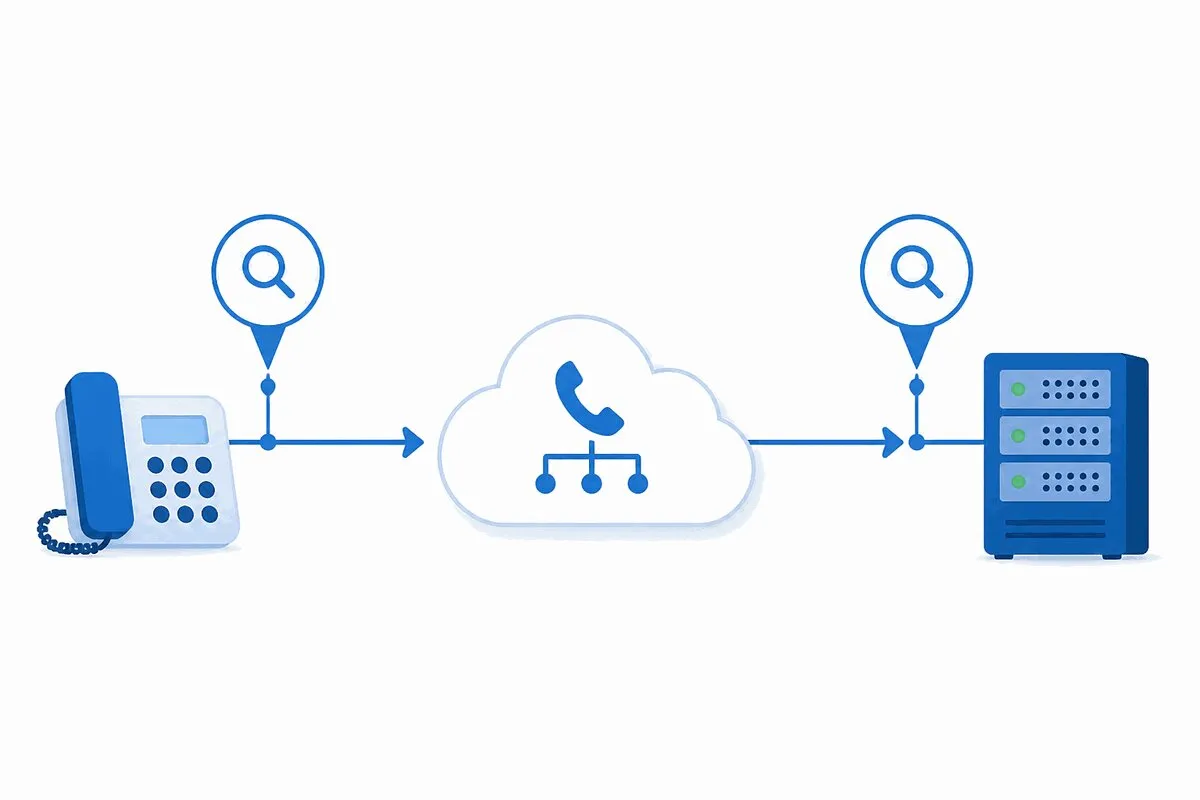
O monitoramento SIP chega no número pela direção oposta. Em vez de discar de fora da PSTN, ele se registra como cliente na sua própria infraestrutura de voz e exercita o caminho de sinalização diretamente.
Session Initiation Protocol é a camada de sinalização que estabelece, mantém e termina sessões de voz e vídeo. É a parte da chamada que acontece antes e em torno do áudio: registro, montagem e desmontagem da chamada. Como é um protocolo definido com respostas definidas, você pode testá-lo com precisão.
Aqui está a sequência que as checagens SIP da Dotcom-Monitor executam. Um agente de monitoramento pega o hostname do seu servidor VoIP, porta, nome de usuário SIP e credenciais, e registra como uma extensão SIP no seu PBX, conforme RFC 3261. Uma vez registrado, emite um SIP INVITE pelo seu gateway, simulando o fluxo de configuração da chamada sem completar uma ligação audível para um telefone. Depois lê a resposta do protocolo e compara com o esperado. Um 200 OK significa que a chamada foi aceita. Um 486 Busy Here significa que o endpoint está ocupado. Um 408 Request Timeout significa que nada respondeu a tempo. Se a resposta não corresponder ao esperado, a checagem falha e alerta.
Dois detalhes importam para equipes que rodem voz segura ou distribuída. Primeiro, as checagens suportam transporte TLS e criptografia de mídia SRTP, para que você monitore sessões SIP criptografadas sem desativar a criptografia. Segundo, elas rodam em uma rede global de monitoramento com mais de 30 locais, o que significa que uma falha de registro que só aparece numa região, frequentemente um problema de operadora ou roteamento, surge como um resultado específico de local em vez de esconder em uma média.
Como as checagens SIP só trocam sinalização, são baratas para rodar frequentemente. Você pode sondar o gateway em um intervalo apertado e definir limiares de tempo de resposta que sinalizam quando o servidor começa a ficar lento para responder INVITEs bem antes de cair chamadas. Esta é a mesma abordagem em nível de protocolo que a Dotcom-Monitor usa em suas checagens de monitoramento de rede, e SIP normalmente roda sobre monitoramento UDP na camada de transporte, então observar esse caminho também importa. Para a prática mais ampla de manter o VoIP saudável, isso fica sob monitoramento VoIP.
O que o monitoramento SIP não diz é como a chamada soa para um humano, ou se o IVR da operadora duas etapas depois está lendo o script certo. Ele valida que sua infraestrutura aceitou e configurou a chamada corretamente. Depois do seu gateway, ele é cego.
Discagem Interna x Monitoramento SIP em Resumo
Os dois métodos se sobrepõem menos do que parecem. Veja como eles se alinham nos pontos que uma equipe de operações considera ao decidir qual usar.
| Dimensão | Monitoramento por discagem interna | Monitoramento SIP |
|---|---|---|
| Fornecido por | Phone Number Monitoring (phonenumbermonitoring.com) | Dotcom-Monitor |
| O que testa | A experiência da chamada de ponta a ponta do lado do chamador | O caminho de sinalização SIP e seu servidor VoIP ou PBX |
| De onde roda | Linha externa na rede telefônica pública | Cliente registrado na sua própria infraestrutura |
| Acesso necessário | Apenas o número de telefone publicado | Hostname SIP, porta, usuário e credenciais |
| Nível técnico | Baixo; insira os números e pronto | Alto; requer acesso ao servidor e configuração SIP |
| Resultados típicos | Tocar, atender, ocupado, sem resposta, correspondência IVR, qualidade do áudio | 200 OK, 486 Ocupado, 408 Timeout, registro e tempo de resposta |
| Detecta | IVR mal roteado, saudação silenciosa, áudio ruim, número publicado morto | Registro falhou, INVITE rejeitado, sinalização lenta, gateway fora |
| Cego para | Qual componente do servidor causou a falha | Qualidade da chamada downstream e comportamento do IVR da operadora |
| Ideal para | Centros de atendimento, saúde, governo, linhas de serviços financeiros | Equipes de TI e DevOps que gerenciam troncos SIP e infraestrutura PBX |
Quando Usar Cada Método
A escolha depende do que você possui e do que tenta proteger.
Opte pelo monitoramento SIP quando você gerencia a infraestrutura de voz. Se você administra troncos SIP, um PBX, ou um session border controller, as checagens SIP dão o sinal rápido e específico de que algo na sua pilha quebrou. Você recebe um código de protocolo nomeado e uma localização, que é perto da causa raiz. É também o método que escala barato para muitas extensões, pois as checagens de sinalização são leves e podem rodar frequentemente. Para um PBX interno que atende um prédio cheio de funcionários, esse geralmente é o principal método.
Use o monitoramento por discagem interna quando o que importa é a experiência publicada do chamador, especialmente para linhas que você não controla totalmente. Um número gratuito da operadora, um IVR gerenciado por um fornecedor, uma linha de atendimento onde a saudação e o roteamento são o produto. Uma checagem SIP no seu gateway pode passar enquanto o chamador cai num menu quebrado três etapas depois. Só uma chamada real detecta isso. Por isso, call centers, linhas de saúde, serviços governamentais e suporte de serviços financeiros usam testes por discagem interna: o risco deles está na experiência do chamador, não só no servidor.
Execute os dois quando o número for importante o suficiente para que você precise saber que quebrou e onde. O monitoramento SIP diz que o gateway rejeitou o INVITE. O monitoramento por discagem diz que os clientes não conseguem passar. Juntos, transformam “os telefones estão estranhos” em “o registro está falhando de dois nós europeus, e os chamadores lá estão recebendo sinal de ocupado.” Essa configuração em camadas é prática padrão para linhas críticas para receita e sujeitas a compliance, onde uma falha não detectada tem custo real.
Como Configurar o Monitoramento de Número de Telefone
Aqui está uma configuração que cobre ambas as camadas sem virar um peso de manutenção.
- Passo 1: Liste os números e os caminhos por trás deles. Inventarie cada número que clientes discam, depois mapeie o que está atrás de cada um: um tronco SIP, uma extensão PBX, um IVR hospedado pela operadora. Isso indica qual camada cada número precisa testar e onde uma checagem por discagem adiciona cobertura que uma SIP não cobre.
- Passo 2: Adicione uma checagem SIP para cada gateway ou PBX. Insira o hostname do servidor VoIP, porta, usuário SIP e credenciais no painel. O agente registra como uma extensão SIP podendo enviar sinalização pelo gateway. Ative TLS e SRTP aqui se suas sessões forem criptografadas.
- Passo 3: Defina a resposta SIP esperada e os limiares. Defina o resultado esperado, geralmente um
200 OK, e configure tempo máximo de espera. Um registro lento ou falho ou INVITE, ou resposta486ou408, dispara a checagem. - Passo 4: Adicione um teste por chamada para o número público. Agende uma chamada externa para o número publicado para confirmar que toca, é atendido e roteia. Adicione passos de navegação IVR e deixe o reconhecimento de voz verificar se a saudação e os menus batem com o esperado.
- Passo 5: Escolha locais globais para as checagens. Rode as checagens SIP de vários nós geográficos para que falhas regionais ou de operadora apareçam como falha específica de local em vez de ponto cego. Isso separa “nosso servidor está offline” de “a rota de uma operadora está fora”.
- Passo 6: Direcione alertas e revise relatórios. Envie falhas para telefone, e-mail ou SMS com política de escalonamento, e revise relatórios históricos de SLA e uptime para diferenciar uma falha isolada de uma linha que degrada lentamente.
Dois Cenários Reais de Monitoramento
Os dois métodos se encaixam bem em duas situações comuns.
Um PBX VoIP interno. Uma empresa opera seu próprio PBX SIP para chamadas internas e externas. Para evitar tempo de inatividade inesperado, a equipe de TI configura monitoramento sintético SIP que realiza checagens periódicas de sinalização pelo gateway para extensões internas e um número externo parceiro. As checagens medem sucesso de configuração da chamada e latência, alertando a equipe quando registro falha ou o tempo de resposta sobe. Relatórios diários e semanais mostram tendências, permitindo manutenção programada antes que o gateway devagar vire problema de chamadas caídas. Aqui, o monitoramento SIP é o principal, porque o risco é a infraestrutura que a equipe controla diretamente.
Centenas de linhas de cliente externas. Um negócio gerencia centenas de números de entrada, fixos, móveis e VoIP, que levam tráfego de atendimento ao cliente e operações. Com tantas linhas, algumas falham silenciosamente. A equipe usa monitoramento por discagem para ligar regularmente de uma linha externa para números selecionados e verificar se conectam, não estão ocupados e não tocam no vazio. Para números que atendem com mensagem gravada ou IVR, o reconhecimento de voz confirma a gravação corresponde ao prompt esperado. Aqui, a discagem interna é a principal, porque o risco está na experiência do chamador, passando por operadoras e fornecedores que a equipe não controla.
Uma equipe que gerencia um PBX e muitos números ao público acaba usando ambos, um método para cada camada.
Sobre o Que Alertar
O monitoramento só ajuda se a pessoa certa souber da falha rápido. Alguns princípios mantêm os alertas úteis, não barulhentos.
Alerta sobre a falha específica, não só “off”. Uma checagem SIP com 408 Timeout de três nós é bem diferente de uma com 486 Busy de todos os nós. O primeiro indica problema de alcance ou roteamento; o segundo indica capacidade. Trazer o código do protocolo e os locais com falha no alerta economiza etapa diagnóstica para o engenheiro de plantão.
Roteie por severidade. Uma linha de receita ou linha de emergência fora do ar merece ligação e política de escalonamento. Uma extensão interna de pouco tráfego pode enviar e-mail. Alertas multicanal por telefone, e-mail e SMS com grupos de alerta permitem casar urgência do canal com importância da linha.
Configure limites antes de a falha ocorrer, não depois. Tempo de resposta SIP crescendo é aviso precoce de um gateway sob carga. Alertar em limite, em vez de só em falha grave, dá janela para agir em horário comercial em vez de às 2 da manhã. E revisar tendências nos relatórios ao longo de semanas mostra se a linha é estável ou está piorando silenciosamente.
Conclusão
Monitorar um número de telefone, no sentido operacional, significa provar num cronograma que quem liga ainda consegue passar. Existem duas formas de provar isso, e elas observam camadas diferentes. O monitoramento por discagem interna faz uma chamada real de fora e verifica o que o chamador ouve: toque, atendimento, roteamento IVR, qualidade do áudio. O monitoramento SIP se registra no seu gateway e verifica a sinalização por baixo: registro, INVITE e códigos de protocolo que decidem se a chamada é estabelecida.
Escolha monitoramento SIP se você for dono da infraestrutura e precisar de sinal rápido e específico. Escolha discagem interna se a experiência do chamador é o produto e parte do caminho passa por sistemas que você não controla. Para um número que não pode falhar silenciosamente, rode os dois, para saber que quebrou e onde. Dois provedores cobrem as duas camadas: Dotcom-Monitor cuida da sinalização com checagens SIP e VoIP numa rede global, e Phone Number Monitoring cuida da discagem de fora da rede. Ambos são self-service e oferecem teste gratuito para você apontar para seus números antes de comprar.
Monitore Suas Linhas Telefônicas Antes dos Clientes
Dois produtos, um objetivo: provar que seus números ainda funcionam. Teste o lado da sinalização com um teste gratuito Dotcom-Monitor para monitoramento SIP e VoIP. Teste a experiência do chamador com um teste gratuito Phone Number Monitoring para teste de chamadas por discagem. Ambos self-service, sem cartão de crédito.
Teste Dotcom-Monitor (SIP) Teste Phone Number Monitoring (Discagem Interna)