
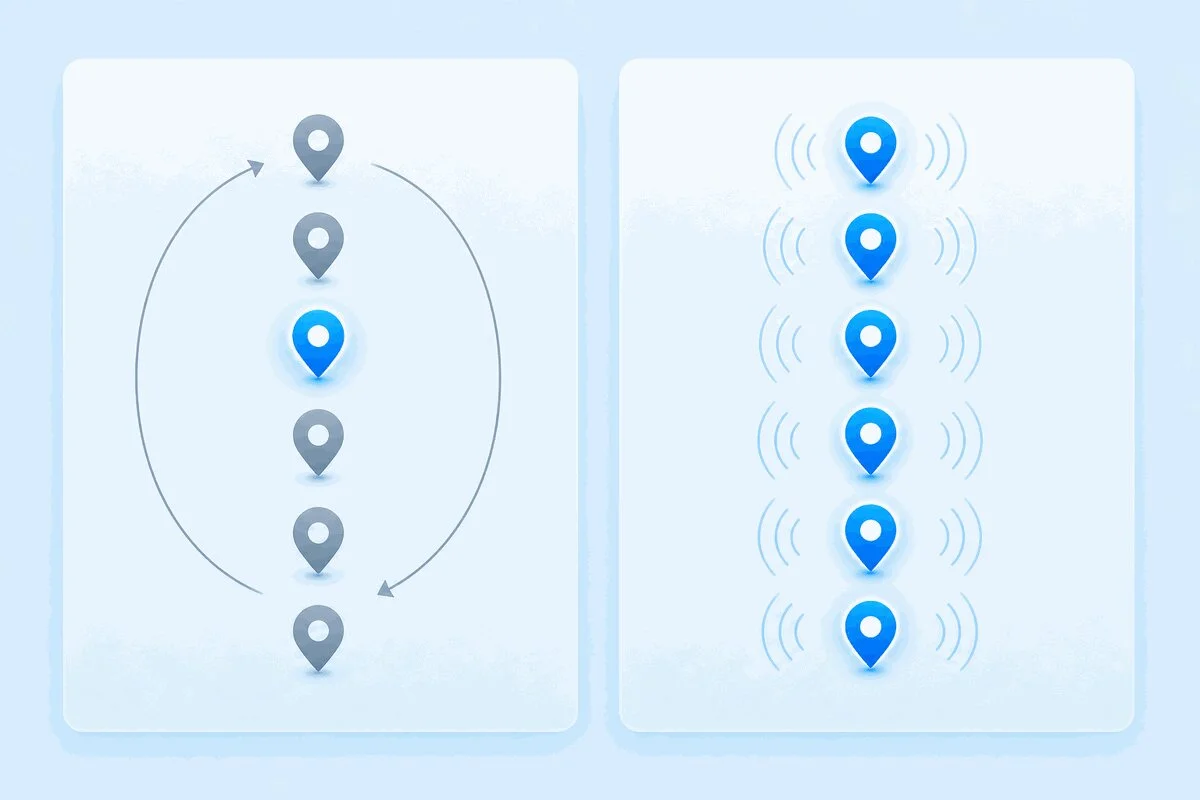
Vous configurez des contrôles synthétiques à partir de huit emplacements. Chaque emplacement doit-il tourner à chaque cycle ou un emplacement à la fois en rotation ? Ce réglage unique décide de la rapidité avec laquelle vous détectez une panne régionale et du nombre de contrôles que vous effectuez pour cela.
La plupart des plateformes de surveillance choisissent un paramètre par défaut et cachent ce choix. Dotcom-Monitor l’expose, et les deux options se comportent différemment au point où le mauvais choix soit vous inonde de contrôles redondants, soit laisse une panne régionale passer inaperçue pendant un cycle entier. Voici comment fonctionnent réellement le round-robin et la surveillance concurrente, où ils divergent, et comment choisir.
Un point à clarifier d’abord. Il ne s’agit pas de l’équilibrage de charge round-robin. Les équilibreurs de charge utilisent le round-robin pour répartir le trafic utilisateur entrant entre les serveurs backend. Ici, round-robin décrit comment une plateforme de surveillance programme ses propres contrôles sortants à travers des emplacements géographiques. Même nom, sens du trafic opposé.
Que signifient Round-Robin et Surveillance Concurrente
Deux termes rendent le reste plus facile à suivre. Une session de surveillance est un contrôle unique exécuté depuis un emplacement. Un cycle de surveillance est un passage complet à travers tous les emplacements que vous avez choisis.
Round-robin et concurrent décrivent comment les sessions sont réparties sur un cycle. Round-robin exécute un emplacement par cycle et passe au suivant au cycle suivant. Concurrent exécute tous les emplacements à chaque cycle. L’écart entre ces deux schémas détermine la vitesse de détection, le coût et la qualité des données.
Comment fonctionne la surveillance Round-Robin
Round-robin est le paramètre par défaut, conçu pour être économique. À la fréquence configurée, la plateforme lance une session depuis un emplacement, puis depuis l’emplacement suivant à l’intervalle suivant, en faisant tourner votre liste. Tant que chaque contrôle confirme que le site est en ligne, vous bénéficiez d’une couverture géographique large sans payer pour tester les huit emplacements simultanément.
La partie astucieuse est ce qui se passe en cas de désaccord. Dès qu’un emplacement rapporte un état différent des autres, par exemple une erreur alors que les autres réussissent, le round-robin cesse la rotation et lance des sessions depuis tous les emplacements. Il agit de la même manière juste après la création, l’édition ou le redémarrage d’un appareil, lorsqu’il n’a pas encore de référence fiable.
Ainsi, le round-robin n’est pas aveugle aux problèmes régionaux. Il est adaptatif. Il reste économique tant que tout semble sain et bascule vers une couverture complète dès qu’un problème apparaît. Le coût de cette économie se traduit par le temps, ce dont les sections suivantes traitent.
Comment fonctionne la surveillance concurrente
La surveillance concurrente abandonne la rotation. Chaque emplacement sélectionné exécute sa session à chaque cycle, quel que soit le rapport du cycle précédent. Huit emplacements à une fréquence d’une minute signifient huit contrôles par minute, chaque minute.
Cela donne un instantané géographique complet à chaque intervalle. Si votre CDN à Francfort ralentit tandis que les autres restent rapides, vous le voyez au cycle suivant et non pas en attendant que la rotation arrive à Francfort. Sur Dotcom-Monitor, la surveillance concurrente est un ajout à activer, et parce qu’elle multiplie le volume de contrôles, elle peut faire augmenter le prix de votre forfait.
Vitesse de détection versus coût de la surveillance
Toute la décision revient à un compromis entre la rapidité avec laquelle vous détectez une panne spécifique à un emplacement et le nombre de contrôles que vous êtes prêt à effectuer.
| Facteur | Round-Robin | Concurrent |
|---|---|---|
| Emplacements par cycle | Un, puis tous en cas d’anomalie | Tous, à chaque cycle |
| Détection de panne régionale | Jusqu’à un cycle de retard | Immédiate |
| Volume de contrôles | Faible quand tout va bien | Élevé et constant |
| Données SLA par emplacement | Clairesemées et inégales | Continues et comparables |
| Coût | Inclus par défaut | Supplément payant |
| Meilleure utilisation | Couverture large en disponibilité | Applications sensibles à la géolocalisation et SLA stricts |
Le délai de détection est la valeur que les gens sous-estiment. Avec le round-robin, une panne qui n’affecte qu’une région attend que la rotation atteigne cette région avant que l’erreur ne déclenche une escalade complète. Sur huit emplacements à une fréquence de cinq minutes, cela peut représenter jusqu’à 40 minutes de panne régionale avant que la plateforme ne réagisse. Le concurrent réduit ce délai à un seul cycle.
L’autre aspect est les données. Parce que la surveillance concurrente teste chaque emplacement en continu, elle produit un enregistrement régulier et comparable par emplacement, ce qui est précisément nécessaire pour prouver un SLA régional ou identifier un bord CDN lent. Le registre du round-robin est plus clairsemé et plus difficile à comparer d’un emplacement à l’autre. Si vous suivez le coût des interruptions par région, cette différence compte.
Pourquoi les contrôles basés sur navigateur s’exécutent un à la fois
Il y a une subtilité qui intrigue ceux qui configurent des contrôles sur navigateur réel. Dotcom-Monitor dispose d’un paramètre Autoriser les contrôles simultanés qui contrôle si les sessions de tous les emplacements sont lancées en même temps ou successivement. Pour les contrôles basés sur HTTP (ServerView et WebView), ce paramètre est activé par défaut, car chaque requête est sans état et indépendante, donc les lancer simultanément est sûr. Pour les contrôles basés sur navigateur (BrowserView et UserView), il est désactivé et ne peut être modifié.
La raison est liée à l’état. Beaucoup d’applications web associent une session connectée à un ensemble unique d’identifiants. Se connecter depuis un second emplacement déconnecte la première session. Lancer une transaction EveryStep multi-étapes depuis cinq emplacements simultanément les fait se gêner mutuellement, produisant de faux échecs qui ne reflètent pas la vraie santé de votre application.
L’état partagé casse sous un accès parallèle. Un panier, un dossier de réservation ou un inventaire mis à jour par cinq sessions simultanées fournit des résultats qui ne correspondent pas à ce que verrait un seul utilisateur.
Ainsi, même en surveillance concurrente, les sessions basées sur navigateur s’exécutent séquentiellement par conception. Vous obtenez toujours chaque emplacement à chaque cycle. Elles ne se déclenchent simplement pas au même instant, ce qui évite les conflits d’identifiants et la pollution des résultats par des données de test partagées.
Quand le Round-Robin est le bon choix par défaut
Le round-robin est souvent très approprié contrairement à sa réputation modeste. Choisissez-le lorsque :
- Vous faites une large couverture de disponibilité. Un site marketing ou un blog servis depuis une seule origine se comporte de la même façon partout. Faire tourner les emplacements confirme son accessibilité globale sans payer pour tester tous les emplacements à chaque minute.
- Votre contenu est uniforme géographiquement. S’il n’y a pas de routage CDN ou d’infrastructure régionale à valider, chaque emplacement teste la même chose, et les contrôles supplémentaires du concurrent apportent peu d’informations nouvelles.
- Le budget est limité et votre SLA est global, pas régional. L’escalade du round-robin détecte toujours les pannes ; il échange simplement un peu de temps de détection contre un nombre beaucoup plus bas de contrôles.
Imaginez une entreprise SaaS surveillant sa page de disponibilité publique sur dix régions. Rien sur la page ne change selon la géographie. Le round-robin maintient un pouls global régulier, et la première erreur régionale déclenche automatiquement la couverture complète. C’est le design qui fonctionne comme prévu.
Quand la surveillance concurrente vaut son coût
La surveillance concurrente vaut son coût quand la géographie fait partie de ce que vous testez ou quand chaque minute de délai a un coût réel. Activez-la lorsque :
- Vous diffusez du contenu via un CDN ou un routage géographique. La performance des bords varie par région, et un problème dans un POP ne se détecte qu’en testant cette région. Le concurrent surveille chaque bord à chaque cycle.
- Vous avez des SLA régionaux. Prouver 99,9 % dans trois régions nécessite des données continues et comparables par emplacement, pas l’échantillon inégal laissé par le round-robin.
- Un parcours de paiement ou de connexion génère des revenus. Pour un paiement en e-commerce, une panne régionale passée inaperçue pendant une demi-rotation signifie des commandes perdues. La détection immédiate vaut l’option payante.
Prenez un détaillant qui réalise une transaction de paiement depuis six régions pendant une promo. Une passerelle de paiement qui échoue uniquement pour le trafic européen doit remonter en quelques secondes, pas après que la rotation ait atteinte l’Europe. La surveillance concurrente, combinée à des alertes rapides, permet cela.
En résumé
Le round-robin est le choix économique par défaut : un emplacement par cycle, escalade automatique à tous les emplacements dès qu’un contrôle diverge. Il convient pour une couverture large et géographiquement uniforme de la disponibilité. La surveillance concurrente teste chaque emplacement à chaque cycle pour une détection rapide régionale et des données propres par emplacement, au prix d’un volume plus élevé de contrôles et d’un supplément. Elle convient aux applications servies par CDN, aux SLA régionaux et aux parcours générateurs de revenus où le délai est coûteux.
Adaptez le mode au contenu que vous testez réellement. Si la géographie influence la réponse, utilisez la concurrente. Sinon, le round-robin vous couvre déjà. Quoi qu’il en soit, bien configurer la surveillance multiple emplacements commence par comprendre comment vos contrôles sont programmés.
Voyez-le fonctionner depuis vos régions
Configurez la surveillance synthétique avec navigateur réel à travers un réseau mondial et observez comment le round-robin et la surveillance concurrente se comportent sur vos sites. Commencez un essai gratuit.
