

A DNS lookup that takes 300 ms adds 300 ms to every first visit, every API call from a new client, and every uptime check you run. Your web server never sees that time. It shows up as a blank tab before the first byte arrives.
Most performance work goes into the page itself: images, JavaScript, cache headers, CDN rules. DNS resolution time gets less attention because it happens before any of that, and testing from your own laptop usually returns a cached answer in under a millisecond.
The lookup is slow for your users, not for you. Monitoring from outside your own network is how you find that out, and how you confirm a fix worked. This guide covers what to measure, how to read the numbers, and which fix matches which symptom.
What Happens During DNS Resolution?
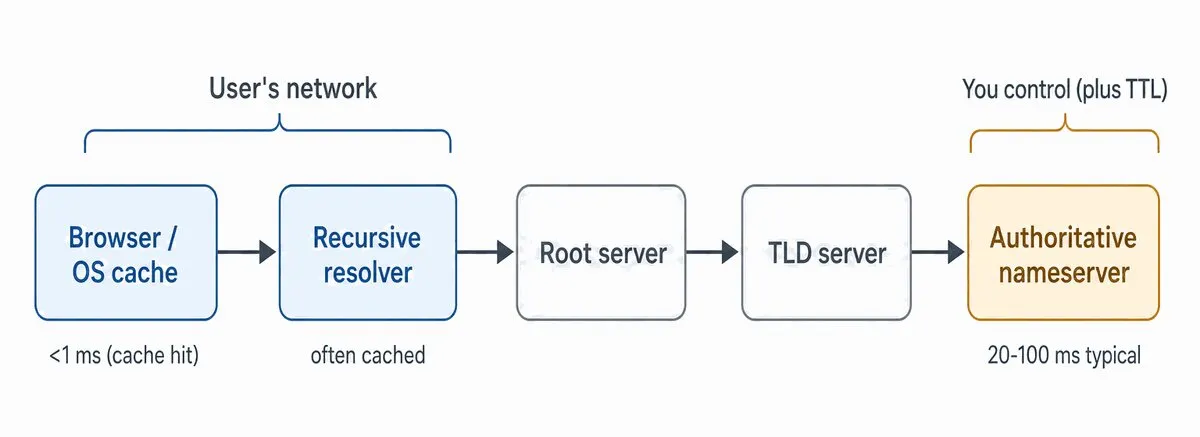
DNS resolution turns a hostname like www.example.com into an IP address, and it takes anywhere from zero to five network round trips depending on what is already cached along the way.
- Local cache. The browser and operating system check their own cache first. A hit returns in well under a millisecond and sends nothing over the network.
- Recursive resolver. On a miss, the query goes to the configured recursive resolver: the ISP’s, a corporate resolver, or a public one such as Cloudflare 1.1.1.1 or Google 8.8.8.8. If the resolver has the record cached, it answers immediately.
- Root nameserver. On a resolver miss, the resolver asks a root server which nameservers handle the top-level domain. Root and TLD referrals are cached at almost every resolver, so this hop rarely costs anything in practice.
- TLD nameserver. The resolver asks the
.comservers which nameservers are authoritative forexample.com. - Authoritative nameserver. The resolver queries your nameservers, gets the A or AAAA record, caches it for the record’s TTL, and returns it to the client.
You control step 5, and you control the TTL that decides how often steps 2 through 5 repeat. Your users’ networks control steps 1 and 2. That split is why measuring from your own machine tells you so little: your laptop’s cache and your office resolver are not the ones a customer in Frankfurt uses.
What Is a Good DNS Resolution Time?
A cached answer from a nearby recursive resolver typically returns in under 20 ms. A full uncached lookup that walks all the way to your authoritative servers is usually acceptable at 50 to 100 ms, and most teams treat anything consistently above 150 ms as worth tracing. These are rules of thumb rather than standards; the right target depends on where your users are and where your nameservers are. Our glossary entry on DNS performance covers the metrics in more detail.
Look at the p95 by location rather than a global average. An average of 60 ms can hide a region where every lookup takes 400 ms. And measure the uncached path, the lookup that misses the resolver cache and reaches your nameservers, separately. A resolver cache hit tells you about the resolver, not about your DNS.
| Measurement | Typical | Worth investigating |
|---|---|---|
| Resolver cache hit | Under 20 ms | Over 50 ms suggests a slow or distant resolver |
| Full uncached lookup (root to authoritative) | 50 to 100 ms | Over 150 ms from any region |
| Authoritative response alone (direct query) | Under 30 ms from nearby locations | Over 100 ms, or any timeouts |
| SERVFAIL, NXDOMAIN, or timeout rate | Zero on valid names | Any sustained rate above zero |
Why Measure DNS From Outside Your Network?
Running nslookup or dig from a workstation almost always returns a cached answer, and even an uncached one goes through your corporate resolver. Neither path matches what a first-time visitor on a mobile carrier in Tokyo goes through.
Synthetic network monitoring runs the lookup from agents in the regions your users live in, on a schedule, with caching under your control. Dotcom-Monitor’s DNS monitoring queries your authoritative nameservers directly instead of asking a public resolver, so the time you see is the time your nameservers took, from 30+ locations, as often as once per minute.
Caching control is the part most tools skip. On any Dotcom-Monitor task you choose how the agent resolves hostnames: Device Cached, Non-Cached, TTL Cached, or through a specific External DNS Server. Non-Cached gives you comparable timing on every run. TTL Cached behaves like a visitor’s browser. The guide to DNS resolve modes covers when to use each.
How to Improve DNS Resolution Time in 5 Steps
Step 1: Baseline Resolution Time From Multiple Locations
Set up two kinds of checks before changing anything. Query your authoritative nameservers directly to measure the part you control. Then resolve the same hostnames through a public resolver, using External DNS Server mode pointed at 1.1.1.1 or 8.8.8.8, to see what a user behind that resolver gets after a cache miss.
Run both from the regions that carry your traffic: North America, Europe, and Asia-Pacific at minimum, and ideally every region in your analytics top ten. For each location, record lookup time, response code (NOERROR, NXDOMAIN, SERVFAIL), and timeouts. The global monitoring network page lists the available vantage points.
Let the checks run for a week before drawing conclusions. Plus, DNS timing moves with time of day and with resolver cache state, and one afternoon of data mostly shows you noise.
Step 2: Separate Authoritative Latency From Resolver Latency
Compare the two baselines. If direct queries to your nameservers are fast from every location but resolver lookups are slow, the delay is upstream of you: a distant or overloaded resolver, or a CNAME chain the resolver has to walk. But if direct queries are slow from some regions, the problem is nameserver placement or your DNS provider’s network.
On the command line, dig @ns1.yourprovider.net www.example.com reports Query time for the authoritative hop alone, and dig +trace www.example.com walks the full chain with timing at each referral. One machine confirms a hypothesis; the monitoring data tells you if it holds across regions and across days.
Step 3: Find the Slow Hop
Most slow lookups fall into a handful of patterns, and each pattern points at a different cause.
- Regional gaps. Lookups at 20 ms from North America and 350 ms from Asia usually mean unicast nameservers, or an Anycast provider with a thin footprint in that region. The per-location p95 in DNS monitoring shows this directly.
- Timeouts and SERVFAIL spikes. DNS runs over UDP, so packet loss on the path to the nameserver shows up as retries and timeouts rather than slow answers. SERVFAIL with no packet loss often means a DNSSEC validation failure, such as an expired RRSIG. Dotcom-Monitor validates the DS, DNSKEY, and RRSIG chain on every check and alerts before signatures expire.
- Spikes that track traffic peaks. A low TTL sends resolvers back to your nameservers on every expiry, so query volume rises with visitor volume. If latency climbs with it, the nameservers or the provider are near capacity. Our guide to DNS outages covers what happens when they run out.
- Slow from everywhere, including nearby. Suspect a CNAME chain.
www.example.compointing to a hosting platform hostname, which points to a load balancer hostname in a third zone, can mean three lookups before the resolver has an address. DNS monitoring reports chain depth for each CNAME record. - Slow only for signed or TXT-heavy names. A response larger than the resolver’s EDNS buffer (1232 bytes is the common default now) comes back truncated, and the resolver retries over TCP, which adds a handshake and a full extra round trip. DNSSEC signatures and long SPF records are the usual cause.
dig +dnssec +bufsize=1232shows the TC flag when it happens, and Dotcom-Monitor alerts on EDNS truncation per record. - One nameserver slower than the rest. Resolvers rotate across your NS set, so a single lame or overloaded server slows a share of all lookups. NS set consistency and lame delegation checks catch this.
And if the nameserver answers quickly once a packet reaches it, but the path there is long, traceroute monitoring shows hop-by-hop latency from each location and separates a routing problem from a nameserver problem.
Step 4: Apply the Fix That Matches the Data
Move to Anycast DNS
If the data shows regional gaps, move the zone to a provider that announces its nameserver addresses from many data centers. Amazon Route 53, Cloudflare, NS1, and Akamai Edge DNS all do this, as do most managed DNS services. BGP routes each query to the nearest instance, and lookups from distant regions typically drop from hundreds of milliseconds to tens. Keep the old nameservers listed at the registrar until monitoring confirms every location resolves through the new ones. And if one region stays slow after the move, dig +nsid returns the NSID of the instance that answered, which tells you if BGP is sending Singapore queries to a node in California; providers differ a lot in footprint outside North America and Europe.
Set TTLs Deliberately
TTL decides how long resolvers keep your record before asking again. A 300-second TTL keeps you agile for IP changes but sends resolvers back to your nameservers constantly, which raises the average lookup time users see. A 3,600-second or 86,400-second TTL keeps answers cached close to users and cuts authoritative query volume. Or split the difference and set different TTLs per record. Set long TTLs on records that rarely change, short ones only on records you plan to move, and lower a TTL at least one full old-TTL period before a migration. Then watch per-location lookup time for a few days to confirm the change did what you expected. Check the SOA minimum field too: resolvers cache NXDOMAIN answers for that long, so a value of 86,400 means a record you add during an incident stays invisible to anyone who queried it before it existed. Most zones do fine at 300 to 900 seconds.
Shorten CNAME Chains and Prune the Zone
Replace multi-hop CNAME chains with an ALIAS or ANAME record at the apex, or with a provider that supports CNAME flattening, so the resolver gets an A or AAAA record in one answer. While you are in the zone file, remove subdomains that no longer serve anything and TXT records for services you stopped using. Bloat does not slow a single lookup much. But it hides the records that matter when you are troubleshooting at 2 a.m.
Reduce the Lookups a Page Triggers
Every third-party hostname on a page is another lookup for a first-time visitor. A page that loads scripts from eight hostnames pays for eight resolutions before any of them run. Consolidate assets onto fewer hostnames where you can, and add <link rel="dns-prefetch"> or preconnect hints for the ones you cannot. The waterfall in Dotcom-Monitor’s website performance monitoring shows the DNS segment for every host the page touched, which tells you which third parties cost the most.
Fix the Resolver Side for Internal Users
For staff and internal applications, the slow hop is often the corporate resolver or a branch office forwarder, not your zone. Run a caching resolver close to each site, point forwarders at a nearby upstream, and monitor internal lookups with private agents installed inside the network. They run the same DNS checks on internal nameservers that the public locations run against your authoritative ones.
Step 5: Alert on Regressions and Re-Verify
DNS performance regresses quietly. An upstream routing change, a provider incident in one region, or an automated deploy that rewrites a record can push lookup time up without taking the site down.
Set alerts on the measurements from Step 1 rather than on a global average: p95 lookup time above twice that location’s baseline for 10 minutes (Sydney will never match Virginia, so one fixed number alerts on the wrong region), any SERVFAIL or timeout rate above zero, and any change to the expected value of an A, AAAA, CNAME, MX, or NS record. Route DNSSEC failures to the team that owns signing and record drift to whoever owns the zone, through Slack, PagerDuty, OpsGenie, Teams, or a webhook.
After each change in Step 4, compare the per-location numbers from the week before with the week after. Dotcom-Monitor keeps 36 months of check history, so the same comparison is available when a provider renewal comes up.
What Does Slow DNS Look Like in Practice?
The Registrar Nameservers Nobody Replaced
A 40-person SaaS company hosts on AWS but still uses the two nameservers its registrar assigned when the domain was bought. North American lookups average 25 ms. Lookups from Singapore and Sydney sit at 380 ms, and the company’s largest reseller is in that region. Moving the zone to Route 53 drops Asia-Pacific p95 to roughly 45 ms within a day of the NS change propagating.
What catches it: DNS monitoring with per-location p95 latency, run from the Asia-Pacific vantage points as well as the US ones.
The CNAME Chain Through the CDN
An e-commerce site’s www record is a CNAME to a hosting platform hostname. That hostname is a CNAME to a CDN hostname, which is a CNAME to a load balancer in the CDN’s zone. Uncached lookups take 190 ms even from locations near the nameservers, and the page waterfall shows the DNS segment ahead of every other request. Flattening the apex to an ALIAS record and pointing www straight at the CDN hostname cuts uncached lookup time to about 60 ms.
What catches it: CNAME chain depth reported by DNS monitoring, and the DNS segment in the website performance monitoring waterfall.
The 60-Second TTL From Last Year’s Migration
A team lowered the TTL on its API hostname to 60 seconds for a data center move and never raised it. A year later, authoritative query volume tracks traffic almost one to one, and lookup time from Europe climbs past 200 ms every weekday afternoon as the provider’s regional nodes get busy. Raising the TTL to 3,600 seconds cuts most of the authoritative query volume and flattens the afternoon spike.
What catches it: uncached lookup time plotted against time of day in DNS monitoring, and record change detection confirming the new TTL reached every location.
Dotcom-Monitor is a synthetic platform, so every number in these scenarios comes from scheduled checks run from fixed locations, not from visitors’ browsers. If you also need the mix of cache hits and misses your audience gets, pair it with a real user monitoring tool. For other tools that cover this layer, see our reviews of DNS monitoring tools and synthetic infrastructure monitoring tools.
Where to Start
Start with the baseline. Put a direct authoritative check and a resolver check on your main hostname from every region that carries traffic, let them run for a week, and read the p95 per location. Most teams find one of two things: a regional gap that points at nameserver placement, or a lookup that is slow everywhere and points at a CNAME chain or TTL.
Fix that one thing, confirm it in the same monitoring data, and then set alerts so the next regression gets caught in a check interval instead of a support ticket. The first pass takes an afternoon to set up and a week to read, and it usually recovers more page load time than the next three front-end optimizations combined.
